Solved

Hide Pool Work Orders

  • May 10, 2021
  • 2 replies
  • 198 views

ctaylor56
Hero (Partner)
Forum|alt.badge.img+14

I have an environment where we don’t want to allow the use of Pool Work Order or Technicians to Create New Work from mWO Service 10.  Is there a way to hide these tiles on the home screen in mWO Service 10?

Best answer by Ibrahim Naazir

Hi,

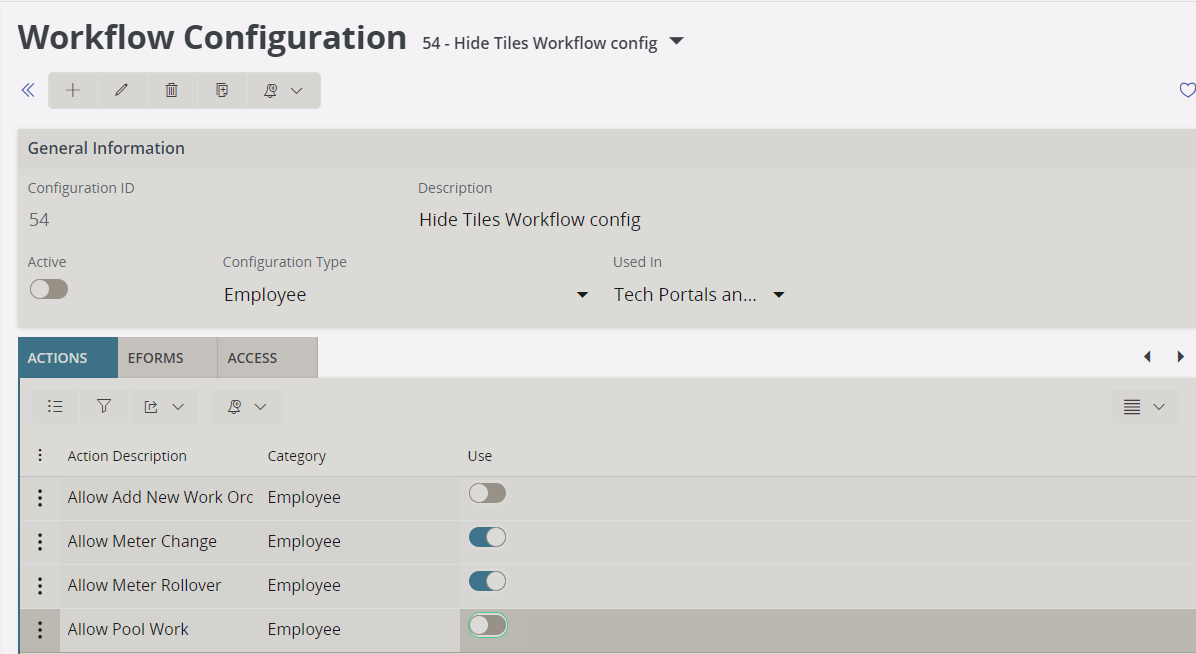
You can try using a workflow configuration with configuration type “Employee” and then disable Allow New Work Order and Allow Pool Work Order:


Remember to set the access so that it affects your user.

/Ibrahim​​​​​​​

This topic has been closed for replies.

2 replies

Forum|alt.badge.img+10
  • Hero (Employee)
  • Answer
  • May 10, 2021

Hi,

You can try using a workflow configuration with configuration type “Employee” and then disable Allow New Work Order and Allow Pool Work Order:


Remember to set the access so that it affects your user.

/Ibrahim​​​​​​​


ctaylor56
Hero (Partner)
Forum|alt.badge.img+14
  • Author
  • Hero (Partner)
  • May 10, 2021

Hi,

You can try using a workflow configuration with configuration type “Employee” and then disable Allow New Work Order and Allow Pool Work Order:


Remember to set the access so that it affects your user.

/Ibrahim

Thanks, this came in a later updated then UPD7