Solved

IFS Cloud Patch Error

  • Sep 23, 2024 1:05 PM UTC
  • 3 replies
  • 399 views

Forum|alt.badge.img+3

Hello,


While attempting to perform a PATCH request from Postman (or any other connection) to IFS Cloud, I receive the following error:


{

    "error": {

        "code": "REQUEST_ERROR",

        "message": "Malformed Request.",

        "details": [

            {

                "code": "HTTP_METHOD_NOT_ALLOWED",

                "message": "HTTP method 'PATCH' not allowed for this resource."

            }

        ]

    }

}


The url I am using for the request is: https://suwifsmidmigr.controlsouthern.com/main/ifsapplications/projection/v1/ManualSupplierInvoiceHandling.svc/ManSuppInvoiceSet


I am only encountering this error for the ManSuppInvoiceSet projection, and only when attempting an update. This error occurs regardless of what fields I use in the request’s body, as long as the body is valid. Finding the corresponding page in IFS Cloud and manually updating it still works. Doing so through applications like Postman gets a similar error as above.


This request worked for 2+ years with no error before stopping two or so months ago, presumably caused by an IFS Cloud update.


Any assistance would be appreciated.

Best answer by colekenna

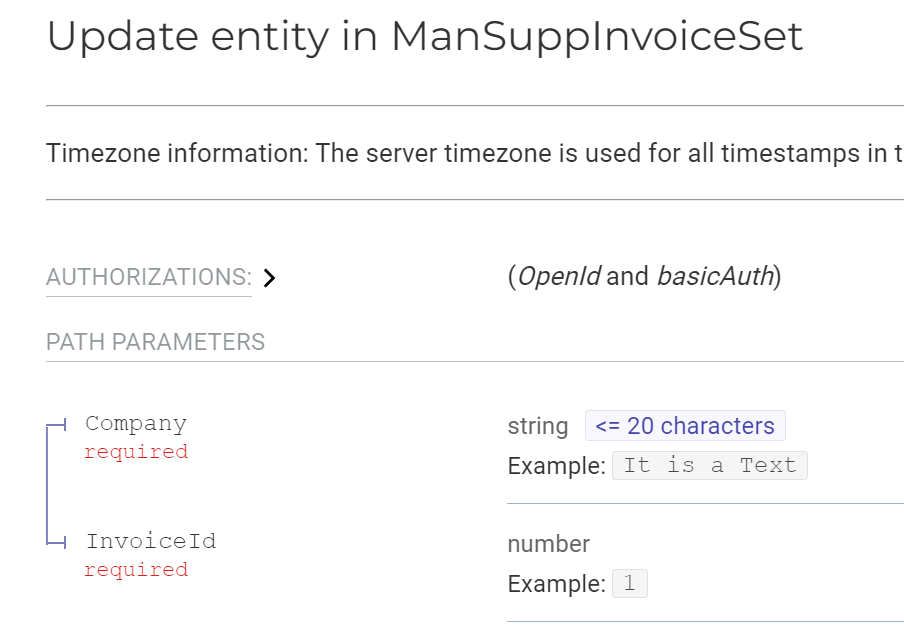
Solution has been found. The request specifically needs the Company and InvoiceId in the header of the request not the body (or in addition to the body). I am still unsure what caused this change but the request is now working.

View original

3 replies

Forum|alt.badge.img+5
  • Sidekick
  • Sep 23, 2024 1:09 PM UTC

You might want to send us the Request.

Looking at the API Explorer, it seems like ManSuppInvoiceSet ´requires both the Company and the InvoiceId for the Patch endpoint.


Forum|alt.badge.img+3
  • Author
  • Do Gooder (Customer)
  • Sep 23, 2024 4:08 PM UTC

Apologies, I should have posted an example request that I sent. The Company and InvoiceId fields are always filled in.


{
  "@odata.etag" : "test",
  "AdvInv" : false,
  "Company" : "01",
  "CurrRate" : 1,
  "DueDate" : "2023-03-05",
  "GrossCurrAmount" : 1728.7,
  "InvGrossCurrAmt" : 1728.7,
  "InvoiceDate" : "2023-02-03",
  "InvoiceId" : 123456,
  "InvoiceType" : "SUPPINV",
  "IsTaxDocument" : false,
  "PayTermBaseDate" : "2023-02-03",
  "PayTermId" : "30",
  "PlPayDate" : "2023-03-05",
  "UseDeliveryInvAddress" : false,
  "UseProjAddressForTax" : false,
  "WhtAmountBase" : "InvoiceGrossAmount"
}


I’ve tried removing fields to see if any were problematic but same error.


Forum|alt.badge.img+3
  • Author
  • Do Gooder (Customer)
  • Answer
  • Sep 24, 2024 6:41 PM UTC

Solution has been found. The request specifically needs the Company and InvoiceId in the header of the request not the body (or in addition to the body). I am still unsure what caused this change but the request is now working.