Hi all, I work with IFS and I’ve been assigned a manual data-check task I’d like to automate.
The check works like this: for each manufacturing order I have to check wheter I have or not enough raw material, if yes release to production, if not check if a purchasing order has placed and talk with procurement.
What I’d like is a system that runs these checks automatically and sends me an email with a recap.
It's very boring so I'd like to make it simpler
I’m a business user, not a developer, so any pointers to documentation or examples would be very welcome.
Thanks!
Best answer by Michael Kaiser
Hi Matteo, just get it done. Here an example: My select (on the DWH DB)
select SiteID, Orderno, DateRequired, QtyDemand,SafetyStockOSD, SuppMinDemand, UsableQty, PartNo, partkey from FACT_OrderSupplyDemand where SuppMinDemand < 0 and OrderSupplyDemandType <> 'Forecast' and SiteID = '10' -- german company and DateRequired < GETDATE() + 30 -- only for the next 30 days. and SuppMinDemand * -1 > UsableQty order by DateRequired desc
This sounds like a good candidate for a small, read-only workflow: check each open manufacturing order against available raw material, look for a linked purchase order when stock is short, then email a concise exception list for procurement. Since you are a business user, I would start by mapping where those two data points live in your IFS setup and how often you need the recap, then check what can be automated safely without touching order-release decisions.
Hi @matteod19 We don’t have anything that checks automatically and sends an email with a recap. Have you reviewed any of the following existing functionality?
Under Manufacturing - Shop Order - Material is Shop Order Availability
Also under the same path is Simulate Availability for Shop Order Material
Under Manufacturing - Shop Order - Material - Report is Shortage for Shop Order Report
If you’ve reviewed these and feel they will not help, you could enter an enhancement request. IFS Product & Technology (formally RnD) would review the request and advise if the request would be considered.
Please advise if you have any questions. Thanks! Jane
Hi Matteo, do you have a BI solution already installed? Two of our customers do have a “Manufacturing Model”. We have a FACT_ShopOrder, a FACT_ShopOrderMaterial and other FACT-tables. Your question never occured the last years but I will place it. One customer use QlickView, the other Aruba EIS. Both test MS PowerBI.
Normally I would suggest to create a “report” in one of these BI-frontend-tools and send a mail from there. But I could also imagine doing that only with MS SQL Server logic. We use the MS SQL Server Mail for maintenance issues - like problems within the ETL process - It would be a minor task to create a SQL script to search for the information you mentioned and send a mail when certain criteria occur.
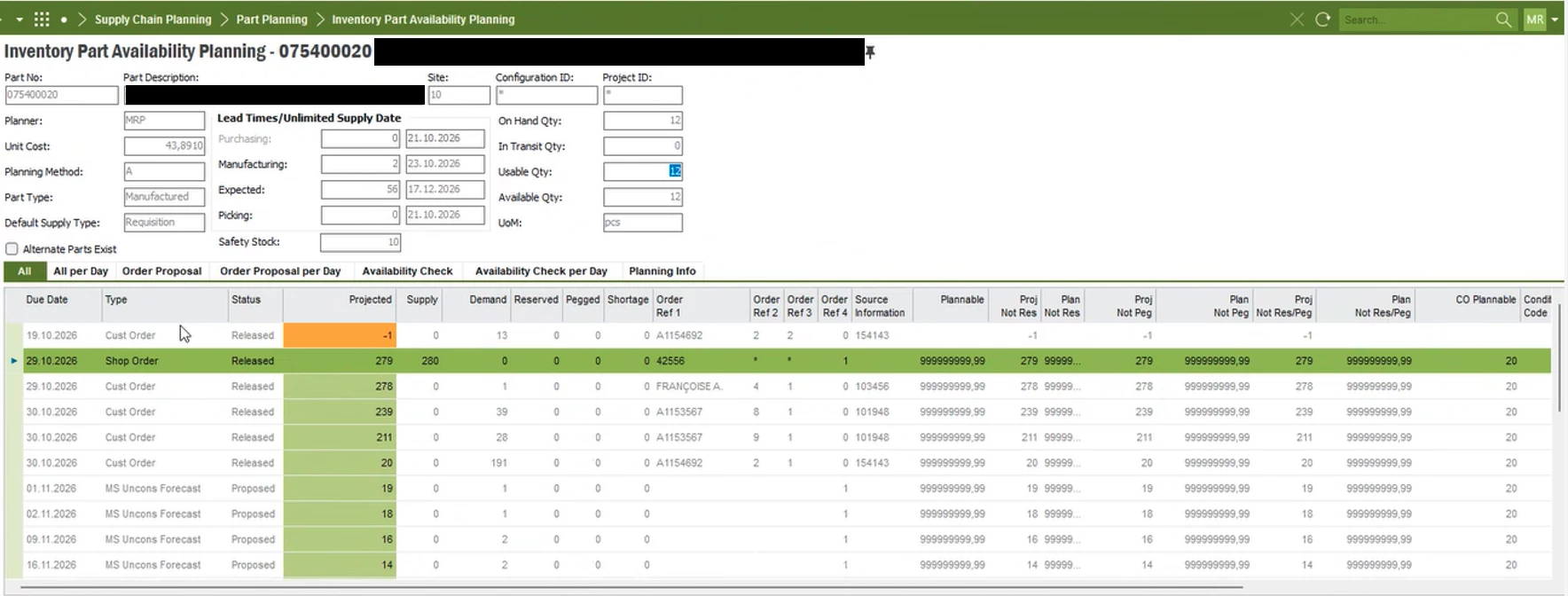
Hi Matteo, a second idea: Did you managed to have a look into Supply Chain Planning > Part Planning > Inventory Part Availability Planning? Please take a look into the graph (granularity “day”). I can imagine that the “equivalent” of “sendig a mail” is, when your graph goes below the security stock - line. This not for one InventoryPart but all you need for your ShopOrders.
We did a lot of research for the underlying VIEW ORDER_SUPPLY_DEMAND: It contains 20(!) sub-views. At the customer site we identified only 12 used.
Good news: We created a FACT - table (situated in the DWH on the MS SQL BI Server) As mentioned above it is quite simple to query data from this FACT-table and filter the records (ShopOrderNo, PlannedDate, etc) for raw material (InventoryParts) and send this list via mail to one or more people.
Hi Matteo, just get it done. Here an example: My select (on the DWH DB)
select SiteID, Orderno, DateRequired, QtyDemand,SafetyStockOSD, SuppMinDemand, UsableQty, PartNo, partkey from FACT_OrderSupplyDemand where SuppMinDemand < 0 and OrderSupplyDemandType <> 'Forecast' and SiteID = '10' -- german company and DateRequired < GETDATE() + 30 -- only for the next 30 days. and SuppMinDemand * -1 > UsableQty order by DateRequired desc
Hi all, I work with IFS and I’ve been assigned a manual data-check task I’d like to automate.
The check works like this: for each manufacturing order I have to check wheter I have or not enough raw material, if yes release to production, if not check if a purchasing order has placed and talk with procurement.
What I’d like is a system that runs these checks automatically and sends me an email with a recap.
It's very boring so I'd like to make it simpler
I’m a business user, not a developer, so any pointers to documentation or examples would be very welcome.
Thanks!
Hi Matteo, today I had a meeting with the responsible person on customer site for FACT_OrderSupplyDemand. We had to add the case when you do not have any demands or supplies (from CustomerOrders, ShopOrders (=demands), Purch Req (=supplies). We did some queries and they look quite promising!
First scenario: Raw material for ShopOrders.
select partkey, cast(sum(SuppMinDemand) as numeric(10,0)) as SuppMinDemand, OrderSupplyDemandType from FACT_OrderSupplyDemand where 1=1 --and SuppMinDemand < 0
--and SafetyStockOSD <> 0 and DateRequired < '2027-12-31' --and OrderSupplyDemandType like 'Shop %' and PartKey = '10_E30260000' group by PartKey, OrderSupplyDemandType
Result: partkey SuppMinDemand OrderSupplyDemandType 10_E30260000 -2465 MRP Forecast 10_E30260000 6000 Purch Order 10_E30260000 162000 Purch Req 10_E30260000 -18188 Shop Order Material
We could deliver all details like OrderNo and DateRequired. partkey SuppMinDemand SafetyStockOSD UsableQty Orderno DateRequired OrderSupplyDemandType 10_E30260000 -1519.2 0 18161 6696073 2027-04-21 MRP Forecast 10_E30260000 6000 0 18161 1095982 2027-04-14 MRP Forecast 10_E30260000 -1636.24 0 18161 6695650 2027-04-14 MRP Forecast 10_E30260000 6000 12000 18161 1095982 2027-04-14 Purch Req
Also I could query with concatenated (and count) OrderNos in the grouped view.
I think your request of “shortened” ShopOrders (not enough raw material on the way ) could be done with this FACT_OSD source very easy.
I had a long discussion with my customer today. They also want a list of parts where the following information is not from one part but for all parts
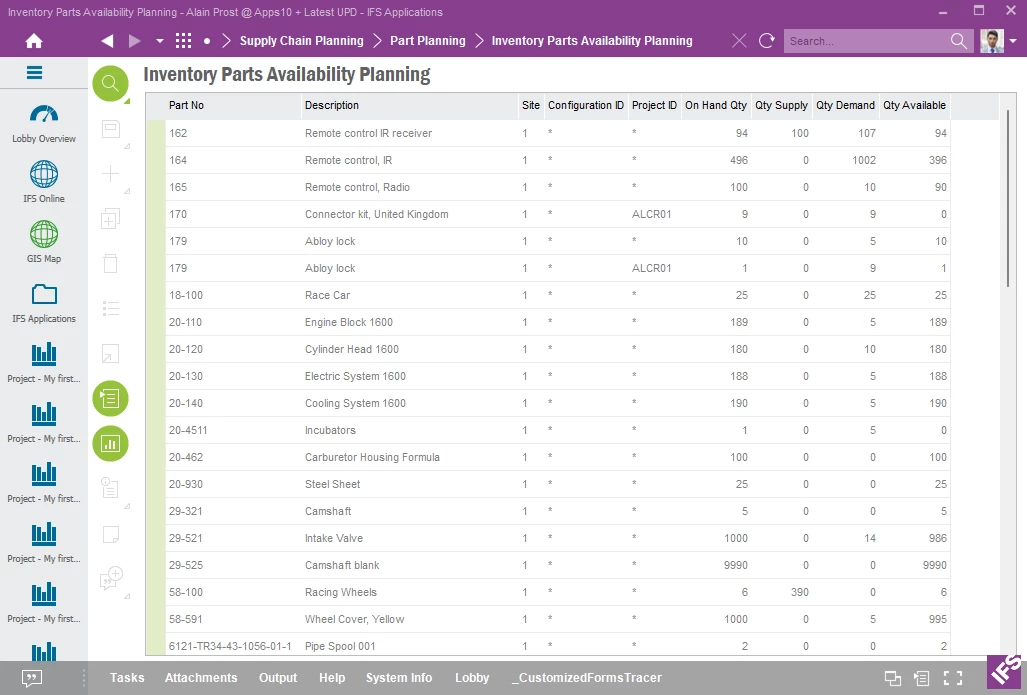
The Projected Qty showing in the above print screen in your response would be the on hand quantity once all supply / demand has been processed. This screen shows you by Part / Project On Hand, Supply Demand and Qty Available on one screen.
You can right mouse click on any record or records to go to Inventory Part Availability Planning to view additional information.