
Solved

Save As and Excel is not active

  • Aug 27, 2024 7:17 AM UTC
  • 9 replies
  • 153 views

Forum|alt.badge.img+10

Hi,

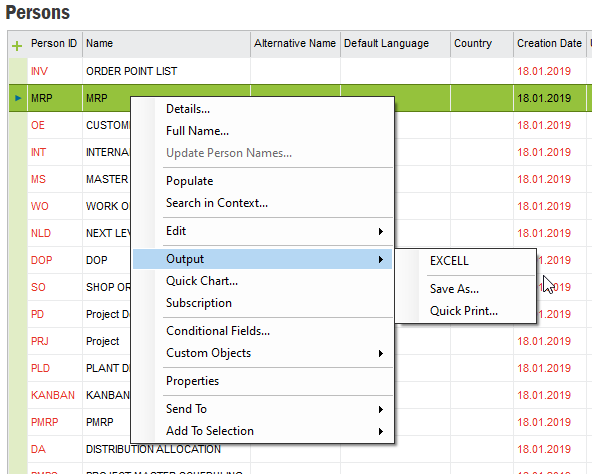
on some users Save As and Excel is not active under Output.
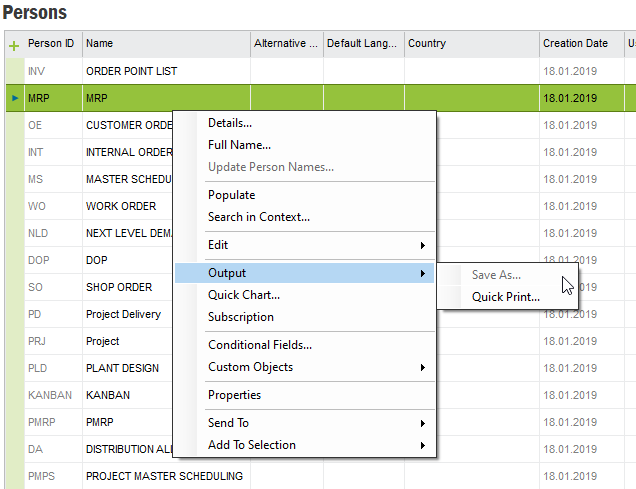
Not Active

but they are active on IFSAPP


Active

i checked Permissions and could not find anything related to this.

what would be the reason?

Thanks.

Best answer by Link

Dear @Noriro2 

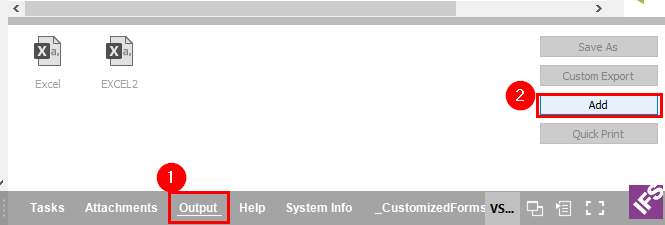
you need to create the output:


View original

9 replies

Link
Superhero (Customer)
Forum|alt.badge.img+23
  • Superhero (Customer)
  • Answer
  • Aug 27, 2024 7:57 AM UTC

Dear @Noriro2 

you need to create the output:


Link
Superhero (Customer)
Forum|alt.badge.img+23
  • Superhero (Customer)
  • Aug 27, 2024 8:00 AM UTC

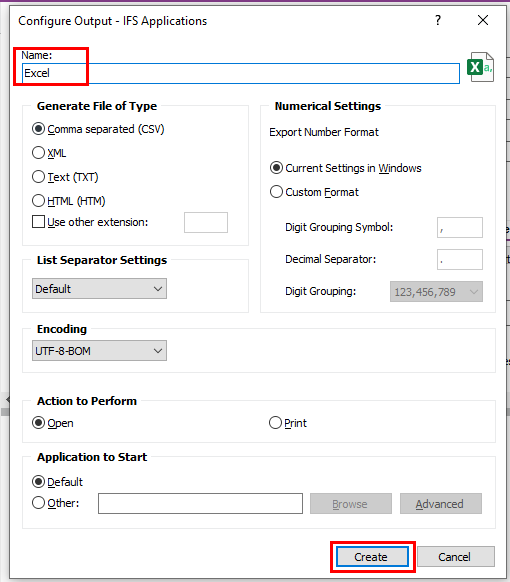
Then do this:


But it works only if you want to export a table.


Forum|alt.badge.img+10
  • Author
  • Hero
  • Aug 27, 2024 8:08 AM UTC

Hi @Link , 

Thank you for reply, the thing is we didn’t do these in our TEST env. they are just there, i never use the way you showed me. but it worked on my test, i will test with users. 

Thank you.

Edit 1: It worked.


Link
Superhero (Customer)
Forum|alt.badge.img+23
  • Superhero (Customer)
  • Aug 27, 2024 8:47 AM UTC

Hi @Link , 

Thank you for reply, the thing is we didn’t do these in our TEST env. they are just there, i never use the way you showed me. but it worked on my test, i will test with users. 

Thank you.

Edit 1: It worked.

You are welcome. 

You can export to xml as well if needed.


Forum|alt.badge.img+10
  • Author
  • Hero
  • Aug 27, 2024 9:09 AM UTC

Hi @Link , 

Thank you for reply, the thing is we didn’t do these in our TEST env. they are just there, i never use the way you showed me. but it worked on my test, i will test with users. 

Thank you.

Edit 1: It worked.

You are welcome. 

You can export to xml as well if needed.

Also there are other options i just discovered by using “Use other extension:” .docx, .pdf, .xlsx, etc. 

Thank you.


zuhaib
Sidekick (Customer)
Forum|alt.badge.img+6
  • Sidekick (Customer)
  • Aug 27, 2024 9:31 AM UTC

Hi,

on some users Save As and Excel is not active under Output.

Not Active

but they are active on IFSAPP


Active

i checked Permissions and could not find anything related to this.

what would be the reason?

Thanks.

Hi @Noriro2  

I hope this reply finds you well.

First check the permission set after that download the packages and restart user. hope your issue will be resolved.


Zuhaib
https://www.linkedin.com/in/zuhaib-71698211b/


JJäthing
Hero (Partner)
Forum|alt.badge.img+11
  • Hero (Partner)
  • Aug 27, 2024 10:22 AM UTC

The user profiles perhaps need to be updated. Normally there is a default basic profile that is distributed across all users. In that, such things as the predefined output is entered. Perhaps that was the case in Test and perhaps this has been overlooked when the users have been set up in Prod.


Forum|alt.badge.img+10
  • Author
  • Hero
  • Aug 27, 2024 10:45 AM UTC

Hi,

on some users Save As and Excel is not active under Output.

Not Active

but they are active on IFSAPP


Active

i checked Permissions and could not find anything related to this.

what would be the reason?

Thanks.

Hi @Noriro2  

I hope this reply finds you well.

First check the permission set after that download the packages and restart user. hope your issue will be resolved.


Zuhaib
https://www.linkedin.com/in/zuhaib-71698211b/

Hi Zuhaib, 

which permission set and which package i should check? 

Thanks.


Forum|alt.badge.img+10
  • Author
  • Hero
  • Aug 27, 2024 10:53 AM UTC

The user profiles perhaps need to be updated. Normally there is a default basic profile that is distributed across all users. In that, such things as the predefined output is entered. Perhaps that was the case in Test and perhaps this has been overlooked when the users have been set up in Prod.

Hi @JJäthing,

Thank you for reply, i used standart profile for many times to set some settings to all users, but this wasn’t activated on user, after @Link showed me, i checked if it works on Standart Profile, i saw it is not available in standart profile either so i configured output as @Link showed me and works for everyone.


Thank you.