Solved

Download All Packages not showing for user

  • Mar 14, 2024 10:25 AM UTC
  • 6 replies
  • 249 views

Forum|alt.badge.img+6

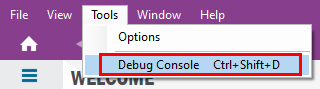
What permission in IFS 10 allows the download all packages option from the debug console?  Thanks!

Best answer by Link

Hi @HyperRon 

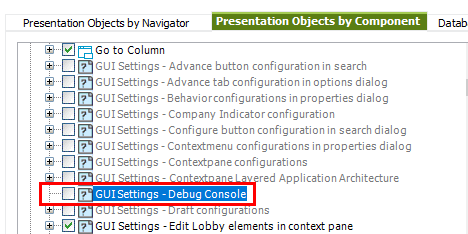
in the folder “IFS Base Functionality” you need to activate the following GUI:
 

View original

6 replies

Forum|alt.badge.img+10
  • Sidekick (Customer)
  • Mar 14, 2024 10:41 AM UTC

Why would you want it?

Causes a pain if you need to clear cache and also means taking up space on your machine you don’t know.

That said - I would like to know, as I would love to block it!


Link
Superhero (Customer)
Forum|alt.badge.img+23
  • Superhero (Customer)
  • Mar 14, 2024 12:30 PM UTC

Hi @HyperRon 

it isn’t recommended.

However, you can activate it as following in the permission set:


Forum|alt.badge.img+6
  • Author
  • Do Gooder
  • Mar 14, 2024 1:05 PM UTC

The permission set has that but, the user cannot see it.  Thanks for your assistance.


Link
Superhero (Customer)
Forum|alt.badge.img+23
  • Superhero (Customer)
  • Answer
  • Mar 14, 2024 1:15 PM UTC

Hi @HyperRon 

in the folder “IFS Base Functionality” you need to activate the following GUI:



Forum|alt.badge.img+6
  • Author
  • Do Gooder
  • Mar 14, 2024 2:38 PM UTC

He has that as well.  He still doesn’t have the option.  This is a head scratcher.


Link
Superhero (Customer)
Forum|alt.badge.img+23
  • Superhero (Customer)
  • Mar 14, 2024 2:52 PM UTC

Hi @HyperRon 

I’ve created a new permission set for testing and did exactly the same settings and it works.