Solved

Sorting of Joblist

  • Mar 1, 2022 8:19 AM UTC
  • 2 replies
  • 121 views

Forum|alt.badge.img+7
  • Do Gooder (Customer)

Hi,

We have just upgraded from FSM5, to FSM6. In the Joblist screen in the previous mobile app, there were a OOTB button in the bottom right corner, where you could choose what you wanted to sort the tasks by, for instance created_dttm, severity etc. 

In the mobile app for FSM6, I see that you can create these on your own. However, I cannot find anything related to this in the documentation, so I wonder what is the best way to solve this?

And, what is the value that this list is sorted by OOTB?
Best answer by SanjeewaJ

Hi @sinyb 

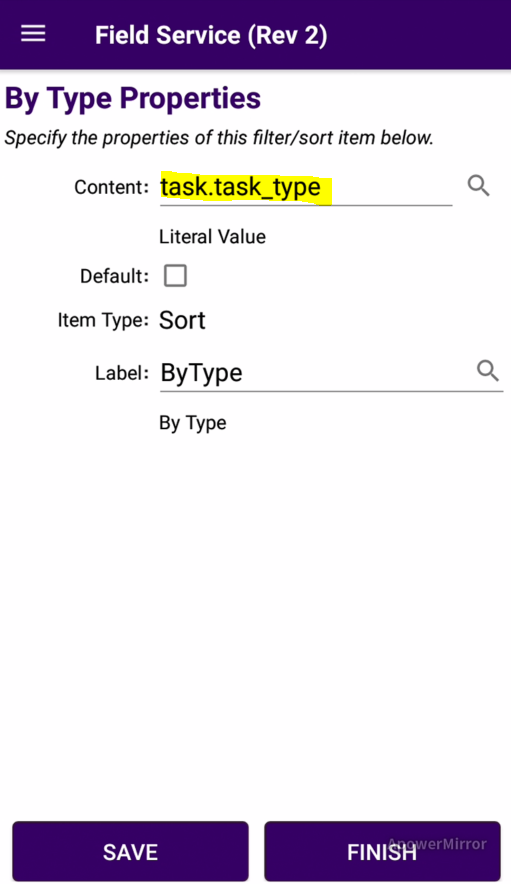
In Mobile designer you can simply modify existing sorting options or add your own.

Value should like below. table_name.column

Ex:

/Sanjeewa

View original
This topic has been closed for replies.

2 replies

SanjeewaJ
Superhero (Employee)
Forum|alt.badge.img+15
  • Superhero (Employee)
  • Answer
  • Mar 1, 2022 8:59 AM UTC

Hi @sinyb 

In Mobile designer you can simply modify existing sorting options or add your own.

Value should like below. table_name.column

Ex:

/Sanjeewa


Forum|alt.badge.img+7
  • Author
  • Do Gooder (Customer)
  • Mar 1, 2022 11:27 AM UTC

Thank you very much, didn’t know I could just enter the columns directly in the content field.