Answer

Printing Order Confirmation

  • November 13, 2020
  • 3 replies
  • 560 views

Forum|alt.badge.img+18

Hi, is it possible to prevent the ability to select Print Order Confirmation/Email Order Confirmation

until the Customer Order has been ‘Released’.


Any advice greatly appreciated.


John

Best answer by dsj

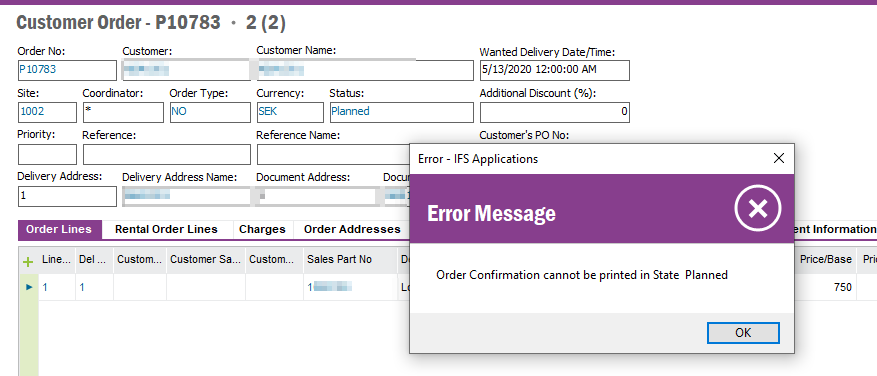
One way to limit printing order conformation would be to create a custom event on CustomerOrderHistory - CUSTOMER_ORDER_HISTORY_TAB  on New records and raise an error if status is Planned and Message_text = Order confirmation printed


Example:
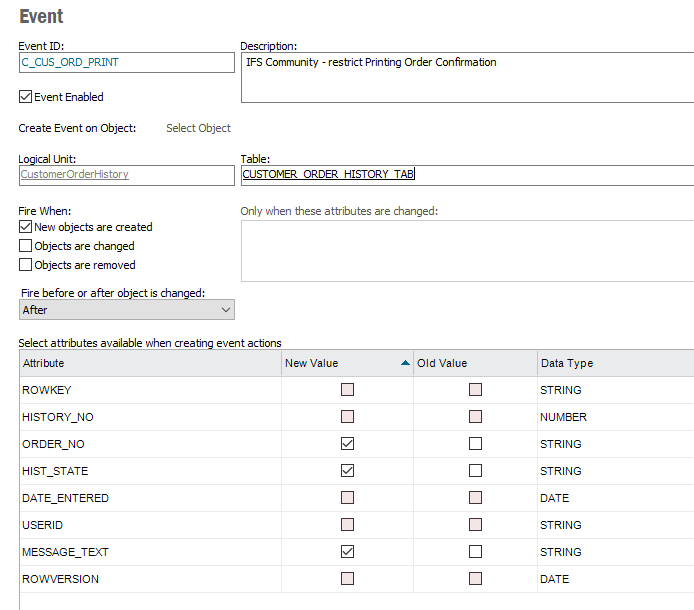
 

Action:
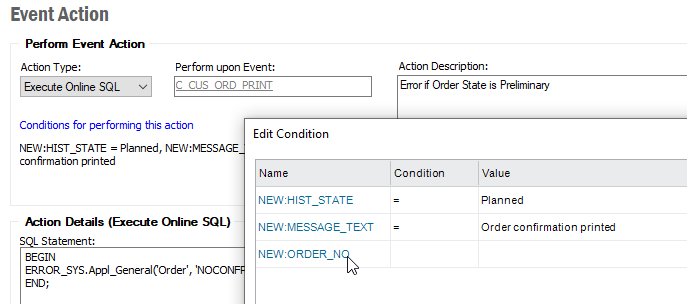
 

Action SQL

BEGIN
ERROR_SYS.Appl_General('Order', 'NOCONFPRINT: Order Confirmation cannot be printed in State :P1', ' &NEW:HIST_STATE');
END;


Regards,

Damith

This topic has been closed for replies.

3 replies

paul harland
Superhero (Employee)
Forum|alt.badge.img+24

hi John

Aurena or Enterprise Explorer?

If the objective is to prevent  a meaningful output being generated, then you can make the content of the report conditional using Report Designer - for example, hide all of the lines if the Order status is Planned.  That way, even though the report can be printed, it is useless.  Alternatively you could do some kind of conditional watermark based on the status.


Forum|alt.badge.img+18
  • Author
  • Superhero (Partner)
  • November 16, 2020

@paul harland Thank you for your reply, it is Enterprise Explorer.

The idea was to prevent the user from printing the order confirmation until the order has been ‘Released’.  


John


dsj
Ultimate Hero (Partner)
Forum|alt.badge.img+22
  • Ultimate Hero (Partner)
  • Answer
  • November 16, 2020

One way to limit printing order conformation would be to create a custom event on CustomerOrderHistory - CUSTOMER_ORDER_HISTORY_TAB  on New records and raise an error if status is Planned and Message_text = Order confirmation printed


Example:


Action:


Action SQL

BEGIN
ERROR_SYS.Appl_General('Order', 'NOCONFPRINT: Order Confirmation cannot be printed in State :P1', ' &NEW:HIST_STATE');
END;


Regards,

Damith