Solved

Import Action Group

  • Apr 19, 2022 4:57 AM UTC
  • 3 replies
  • 118 views

Dinuk Amarasinghe
Hero (Employee)
Forum|alt.badge.img+7

How do I import an Action Group in Alliance v15?

Best answer by Sachin Maheeshana

Hi Dinuk,

Inside the Action Groups module click the Import button and the following Import window will be displayed. 
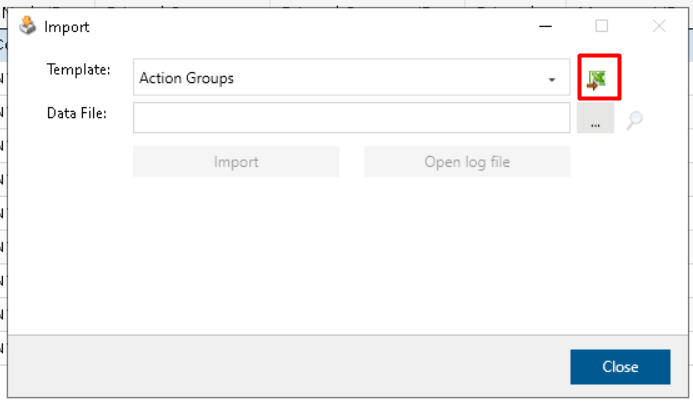
Select “Action Groups” from the Template dropdown, then click the Excel icon to obtain the Excel template required to import. Follow the layout of the template and fill in the mandatory cells.
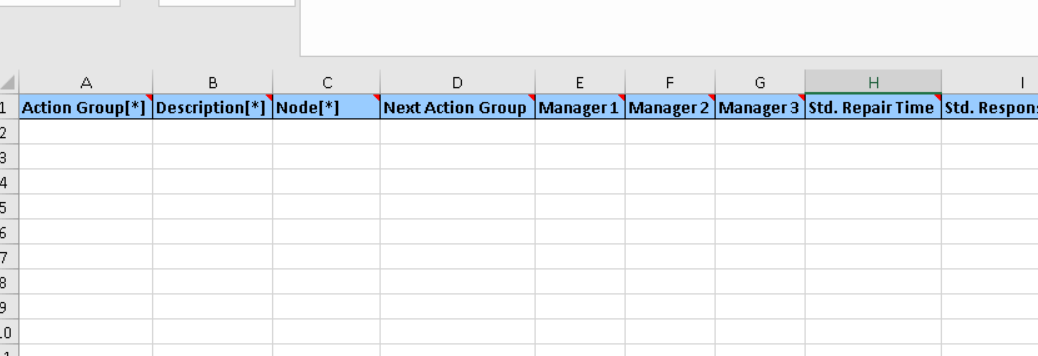
 

Save and close the Excel workbook. Finally, click the Import button in the Import window. You can import many modules which include the import feature in this way.


View original

3 replies

Sachin Maheeshana
Hero (Employee)
Forum|alt.badge.img+7

Hi Dinuk,

Inside the Action Groups module click the Import button and the following Import window will be displayed. 

Select “Action Groups” from the Template dropdown, then click the Excel icon to obtain the Excel template required to import. Follow the layout of the template and fill in the mandatory cells.


Save and close the Excel workbook. Finally, click the Import button in the Import window. You can import many modules which include the import feature in this way.



Forum|alt.badge.img+6
  • Sidekick (Employee)
  • Apr 19, 2022 5:39 AM UTC

Further to these, only the columns denoted with a (*) are mandatory.


Forum|alt.badge.img+3
  • Do Gooder (Employee)
  • Apr 19, 2022 3:13 PM UTC

Additional Tip - Each field has a comment in the header line.  This will tell you the actual field you are updating, formatting information and potential values for the field.