Question

Service Management Request Work Task - Fixed Price Sales Part

  • January 5, 2026
  • 9 replies
  • 77 views

Forum|alt.badge.img+12

Hello,

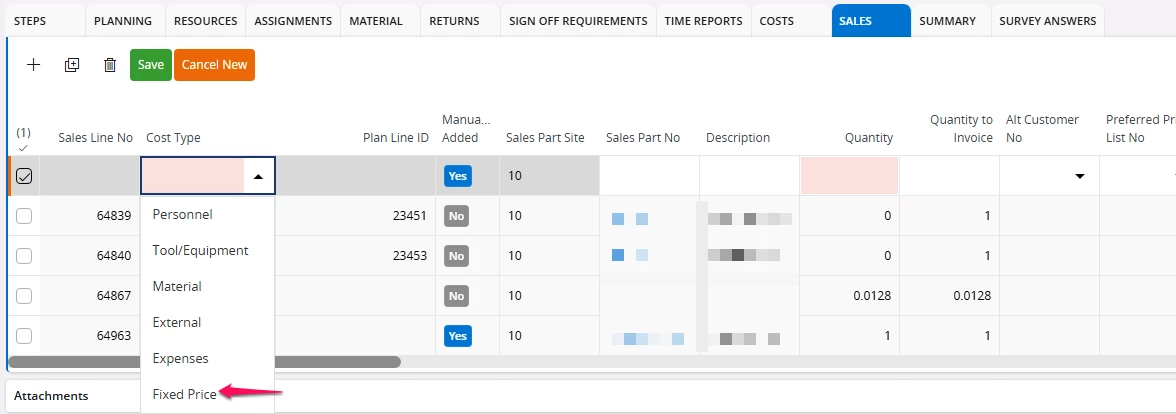
While using the Service module > Work Task screen, we have the option to enter a Fixed Price line for a sales part from the Sales tab.

 Work Task
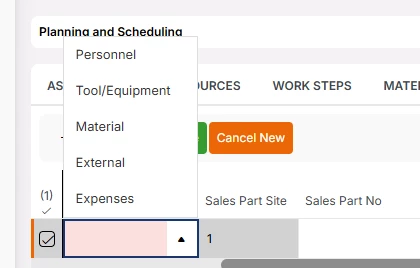
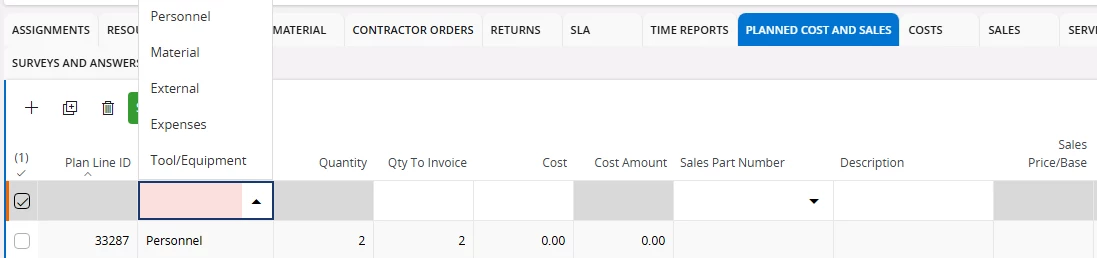
Whereas while using the Service Management module > Request Work Task screen, we do not have the option to enter the Fixed Price in the Cost Type dropdown. Is there a reason for removing this option from the list? If so, is there an alternative way to add the fixed price? Please let me know.

Request Work Task
 

9 replies

kasunhp
Sidekick (Partner)
Forum|alt.badge.img+9
  • Sidekick (Partner)
  • January 6, 2026

Hi,


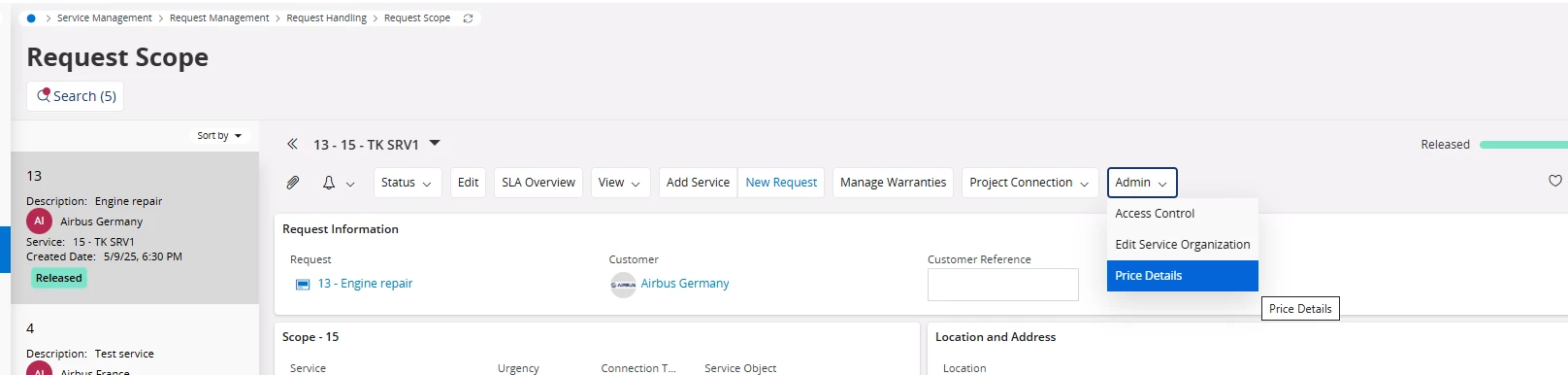
You can use this “Price Details” command to add fixed price sales parts in scope level.


Is this matching with your requirement?


Forum|alt.badge.img+12

Hi,


You can use this “Price Details” command to add fixed price sales parts in scope level.


Is this matching with your requirement?

Thank you ​@kasunhp for the response. Yes, we have seen this option but it seems to be a lot of clicks for the customer to add it from the Request Scope or Request - Cost and Sales screens instead of directly adding/removing it from the individual work task.


kasunhp
Sidekick (Partner)
Forum|alt.badge.img+9
  • Sidekick (Partner)
  • February 13, 2026

Hi ​@Priyanka Cecilia V 

Coming back again. 

Did you work with this adding fixes price sales parts at scope level?

We can add but those added sales parts are not appeared in the invoice preview.


Forum|alt.badge.img+12

Hi ​@Priyanka Cecilia V 

Coming back again. 

Did you work with this adding fixes price sales parts at scope level?

We can add but those added sales parts are not appeared in the invoice preview.

@kasunhp The fixed lines we add at the scope level are only planning lines. We must include the sales parts either at the task level under Sales tab or from the Request - Cost and Sales screen to be considered as Actual fixed prices before creating the invoice preview.


kasunhp
Sidekick (Partner)
Forum|alt.badge.img+9
  • Sidekick (Partner)
  • February 21, 2026

@Priyanka Cecilia V There is a possibility in Cost and Sales to add Actual Fixed Prices after releasing the request. However, these are not visible in the Invoice Preview. As per the my other community post, IFS said this is a bug and that will be corrected 25R2SU4.
On the other hand, adding sales lines in task level will not work if we use All Other- Fixed Price price rule.


Forum|alt.badge.img+5
  • Do Gooder (Partner)
  • March 2, 2026

@kasunhp  Just to add another point I notice, when you have a fixed price line and you do a credit note, then the fixed price line gets reverted as expected but is not added back a new invoiceable line again. This is important if we choose to create a different invoice preview after credit note this fixed line will not showing up. This behavior is different when you do a credit note on material or service line, you can generate a new invoice preview and you will see them show up.


  • Superhero (Employee)
  • March 2, 2026

@kasunhp  Just to add another point I notice, when you have a fixed price line and you do a credit note, then the fixed price line gets reverted as expected but is not added back a new invoiceable line again. This is important if we choose to create a different invoice preview after credit note this fixed line will not showing up. This behavior is different when you do a credit note on material or service line, you can generate a new invoice preview and you will see them show up.

The behavior you’re seeing is expected for fixed price lines, and it’s slightly different from material or service lines.

Here’s an example to make it concrete:

  • You have a fixed price line for $200.
  • You invoice that fixed price line.
  • You then create a full credit note for $200.

When the full credit is created, the original fixed price line is correctly reverted (so the net invoiced amount is back to zero). The system does not automatically create a new invoiceable fixed price line.

This is intentional. A fixed price line represents a one‑time agreed amount. Once it has been fully credited, it is considered completed.
If you want to invoice the customer again after issuing a full credit, you need to add a new fixed price line with the new amount you want to charge.

That’s why, if you generate a new invoice preview after the credit note, the original fixed price line does not reappear, unlike material or service lines, which are usage‑based and can re‑surface in subsequent invoice previews.

I’m assuming that you’re saying that the new fixed price line is not included on the invoice preview? 
That’ll be fixed in 25R2 SU4.


Forum|alt.badge.img+5
  • Do Gooder (Partner)
  • March 2, 2026

@anmise Thank you Sir for you quick response. Understood


kasunhp
Sidekick (Partner)
Forum|alt.badge.img+9
  • Sidekick (Partner)
  • March 3, 2026

@anmise Are you planning to include Fixed Price into sales lines in a request task as well. 


This is badly needed to a customer.