


Question

Help needed - Payment Advice file IFS Cloud 24R2

  • July 14, 2025
  • 6 replies
  • 143 views

Forum|alt.badge.img+11

All, I need your help.

I am not sure why this is not working or why i can not see a pdf file in the report archive.

I have set up the payment formats per company as below. The supplier payment advice is set At Create Order. The background payment file runs for the payment order to the OUTPUT location specified, but I get no pdf created and therefore my e-mail event is not sending out an email.
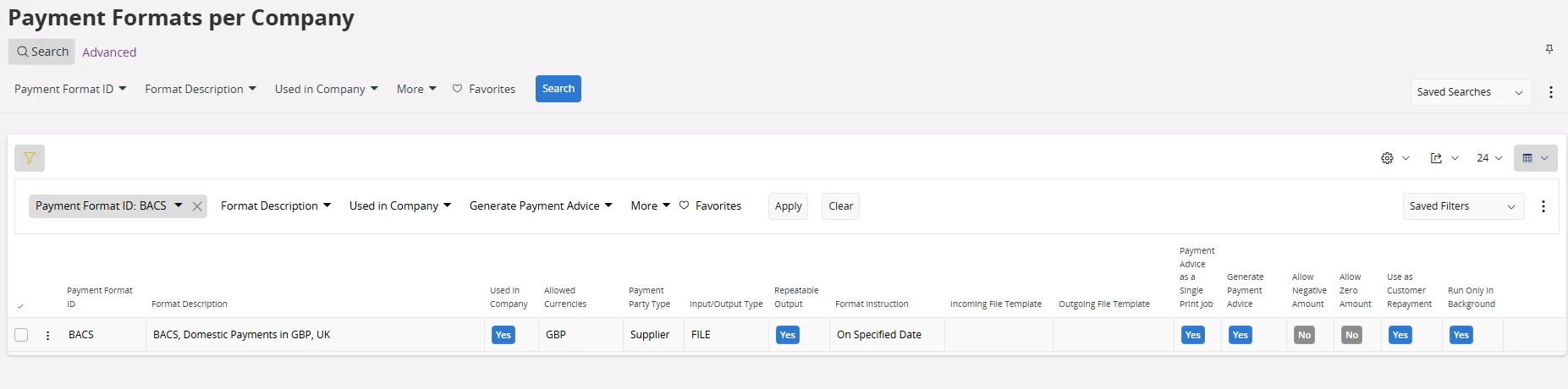
The event is set to trigger on REPORT_TITLE = Payment Advice

Can anyone advise what might be happening here? Or what I haven’t set up, thanks.

6 replies

Forum|alt.badge.img+8
  • Sidekick (Customer)
  • July 15, 2025

@sholmes 

To my knowledge Payment Formats require a Routing Rule, and send its content to the configured Routing Address, usually File / FTP.

Mail may be an option, but I’m not sure event triggers on REPORT_TITLE will work.


Forum|alt.badge.img+2
  • Do Gooder (Customer)
  • September 22, 2025

bonjour, cela fonctionnait bien en 23R2 mais depuis qu’on est passé en 24R2, pareil l’action d’évènement fait bien partir le mail mais pas la pièce jointe. alors que pour les commandes d’achat cela fonctionne


Forum|alt.badge.img+7
  • Sidekick (Customer)
  • November 19, 2025

@sholmes Did you resolve this issue?

The supplier must also have setting; 

Payment Advice = At create order on supplier, payment tab

in the help text I found, Payment advice as a single print job should also be unticked on Payment Format.

I am getting the advice to be created but the event to fail, PDF_parameters are not picked up for some reason.


Forum|alt.badge.img+9
  • Hero (Customer)
  • November 19, 2025

hello every body.

Is there any documentation on how to setup this step by step please?


thank you in advance


Forum|alt.badge.img+7
  • Sidekick (Customer)
  • November 19, 2025

This guide is quite well described:


I just got it to work, missed that you have to create a contact on supplier AND select that contact as AP Supplier Contact in Supplier/payment tab.


Forum|alt.badge.img+11
  • Author
  • Hero (Customer)
  • November 19, 2025

@Marake - thanks but it has resolved itself with no changes and is now working as it did in our test environment pre go live. Gremlins in the system is what I have put it down to.


Do you have an error message in application messages as to why the event is failing?


@N.GEORGI - sorry I do not know of any documentation, it was looking at the App9 set up we had and using that as the base for IFS Cloud



