Solved

Remove a POR with a connection to a Closed Project

  • August 8, 2024
  • 8 replies
  • 69 views

Forum|alt.badge.img+17

Hello, 

I have run into an issue with a hung POR in an Authorized (not closed state). Unfortunately, I was made aware too late and the project and activity have been closed for a long time. 

At this point, I am unable to cancel the POR, or disconnect the POR from the project. I’m looking for some way to resolve this, but I have found nothing. Hoping someone has seen this before and can provide some  guidance. Thank you!
Best answer by PRODQ

@PRODQ Are you able to provide how you re-open the project (from what screen)? I’ve never seen that option once a project has been closed/costed. 


Thank you.

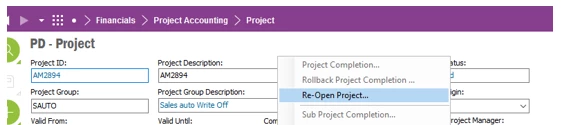
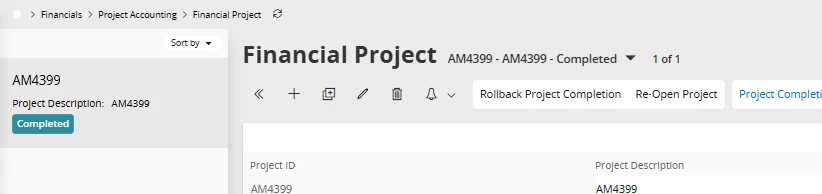
Query in ‘Financial Project’ and select Re-Open Project


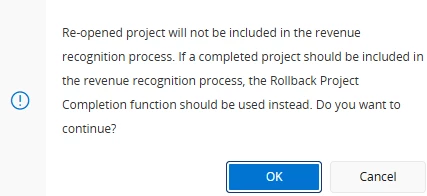
We don’t use revenue recognition functionality.  This may be different for you.  Your Finance Team should be able to confirm/advise.  


8 replies

Tharindu Illangasinghe
Superhero (Partner)
Forum|alt.badge.img+16

Hi @cjohnson,


It is quite strange that the user was able to close the Activity and the Project when the POR is in an opened state. 

So this POR has not reported any costs to the Activity ? like a Planned Cost ?

If you are not in a position to open the Project and Activity then I don’t think you can disconnect this POR from the project, functionally. An option I could think of is to do a data correction to remove the project connection from the POR in the database side. Afterwards you should be able to cancel/delete the POR.


Forum|alt.badge.img+17
  • Author
  • Superhero (Customer)
  • August 20, 2024

@Tharindu Illangasinghe Yes correct. They were able to close the Activity and the Project itself. I was assuming there is some control that would prevent this, but I have seen this several times where they close the project and have “hung POs/PORs”. No, once the connection is established, I cannot remove it to cancel it. Given the project is closed, that prevents all manipulation of the PO/POR. It’s odd that it cannot be fixed. 


Tharindu Illangasinghe
Superhero (Partner)
Forum|alt.badge.img+16

Hi @cjohnson,


Ideally, the system should not allow to close Activity/Project when there are unprocessed objects like PORs/POs. To me this looks like a bug. Have you tried reporting a support case to IFS already ?


PRODQ
Superhero (Customer)
Forum|alt.badge.img+18
  • Superhero (Customer)
  • January 2, 2026

You can re-open the Project - generally a finance task.  


We have this all the time when a req has been added but not processed through to PO Created.


Forum|alt.badge.img+17
  • Author
  • Superhero (Customer)
  • January 2, 2026

@PRODQ Are you able to provide how you re-open the project (from what screen)? I’ve never seen that option once a project has been closed/costed. 


Thank you.


PRODQ
Superhero (Customer)
Forum|alt.badge.img+18
  • Superhero (Customer)
  • Answer
  • January 2, 2026

@PRODQ Are you able to provide how you re-open the project (from what screen)? I’ve never seen that option once a project has been closed/costed. 


Thank you.

Query in ‘Financial Project’ and select Re-Open Project


We don’t use revenue recognition functionality.  This may be different for you.  Your Finance Team should be able to confirm/advise.  


Forum|alt.badge.img+17
  • Author
  • Superhero (Customer)
  • January 2, 2026

Thank you. I will test this. We are currently on IEE, not IFS Cloud. 


PRODQ
Superhero (Customer)
Forum|alt.badge.img+18
  • Superhero (Customer)
  • January 2, 2026

It’s a RMB...