


Solved

Setting up order points parameters

  • Aug 17, 2022 6:19 PM UTC
  • 2 replies
  • 602 views

angelodisi
Sidekick (Customer)
Forum|alt.badge.img+6

Hello fellow users,

I’m in the process of setting up order points for a list of low cost items. I also want to include the max qty  (order-up-to-level) on the report for the buyers.

I haven’t found a place for the MAX QTY to be entered, but there is a field labeled “Max Lot Size” in Inventory Part/ Planning Data tab.

Does anyone know of another place to enter the MAX (order up to ) qty?
Best answer by matt.watters

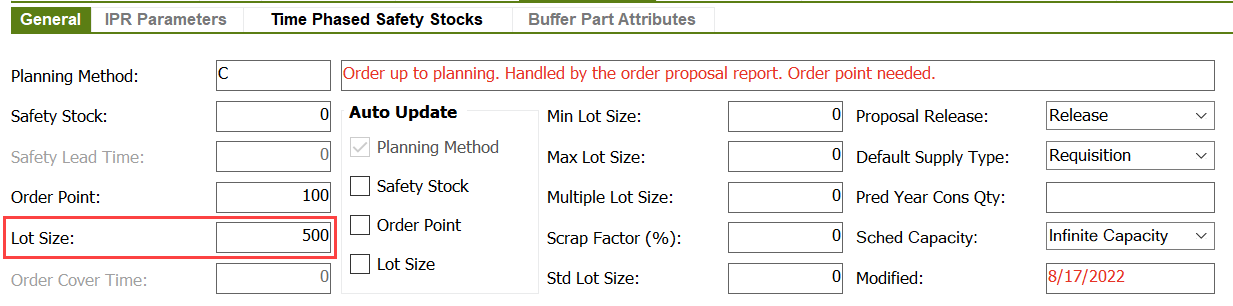
Are these cycle stock items for which you intend to use Planning Method ‘C’ (Replenishment Level)?

From the documentation on this:

This planning method works in the same way as order point planning, the difference being that the order quantity is calculated as the order proposal quantity minus the current quantity on hand, which is the replenishment level. This value is useful if storage space for the parts is limited, e.g., storage in silos.

The MAX QTY (order-up-to-level) for this would be the Lot Size.


View original

2 replies

matt.watters
Ultimate Hero (Partner)
Forum|alt.badge.img+26
  • Ultimate Hero (Partner)
  • Answer
  • Aug 17, 2022 7:14 PM UTC

Are these cycle stock items for which you intend to use Planning Method ‘C’ (Replenishment Level)?

From the documentation on this:

This planning method works in the same way as order point planning, the difference being that the order quantity is calculated as the order proposal quantity minus the current quantity on hand, which is the replenishment level. This value is useful if storage space for the parts is limited, e.g., storage in silos.

The MAX QTY (order-up-to-level) for this would be the Lot Size.


angelodisi
Sidekick (Customer)
Forum|alt.badge.img+6
  • Author
  • Sidekick (Customer)
  • Aug 22, 2022 11:58 AM UTC

Matt,

Thank you for your input.

Angelo