Question

Calendar Generation

  • Jul 21, 2020 2:58 PM UTC
  • 3 replies
  • 661 views

Forum|alt.badge.img+7

Trying to create a new calendar, I set up new Day Type, New Schedule and a new calendar and when I try and generate the calendar, I receive an error saying “The Work Time Counter does not exist.”  Not sure what I am missing.

3 replies

  • Superhero (Employee)
  • Aug 12, 2020 1:22 PM UTC

Trying to create a new calendar, I set up new Day Type, New Schedule and a new calendar and when I try and generate the calendar, I receive an error saying “The Work Time Counter does not exist.”  Not sure what I am missing.

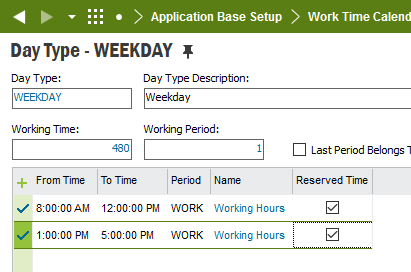
Which release and update are you on? Do you have ‘Reserved Time’ ticked on the day type(s) details by any chance? If so, can you try and untick it and see if that works?


  • Do Gooder (Partner)
  • Oct 20, 2021 10:00 PM UTC

Hi All

In Apps9, After calendar is generated and customer orders & purchase orders are created, then user has increased working days in the calendar this is resetting the customer orders & purchase orders delivery dates.

Is there any solution, when calendar is changed, the open customer orders & Purchase Orders delivery dates shouldn’t reset.


Thank You


Forum|alt.badge.img+1
  • Do Gooder (Partner)
  • Sep 6, 2024 9:49 AM UTC

What is the functionality of Reserved time in Day Type Screen?