Solved

Availability control ID tracking

  • Apr 8, 2021 7:17 PM UTC
  • 2 replies
  • 755 views

Forum|alt.badge.img+17

Hello All, 

I’m hoping there is somewhere in IFS to track this. It was recently discovered that an Availability Control ID was applied to a large group of parts in an inventory location. I have not found a place in IFS where you can view when and who applied the ID. I’ve checked Inventory Transaction History, but I do not see the transaction there. 

Any help would be greatly appreciated. 
Best answer by william.klotz

Hi @cjohnson ,


You could enable history logging on the INVENTORY_PART_IN_STOCK_TAB so you can track when the availability control is updated.  


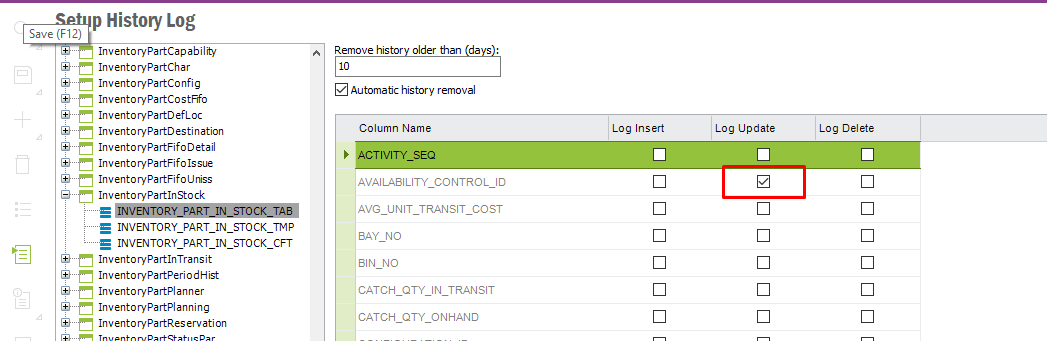
Here’s a simple setup to enabling history logging whenever the availability control in the INVENTORY_PART_IN_STOCK_TAB is updated.


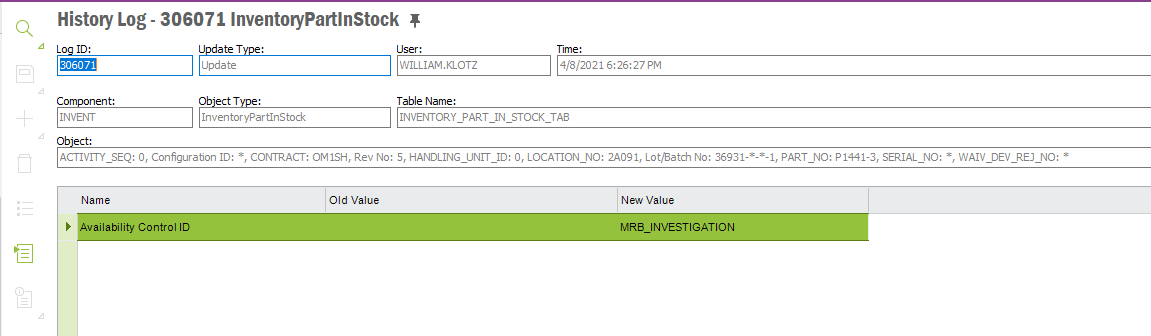
History showing an availability control added to a part.  It shows what availability control was added, who added it and when they added it.


Regards,

William Klotz


View original
This topic has been closed for replies.

2 replies

william.klotz
Superhero (Customer)
Forum|alt.badge.img+21
  • Superhero (Customer)
  • Answer
  • Apr 8, 2021 11:34 PM UTC

Hi @cjohnson ,


You could enable history logging on the INVENTORY_PART_IN_STOCK_TAB so you can track when the availability control is updated.  


Here’s a simple setup to enabling history logging whenever the availability control in the INVENTORY_PART_IN_STOCK_TAB is updated.


History showing an availability control added to a part.  It shows what availability control was added, who added it and when they added it.


Regards,

William Klotz


Forum|alt.badge.img+17
  • Author
  • Superhero (Customer)
  • Apr 9, 2021 11:28 AM UTC

Thank you @william.klotz that’s perfect!