Question

User Sessions Timing Out

  • December 5, 2025
  • 6 replies
  • 257 views

Forum|alt.badge.img

After upgrading to Cloud 25R1 our user sessions are timing out much more frequently even after extending the times on the Sessions and Tokens page.


We use SSO and the user is taken to an Azure Login Screen but this has happened on accounts that are not using SSO as well.


Some users have reported being logged out while they are working in the system and others after only working outside of IFS for only 5 - 10 minutes.


Has anyone else experienced this?

6 replies

Forum|alt.badge.img+17
  • Superhero (Partner)
  • December 5, 2025

Hi


Go to IAM Sessions and Tokens Configuration and increase Session Idle value.


Forum|alt.badge.img+3
  • Do Gooder (Customer)
  • December 6, 2025

Hi,

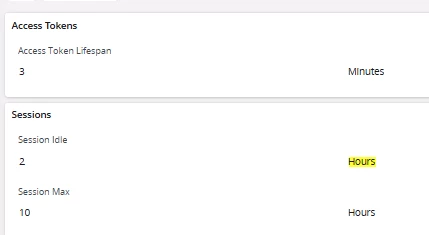
We are also on 25R1 SU4 and experience these issues, where production employees are logged off when busy on production for a time between 6 - 10 minutes. Then need to logon again. The above suggestion to increase ‘Session Idle’ value is not possbile in 25R1 SU 4 (Cloud). Both menus [IAM Sessions and Tokens Configuration] and [IAM Client Details] show a “Access Token Lifespan” of 3 minutes and a “Session Idle” of 30 minutes. But this is actually much shorter. As we cannot edit any setup screen, anybody suggestion what to do for 25R1 SU4 CLOUD?


Forum|alt.badge.img+5
  • Do Gooder (Partner)
  • January 26, 2026

Hi all,

we have the same problem after upgrade to 25R1.

Do you already have a solution or information about this?


Guzik
Hero (Customer)
Forum|alt.badge.img+5
  • Hero (Customer)
  • January 27, 2026

Hi ​@CdcPetBla ,

We applied the following settings which helped:


Regards,

Kajetan


Forum|alt.badge.img+1
  • Do Gooder (Customer)
  • March 4, 2026

Hi,

We are also on 25R1 SU4 and experience these issues, where production employees are logged off when busy on production for a time between 6 - 10 minutes. Then need to logon again. The above suggestion to increase ‘Session Idle’ value is not possbile in 25R1 SU 4 (Cloud). Both menus [IAM Sessions and Tokens Configuration] and [IAM Client Details] show a “Access Token Lifespan” of 3 minutes and a “Session Idle” of 30 minutes. But this is actually much shorter. As we cannot edit any setup screen, anybody suggestion what to do for 25R1 SU4 CLOUD?

@arjenheijboer 
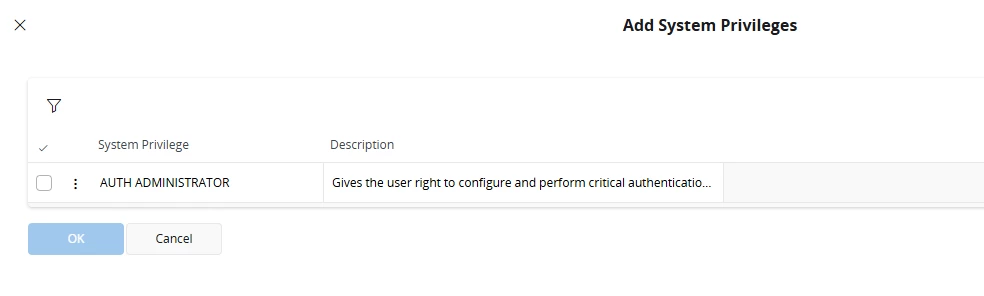
You need AUTH ADMINISTRATOR access in System Priviliges to edit this values


Forum|alt.badge.img+9
  • Hero (Partner)
  • March 31, 2026


After upgrading to Cloud 25R1 our user sessions are timing out much more frequently even after extending the times on the Sessions and Tokens page.


We use SSO and the user is taken to an Azure Login Screen but this has happened on accounts that are not using SSO as well.


Some users have reported being logged out while they are working in the system and others after only working outside of IFS for only 5 - 10 minutes.


Has anyone else experienced this?

Hi ​@dtarai ,

   Yes — this behavior has been observed by several customers after upgrading to IFS Cloud 25R1, especially in environments using Microsoft Entra ID (Azure SSO).

 Key Point (Why your changes didn’t help)

Even if you increased:

  • Session timeout
  • Token timeout (IFS side)

 Users can still be logged out because:

IFS session settings are only one part of the chain

The actual session depends on multiple layers:

  1. IFS session timeout
  2. IFS token lifetime
  3. Azure (Entra ID) token/session policies
  4. Browser/session cookies
  5. Reverse proxy / ingress timeouts

🛠️ Most Common Root Causes

🔹 1. Azure / Entra Token Lifetime (VERY COMMON)

  • Default Azure access token lifetime is short (~1 hour or less)
  • Silent refresh may fail → forces re-login

 Even worse:

  • If refresh token policy is strict
  • Or Conditional Access is applied

🔹 2. Cookie / SameSite Changes (25R1 Impact)

IFS 25R1 introduced stricter:

  • Cookie handling
  • Security policies

 This can cause:

  • Session loss when:
    • Switching tabs
    • Idle for short time
    • Using SSO redirects

🔹 3. Reverse Proxy / Load Balancer Timeout

Check:

  • Ingress / proxy idle timeout

 If set low (e.g., 5–10 mins):

  • Session appears to expire early

🔹 4. Token Refresh Issues

Symptoms:

  • User active → still logged out
  • Redirect to login screen

 Means:

  • Token refresh failed silently

🔹 5. Non-SSO Users Also Affected

This confirms:
 Not only Azure issue

Likely combined with:

  • Cookie/session config
  • Backend timeout

 What to Check (Action Plan)

✅ 1. Azure / Entra Settings

  • Review:
    • Token lifetime policies
    • Conditional Access
  • Check:
    • Sign-in logs for session expiration

✅ 2. IFS Session Settings

  • Recheck:
    • Session timeout
    • Token timeout
  • Ensure:
    • Values are actually applied (restart if needed)

✅ 3. Ingress / Proxy Config

Check:

  • Idle timeout
  • Keep-alive settings

 Very often overlooked

✅ 4. Browser Testing

  • Test:
    • Different browser
    • Incognito mode

 Helps identify cookie issues

✅ 5. Logs (Important)

Check:

  • IFS application logs
  • Identity provider logs

Look for:

  • Token expiration
  • Authentication failures

 Quick Fixes (Seen in Practice)

  • Increase proxy idle timeout
  • Adjust Azure token policies
  • Ensure persistent session cookies
  • Apply latest IFS patches (some fixes in later updates)