


Question

Lobby Element Conditional Formating 24R2 U16 - DATE

  • June 11, 2026
  • 4 replies
  • 38 views

Forum|alt.badge.img+11

All,


Created a lobby to show the supplier data of Quality and Environmental, and applying a conditional format to the date field and it’s not behaving as expected. Below is what I have set for the conditional formating and the results.

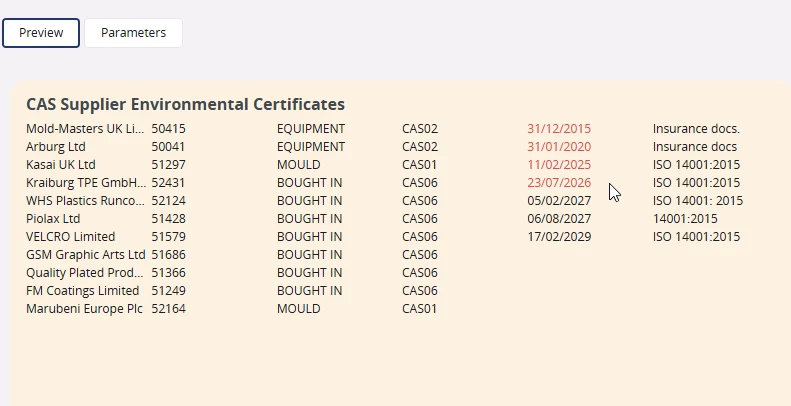
 

As you can see it has highlighted the 23/07/2026 as a date that is less than or equal to #TODAY# - today is 11/06/2026. Have I written the Value correctly? what else could be causing this?


4 replies

Forum|alt.badge.img+3
  • Do Gooder (Partner)
  • June 11, 2026

What is the server time  compared to your local time?  Most likely there is an error in the date set. To Test change the copare rule to “is Higer or equal to” to see if this specific row will be black or not. If black, it is likely an date setting somewhere in the servers which is wrong.


Forum|alt.badge.img+11
  • Author
  • Hero (Customer)
  • June 12, 2026

@jorlin - I’ve checked the servers and they are as per my local time and date, so I doubt that this is the issues. I have checked the two windows servers that run the windows management and the database plus checked the Unbuntu date also. Is there else where to check? However when I change the condition as you suggest the date in July is staying black.


@jorlin - I’ve checked the servers and they are as per my local time and date, so I doubt that this is the issues. I have checked the two windows servers that run the windows management and the database plus checked the Unbuntu date also. Is there else where to check? However when I change the condition as you suggest the date in July is staying black.

Hi ​@sholmes ,

Your value is written correctly — the issue is with how the client evaluates date conditions against #TODAY#. There are multiple reported cases on the community of this not resolving correctly for date columns.

Reliable workaround — do the comparison in the data source, not in the formatting rule:

  1. Add a flag column to your data source SQL:

CASE WHEN TRUNC(expiry_date) <= TRUNC(SYSDATE) THEN 'EXPIRED' ELSE 'VALID' END AS cert_status

  1. Set conditional formatting on: cert_status is equal to 'EXPIRED' → red
  2. Keep the original date column in the element for display

Since Oracle does the comparison in the database, this works regardless of client locale or date format.

Also check: if your data source returns the date using TO_CHAR (as text), the condition becomes a string comparison — that alone can cause results like this.

Hope this helps!


@jorlin - I’ve checked the servers and they are as per my local time and date, so I doubt that this is the issues. I have checked the two windows servers that run the windows management and the database plus checked the Unbuntu date also. Is there else where to check? However when I change the condition as you suggest the date in July is staying black.

Hi ​@sholmes ,

Your value is written correctly — the issue is with how the client evaluates date conditions against #TODAY#. There are multiple reported cases on the community of this not resolving correctly for date columns.

Reliable workaround — do the comparison in the data source, not in the formatting rule:

  1. Add a flag column to your data source SQL:

CASE WHEN TRUNC(expiry_date) <= TRUNC(SYSDATE) THEN 'EXPIRED' ELSE 'VALID' END AS cert_status

  1. Set conditional formatting on: cert_status is equal to 'EXPIRED' → red
  2. Keep the original date column in the element for display

Since Oracle does the comparison in the database, this works regardless of client locale or date format.

Also check: if your data source returns the date using TO_CHAR (as text), the condition becomes a string comparison — that alone can cause results like this.

Hope this helps!

@sholmes — If this worked, please mark it as Best Answer to help others find the solution.
