Question

Datamatrix barcode randomly displays black box

  • September 23, 2026
  • 2 replies
  • 49 views

Forum|alt.badge.img+3

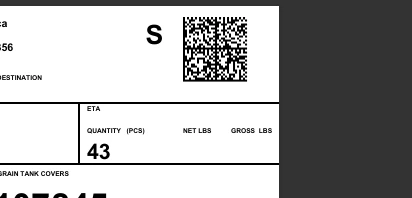
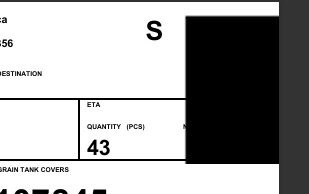
We have a 6x4 inch label created in IFS Report Designer with a DataMatrix barcode in the top right corner.  The barcode displays correctly most of the time, but occasionally the barcode is replaced by a black box.  This only happens on the first printed label when we have multiple result keys that are sent to our label printer, and it doesn’t happen every time they print even if the exact same set of labels are printed.  When previewing the label in IFS, it can happen on the first label that is previewed and then everything after will work until we wait around 30 minutes and then again the first label might have the problem.  Has anyone else experienced this or have ideas on what might cause this and how to prevent it from happening?


Examples of the bad and good labels:
 

2 replies

Forum|alt.badge.img+15
  • Superhero (Partner)
  • September 25, 2026

​@CHFMOLTBD You mentioned in your description that you see the black box when previewing the labels.  Does the black box actually print?  If I had to guess, this could be caused by the PDF renderer itself.  If it wasn’t transient, (the exact same set of labels is not okay, then is okay), I’d look at the size given to the bar-code on the layout.


Forum|alt.badge.img+3
  • Author
  • Do Gooder
  • September 29, 2026

​@CHFMOLTBD You mentioned in your description that you see the black box when previewing the labels.  Does the black box actually print?  If I had to guess, this could be caused by the PDF renderer itself.  If it wasn’t transient, (the exact same set of labels is not okay, then is okay), I’d look at the size given to the bar-code on the layout.

Yeah, it does print on the first label of a group, I agree that its most likely the PDF renderer causing the problem but we weren’t able to find what causes it.  We’ve tried adjusting the size and position of the barcode but haven’t had luck with that.  To prevent it from happening we’ve customized the IFS print process so it silently “previews” a label before showing the print dialog to the user, since we’ve done that we haven’t seen the black box again.