Question

Customize This not available on specific projection in Developer Studio

  • July 13, 2026
  • 5 replies
  • 35 views

Forum|alt.badge.img+3

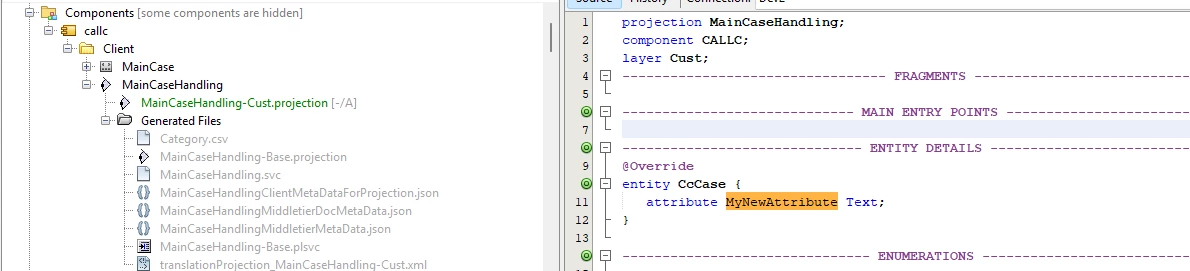
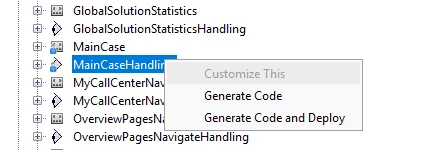
We are trying to create a customization to the projection for MainCaseHandling under the callc component using IFS Developer Studio but for some reason the “Customize This” option isn’t available on this specific projection.  Has anyone else ran across something like this to know if this is a bug or if its intentional?  We can’t find a reason on why this specific projection isn’t available.


The core files we are using for this are version 25.2.4, any help or thoughts would be appreciated.
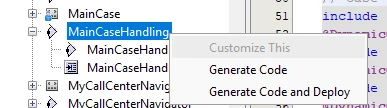

 

“Customize This” not available


5 replies

PhillBronson
Hero (Customer)
Forum|alt.badge.img+12
  • Hero (Customer)
  • July 13, 2026

@CHFMOLTBD that is very strange given that you have already customized the client. We are on an older version and do have that projection customized.
I would tell you to check the `deploy.ini` inclusion of implementation final, but I believe that is at a component level not at a single file level (and you already customized the client).

You probably already have done this but go up to the Core Files folder in the project and Clear & Refresh Cache, this usually helps me when I can’t see fragments.


Forum|alt.badge.img+3
  • Author
  • Do Gooder
  • July 13, 2026

@CHFMOLTBD that is very strange given that you have already customized the client. We are on an older version and do have that projection customized.
I would tell you to check the `deploy.ini` inclusion of implementation final, but I believe that is at a component level not at a single file level (and you already customized the client).

You probably already have done this but go up to the Core Files folder in the project and Clear & Refresh Cache, this usually helps me when I can’t see fragments.

Yeah, we also thought it was weird that we can customize the entity and client file but not the projection.  I’ve done some testing and we can customize all but a handful of the other projections in callc, the same problem happens on CaseTaskTemplateHandling, CasualCaseAssistant, CasualCaseManagement, CasualGlobalSolution, CreateCasualCaseSol, GlobalSolutionPerBusinessObject, and of course MainCaseHanding.  So far we’ve been unable to figure out what the common problem is with these.


I did try clearing and refreshing all of the caches and restarting IFS Dev studio, still no luck but thanks for the suggestion. 


PhillBronson
Hero (Customer)
Forum|alt.badge.img+12
  • Hero (Customer)
  • July 13, 2026

@CHFMOLTBD is there anything special in the deploy.ini for this component? Or if you look at the raw file outside of developer studio?

Hopefully, someone who has experienced this sees this chatter and comes into the chat


Forum|alt.badge.img+3
  • Author
  • Do Gooder
  • July 14, 2026

I’ve manually added a copy of the projection into the core files to do some testing, I found that if I remove any reference to “BusinessObject” it allows me to do the customize.  In MainCaseHandling I removed these 2 attributes to get it to work, I don’t know why but I assume that its a bug in IFS Developer Studio.


@Override
entity CcCase {
   ...
   attribute BusinessObject Text {
      fetch = "NULL";
      insertable = [true];
   }
   ...

}


query ConnectBusinessObjectQuery {
   ...
   attribute BusinessObject Text;
   ...
}


Forum|alt.badge.img+2
  • Do Gooder (Partner)
  • July 14, 2026

Hi ​@CHFMOLTBD 


I see the exact same behavior using the 26R1 core files and can’t workout why it wont show the option.


You can customize this projection though without any errors. I just clicked “Customize This” on another projection in callc, then renamed the custom component file and changed the projection name in the file contents:


The code generates as expected and it even shows the little blue customization icon on the core file.