Solved

CTO Assign Value Based on Another Characteristic Value

  • June 14, 2024
  • 3 replies
  • 77 views

Forum|alt.badge.img+10

In the CTO setup for a part, how can I populate a value for one characteristic based on the value entered in another. For example, if the value selected for Characteristic 1 is “SKY”, I’d like the value for Characteristic 2 to be “BLUE”. I’d like the value automatically populated in Characteristic 2 without the user having to enter it.


Thank you!
Best answer by anbouk

Holly,

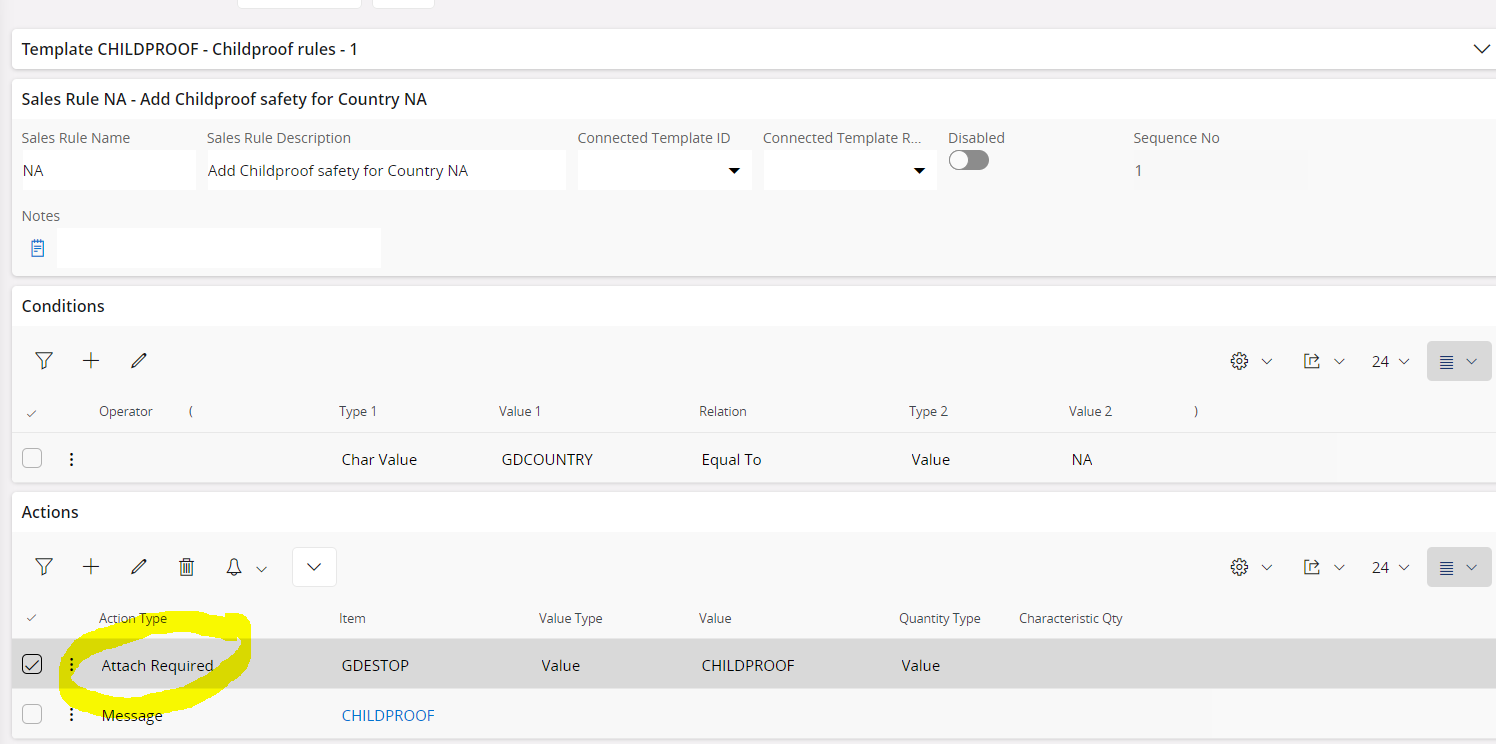
I think that you need to look at using the “Attach Required” action in the sales rules since this can add answers to questions based on previous answers being chosen…

Regards,

Antony

3 replies

Forum|alt.badge.img+4
  • Sidekick (Partner)
  • June 14, 2024

Have you seen this IFS Cloud video on BPA?  It shows three types of workflow. One is making one field required based on the value in another field. Could this be translated into what you are trying to do?  If not, it’s still a really cool video


 https://play.goconsensus.com/1d7a4385 - < 10 minute video


anbouk
Superhero
Forum|alt.badge.img+16
  • Superhero
  • Answer
  • June 14, 2024

Holly,

I think that you need to look at using the “Attach Required” action in the sales rules since this can add answers to questions based on previous answers being chosen…

Regards,

Antony


Forum|alt.badge.img+10
  • Author
  • Sidekick (Customer)
  • June 14, 2024

@anbouk 

This is what I was looking for! Thank you!