Solved

Attributes "Column Visible” and “Visible” in Page Designer tool

  • Mar 18, 2024 1:20 AM UTC
  • 4 replies
  • 462 views

Forum|alt.badge.img+7

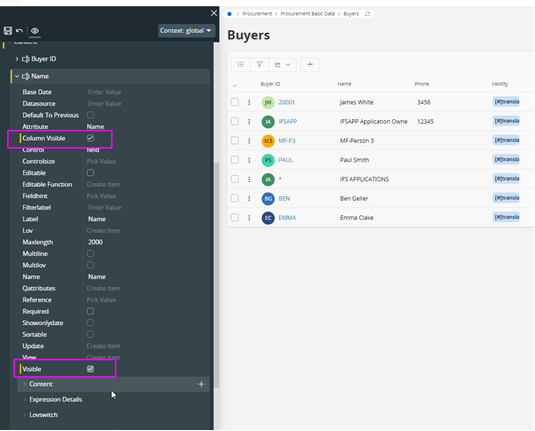
There are two attributes called as “Column Visible” and “Visible” in the Page Designer tool.  

  • Is there any difference between them? 
  • Is there any recommendations on choosing either value on certain scenarios? 
 

Thank you!

Bhagya

Best answer by Mayura Wasantha

Hi Bhagya, by observing the behavior, my best understanding is one (column visible) os applicable to List Pages whereas the other (visible) applicable to detail pages. 

I hope this would help?

View original

4 replies

Mayura Wasantha
Superhero (Employee)
Forum|alt.badge.img+19
  • Superhero (Employee)
  • Answer
  • Mar 18, 2024 4:50 AM UTC

Hi Bhagya, by observing the behavior, my best understanding is one (column visible) os applicable to List Pages whereas the other (visible) applicable to detail pages. 

I hope this would help?


Mayura Wasantha
Superhero (Employee)
Forum|alt.badge.img+19

Check the technical documentation for client control properties, that has the same referencing.

https://docs.ifs.com/techdocs/23r2/060_development/022_user_interface/030_aurena_dev/140_resources/client_control_properties/


Forum|alt.badge.img+7
  • Author
  • Sidekick (Employee)
  • Mar 18, 2024 9:12 AM UTC

Thank you, Mayura, your observation is correct.

I checked and the   control “Column Visible” only worked against Lists and  the   Visible” did not apply any changes when checked against a List.


Forum|alt.badge.img+10
  • Hero (Partner)
  • Jul 17, 2024 4:33 AM UTC

Nothing like having two flags when one would do. 
(Yes, Bhagya, I’m still a cynic. ;)