Solved

Reauthentication failed. The Application will shutdown IFS10

  • January 5, 2026
  • 4 replies
  • 52 views

Forum|alt.badge.img

Hello Community,

We have been facing this error “Reauthentication failed. The Application will shutdown….

We not use SSO we use standard authenticathion.
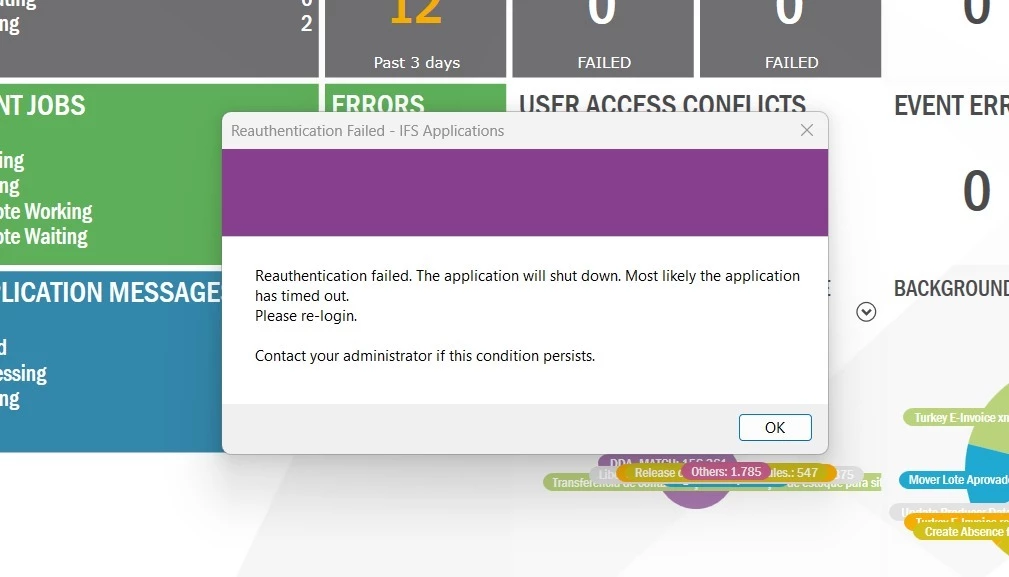
I saw the same problem 5years ago in this link https://community.ifs.com/topic/show?tid=5452&fid=50 but I did’nt see a solution.

Someone figure out how to solve?

I Appreciate your help.

Thanks

Best answer by hardik

Hello ​@DRBGSIQUEIRA ,

can you check these parameters (in url below) and try increasing it?

https://docs.ifs.com/techdocs/Foundation1/040_administration/210_security/015_authentication/040_configure_DBIDP/default.htm#Configure_behaviour_through_startup_paramters

Thanks,
Hardik

4 replies

SNIRLK
Hero (Employee)
Forum|alt.badge.img+9
  • Hero (Employee)
  • January 5, 2026

Hi ​@DRBGSIQUEIRA ,

It most commonly shows up in the Web Client and Smart Client, and can also affect Mobile if the device sleeps for long periods. Below describe some of resolutions steps for you which might help you to overcome the issue. 


  1. Clear .NET ClickOnce Cache:
    • This error can sometimes be caused by corrupted .NET ClickOnce cache. Follow these steps to clear it:
      1. Ensure no IFS Enterprise Explorer (IEE) clients or other .NET ClickOnce applications are running.
      2. Open a Command Prompt or Windows Start > Run screen and execute the following command: rundll32 %windir%\system32\dfshim.dll CleanOnlineAppCache
      3. Navigate to the user's Windows profile directory and delete the 2.0 folder where .NET cache is stored: C:\Users<username>\AppData\Local\Apps\2.0
      4. Delete the IsolatedStorage folder: C:\Users<username>\AppData\Local\IsolatedStorage
      5. Reboot the machine and restart the IFS application.
  2. Optimize for Slow Network:
    • If the error occurs due to network-related issues, enable the "Optimize for Slow Network" option in IEE:
      • Navigate to Tools > Options > Server tab.
      • Enable the "Optimize for Slow Network" option and adjust the advanced settings to restrict files loaded automatically.
  3. Check for Heavy Background Jobs:
    • Verify if any heavy background jobs or reports are running during the time of the error. If so, schedule these jobs during off-peak hours to reduce the load on the system.
  4. Test on a Different Machine/User Profile:
    • To determine if the issue is machine-specific or user-specific:
      • Log in to the application from a different machine using the same user credentials.
      • Alternatively, log in to the application on the same machine using a different user profile.
    • If the issue is machine-specific, consider increasing the machine's allocated resources (e.g., memory, CPU).
  5. Recreate User Profile:
    • If the issue persists and is user-specific, export the current user profile configurations, create a new user profile, and import the configurations into the new profile.


hardik
Hero (Partner)
Forum|alt.badge.img+11
  • Hero (Partner)
  • Answer
  • January 5, 2026

Forum|alt.badge.img
  • Author
  • Do Gooder
  • January 5, 2026

Hello ​@hardik ,

Thanks for your tips ,we add in admin middle server/Startup parameteres, this parameter below and the problem was solved.


-Difs.oidc.accesstoken.lifetime=172800

Thank you very much for your support!


hardik
Hero (Partner)
Forum|alt.badge.img+11
  • Hero (Partner)
  • January 5, 2026

@DRBGSIQUEIRA 

Glad to hear it helped.

You can mark that response as the best answer — it will help others quickly find the working solution if they encounter the same issue.

Regards,
Hardik