


Solved

Projection Access Level Report in Pl/SQL

  • October 5, 2026
  • 5 replies
  • 52 views

Forum|alt.badge.img+10

Given this code

       select sys_connect_by_path(n.label, '>') "NAVIGATOR PATH",
       level "LEVEL",
       upper(n.entry_type) "TYPE",
       g.role,
       n.projection
       from   fnd_navigator_all n
       left join fnd_projection_grant g
       on n.projection=g.projection
       where n.projection like nvl('&Projection','%')
       and g.role like upper(nvl('&Role','%'))
       connect by prior n.id = n.parent_id
      start with n.parent_id = 0
      order siblings by n.sort_order

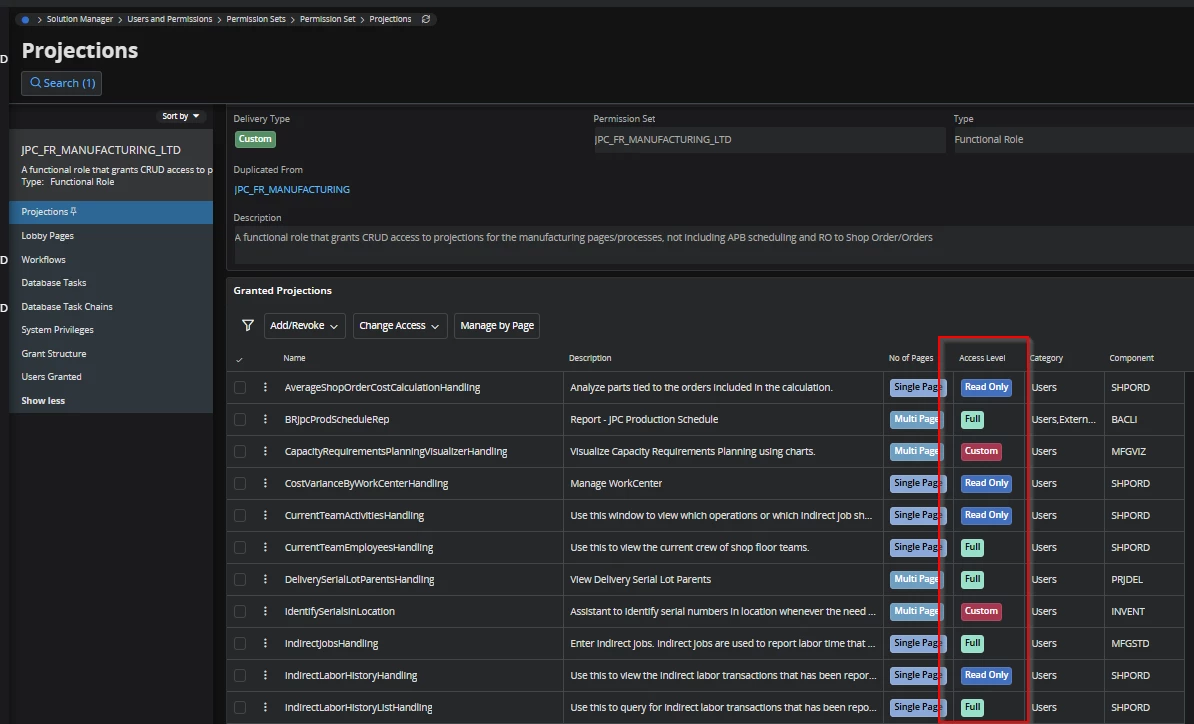
How would I show the Access Level of each projection.

Not really finding this as a selectable field on any view...
 

Best answer by ArcPierreL

Hello, 

The formula gives the access level from the projection and role.

Use it like this : 
 

select 
sys_connect_by_path(n.label, '>') "NAVIGATOR PATH",
level "LEVEL",
upper(n.entry_type) "TYPE",
g.role,
n.projection,
FND_PROJECTION_GRANT_API.Get_Grant_Access(n.projection, g.role) AS access_level

from   fnd_navigator_all n   
   
left join fnd_projection_grant g
on n.projection=g.projection

where n.projection like nvl('&Projection','%')
and g.role like upper(nvl('&Role','%'))
connect by prior n.id = n.parent_id
start with n.parent_id = 0
order siblings by n.sort_order

PL

5 replies

Forum|alt.badge.img+9
  • Hero (Partner)
  • October 6, 2026

Hello, 

You could use this API to retrieve it from (projection, Role) with : 

  • projection → the required projection
  • role → the permission set
FND_PROJECTION_GRANT_API.Get_Grant_Access(PROJECTION, ROLE)

PL


Forum|alt.badge.img+10
  • Author
  • Hero (Customer)
  • October 6, 2026

yes, but I would like to have the field access level.  I do not seem to be able to find that field….


Ie. this role contains this projection and is Full / RO / Custom access.  It would make reviewing permission sets much easier.

Above gives me permission set and projections...just need the access level :-)


Forum|alt.badge.img+9
  • Hero (Partner)
  • Answer
  • October 6, 2026

Hello, 

The formula gives the access level from the projection and role.

Use it like this : 
 

select 
sys_connect_by_path(n.label, '>') "NAVIGATOR PATH",
level "LEVEL",
upper(n.entry_type) "TYPE",
g.role,
n.projection,
FND_PROJECTION_GRANT_API.Get_Grant_Access(n.projection, g.role) AS access_level

from   fnd_navigator_all n   
   
left join fnd_projection_grant g
on n.projection=g.projection

where n.projection like nvl('&Projection','%')
and g.role like upper(nvl('&Role','%'))
connect by prior n.id = n.parent_id
start with n.parent_id = 0
order siblings by n.sort_order

PL


Forum|alt.badge.img+10
  • Author
  • Hero (Customer)
  • October 6, 2026

​@ArcPierreL Sorry totally misread what you said before :-)


Forum|alt.badge.img+10
  • Author
  • Hero (Customer)
  • October 6, 2026

In case anyone is interested this is my final result.  I am using it for user role review.  It does not capture granted roles.

SELECT nav.navigator_path   "NAVIGATOR PATH",
       nav.lvl              "LEVEL",
       nav.entry_type       "TYPE",
       g.role,
       nav.projection,
       fnd_projection_grant_api.get_grant_access(nav.projection, g.role) access_level
FROM  (SELECT h.*, ROWNUM seq            -- preserves navigator (sibling) order
       FROM  (SELECT LTRIM(SYS_CONNECT_BY_PATH(REPLACE(n.label, '>', '-'), ' > '), ' > ') navigator_path,
                     LEVEL                lvl,
                     UPPER(n.entry_type)  entry_type,
                     n.projection
              FROM   fnd_navigator_all n
              START  WITH n.parent_id = 0
              CONNECT BY NOCYCLE PRIOR n.id = n.parent_id
              ORDER  SIBLINGS BY n.sort_order) h) nav
JOIN   fnd_projection_grant g
       ON g.projection = nav.projection
WHERE g.role LIKE UPPER(NVL('&Role', '%'))
ORDER  BY nav.seq, g.role;
