Question

ORA-29024: Certificate validation failure

  • March 30, 2026
  • 9 replies
  • 82 views

Forum|alt.badge.img+1

Hi everyone,

We are trying to call the IFS web service CustomerOrderService.svc from our Oracle APEX environment. The IFS URL is configured with a virtual host name, and we have downloaded the SSL certificate from the browser and imported it into the Oracle database wallet.

However, when we call the web service from APEX/Oracle DB, we receive the following error ORA-29024: Certificate validation failure.

Please advise if we are missing anything 

9 replies

Forum|alt.badge.img+17
  • Superhero (Partner)
  • March 30, 2026

Hi

Is it IFS Cloud or IFS10 version?


Forum|alt.badge.img+1

It is IFS cloud (On Prem) . Version is 24 R1. 


Forum|alt.badge.img+8
  • Do Gooder (Partner)
  • March 31, 2026

Hi ​@SRINIVASU NELLORE ,

   You are probably not missing an APEX setting. ORA-29024 usually happens because Oracle cannot validate the SSL certificate chain or the certificate does not match the virtual host name in the URL.

Please import the full CA chain into the wallet (root + intermediate certs) and verify that the certificate returned by IFS contains the exact virtual hostname in its SAN/CN. If the server presents a different certificate for that host, Oracle will fail with ORA-29024.


Forum|alt.badge.img+1

Hi ​@Lingesan08 ,


Thanks for the update. Please advise on how to get the full CA chain from the IFS middleware to import in Oracle database wallet. FYI - IFS env is an test environment and the certificate is auto generated and self signed.


Forum|alt.badge.img+8
  • Do Gooder (Partner)
  • March 31, 2026

Hi ​@Lingesan08 ,


Thanks for the update. Please advise on how to get the full CA chain from the IFS middleware to import in Oracle database wallet. FYI - IFS env is an test environment and the certificate is auto generated and self signed.

Use openssl s_client -connect <host>:<port> -showcerts to extract the certificate chain from the IFS endpoint. Since your environment uses a self-signed certificate, you likely only need to import that certificate as a trusted cert into the Oracle wallet.


Forum|alt.badge.img+1

Hi ​@Lingesan08 ,

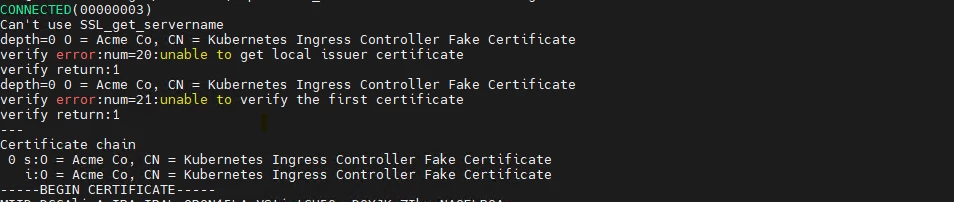
I did but the chain is not showing the server name or SAN in the list only below server certificate in the chain it is listing 


Server certificate
subject=O = Acme Co, CN = Kubernetes Ingress Controller Fake Certificate

issuer=O = Acme Co, CN = Kubernetes Ingress Controller Fake Certificate


Forum|alt.badge.img+8
  • Do Gooder (Partner)
  • March 31, 2026

Hi ​@Lingesan08 ,

I did but the chain is not showing the server name or SAN in the list only below server certificate in the chain it is listing 


Server certificate
subject=O = Acme Co, CN = Kubernetes Ingress Controller Fake Certificate

issuer=O = Acme Co, CN = Kubernetes Ingress Controller Fake Certificate


Thanks for sharing the output — this actually explains the issue 

From your result:

CN = Kubernetes Ingress Controller Fake Certificate

 This means you are not getting the real IFS certificate, but instead a default/fake certificate from the Kubernetes ingress controller.

 What’s happening

  • The ingress is returning a fallback/self-signed “fake” certificate
  • This happens when:
    • The request does not match the correct hostname (SNI)
    • Or TLS is not configured properly for that host

 Because of this:

  • No proper SAN (Subject Alternative Name) is shown
  • Oracle fails with:
    • ORA-29024: Certificate validation failure

 How to fix

 1. Use correct hostname with SNI (IMPORTANT)


Run openssl with -servername:

openssl s_client -connect <host>:443 -servername <host> -showcerts


Example:

openssl s_client -connect myifs.test.local:443 -servername myifs.test.local -showcerts

 This ensures:

  • Ingress returns the correct certificate
  • Not the default “fake” one

 2. Verify certificate after fix

You should now see:

  • Proper CN = your actual hostname
  • SAN entries (DNS names)

 3. Import correct certificate into Oracle wallet

Once correct cert is retrieved:

orapki wallet add -wallet <wallet_path> -trusted_cert -cert server.pem


 If still seeing “fake certificate”

Then likely:

  • TLS not configured for that host in ingress
  • Missing certificate secret
  • Wrong DNS / hostname used

 You need to check with:

  • DevOps / Kubernetes team

Forum|alt.badge.img+1

Hi ​@Lingesan08 ,


As advised, even after using to get the certificate chain with actual server name in place of virtual name with the below command the output is showing fake certificate. FYI -  I have raised a case with IFS support as well.

openssl s_client -connect <host>:443 -servername <host> -showcerts


Forum|alt.badge.img+8
  • Do Gooder (Partner)
  • April 1, 2026

Hi ​@Lingesan08 ,


As advised, even after using to get the certificate chain with actual server name in place of virtual name with the below command the output is showing fake certificate. FYI -  I have raised a case with IFS support as well.

openssl s_client -connect <host>:443 -servername <host> -showcerts


Hi ​@SRINIVASU NELLORE ,

   If openssl s_client -connect <host>:443 -servername <host> -showcerts still returns a fake certificate even when using the actual server name, then the issue is likely outside Oracle/APEX. This usually means the connection is being intercepted by an SSL inspection device, or the reverse proxy/load balancer is presenting the wrong certificate for that host/SNI binding.

In that situation, importing certificates into the Oracle wallet will not fix ORA-29024, because Oracle is validating the certificate it actually receives, and that certificate is not the expected one.

Recommended checks:

  • run the same openssl s_client command from the DB server and compare with a desktop/laptop
  • verify DNS resolution from the DB host
  • inspect Subject / Issuer / SAN of the returned certificate
  • ask the network/load balancer team to confirm the correct certificate is bound for that hostname and that SNI/virtual host configuration is correct

If the returned issuer is from an internal proxy/security appliance, then SSL inspection is likely in place. In that case either the inspection path must be bypassed for this endpoint, or the corresponding CA chain must be trusted explicitly in Oracle, depending on company policy.