We have same planning data set up for number of parts. However After MRP run while looking the “ Inv part Availability planning “ these child parts which are phantom shows the demand. as “ MRP Planned Demand” ?? Why no other phantom part shows the demand? I have checked the item master data but all looks okay to me… can someone tell me what could the reason for it?
Thanks in advance.
Best answer by matt.watters
@IFSFAN The MRP Planned Demand is shown as a demand type on the phantom so MRP can calculate the dependent demand for all the lower-level components of the phantom. Recall also that MRP will not plan supply for phantom parts.
In the IPAP page, phantom parts will show a demand of MRP Planned Demand because a supply for the level above it has not yet been converted to a firm supply; it is still likely a shop order requisition.
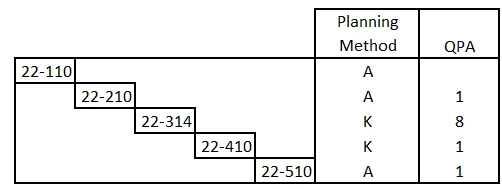
Here is an example. My multi-level product structure:
The only supply or demand in the system for any of these parts is a shop order for (10) of part 22-110. There is no on-hand inventory of any of the parts in this structure.
After running site MRP, the IPAP shows as:
Part
Type
Supply
Demand
22-110
Shop Order
10
0
22-210
Shop Order Req
10
0
Shop Order Material
0
10
22-314
MRP Planned Demand
0
80
22-410
MRP Planned Demand
0
80
22-510
Purch Req
80
0
MRP Planned Demand
0
80
The MRP Planned Demand is coming from the Shop Order Req for (10) of 22-210.
When the shop order req for 22-210 is converted into a shop order, after the next MRP run the MRP Planned Demands for the 'K' parts will not be present and the Demand type for the 22-510 part will be Shop Order Material, as shown below.
For a Phantom part (Planning Method = K) MRP is expected to explode through it, not plan it (Demand should be pushed to its components).
If you are seeing phantom parts showing “MRP Planned Demand” that means MRP is treating the phantom as a planning node instead of fully exploding through it
One thing that could be happening here is this: If the phantom part appears in:
Sales Orders
Forecast
Project demand
Safety stock / min/max
Then MRP thinks “This part has demand → I must plan it”
Another reason could be that, even if setup looks OK, something like this could be affecting it:
BOM validity dates
Effectivity dates
Alternate structures
Engineering vs Manufacturing structure
If the structure is not valid at the planning date MRP cannot explode so it treats phantom like a normal part.
@IFSFAN The MRP Planned Demand is shown as a demand type on the phantom so MRP can calculate the dependent demand for all the lower-level components of the phantom. Recall also that MRP will not plan supply for phantom parts.
In the IPAP page, phantom parts will show a demand of MRP Planned Demand because a supply for the level above it has not yet been converted to a firm supply; it is still likely a shop order requisition.
Here is an example. My multi-level product structure:
The only supply or demand in the system for any of these parts is a shop order for (10) of part 22-110. There is no on-hand inventory of any of the parts in this structure.
After running site MRP, the IPAP shows as:
Part
Type
Supply
Demand
22-110
Shop Order
10
0
22-210
Shop Order Req
10
0
Shop Order Material
0
10
22-314
MRP Planned Demand
0
80
22-410
MRP Planned Demand
0
80
22-510
Purch Req
80
0
MRP Planned Demand
0
80
The MRP Planned Demand is coming from the Shop Order Req for (10) of 22-210.
When the shop order req for 22-210 is converted into a shop order, after the next MRP run the MRP Planned Demands for the 'K' parts will not be present and the Demand type for the 22-510 part will be Shop Order Material, as shown below.
For a Phantom part (Planning Method = K) MRP is expected to explode through it, not plan it (Demand should be pushed to its components).
If you are seeing phantom parts showing “MRP Planned Demand” that means MRP is treating the phantom as a planning node instead of fully exploding through it
One thing that could be happening here is this: If the phantom part appears in:
Sales Orders
Forecast
Project demand
Safety stock / min/max
Then MRP thinks “This part has demand → I must plan it”
Another reason could be that, even if setup looks OK, something like this could be affecting it:
BOM validity dates
Effectivity dates
Alternate structures
Engineering vs Manufacturing structure
If the structure is not valid at the planning date MRP cannot explode so it treats phantom like a normal part.
Hope this helps!
Hi @martin.surasky Thats Brilliant explanation. However I checked all the possibilities which can lead to planned MRP demand but unfortunately none of them violated here . I also check Structure effectivity date /BOM type etc etc as well but all in line with Demand. I am still digging out other possible reason. will let you once get the bottom of it but Much appreciated your valued input.
@IFSFAN The MRP Planned Demand is shown as a demand type on the phantom so MRP can calculate the dependent demand for all the lower-level components of the phantom. Recall also that MRP will not plan supply for phantom parts.
In the IPAP page, phantom parts will show a demand of MRP Planned Demand because a supply for the level above it has not yet been converted to a firm supply; it is still likely a shop order requisition.
Here is an example. My multi-level product structure:
The only supply or demand in the system for any of these parts is a shop order for (10) of part 22-110. There is no on-hand inventory of any of the parts in this structure.
After running site MRP, the IPAP shows as:
Part
Type
Supply
Demand
22-110
Shop Order
10
0
22-210
Shop Order Req
10
0
Shop Order Material
0
10
22-314
MRP Planned Demand
0
80
22-410
MRP Planned Demand
0
80
22-510
Purch Req
80
0
MRP Planned Demand
0
80
The MRP Planned Demand is coming from the Shop Order Req for (10) of 22-210.
When the shop order req for 22-210 is converted into a shop order, after the next MRP run the MRP Planned Demands for the 'K' parts will not be present and the Demand type for the 22-510 part will be Shop Order Material, as shown below.
Part
Type
Supply
Demand
22-110
Shop Order
10
0
22-210
Shop Order
10
0
Shop Order Material
0
10
22-314
22-410
22-510
Purch Req
80
0
Shop Order Material
0
80
@matt.watters This is very informative.. I wasnt aware that , Planned demand generated for phantom part as well and it get disappeared when parent part job created.. very interesting . if thats the case then I think I got an answer. thank you very much for your valued time and clear solution.