


Answer

Manual Pegging disabled for CO-derived Shop Orders

  • November 3, 2025
  • 2 replies
  • 49 views

Forum|alt.badge.img+8

Hi all,


Issue:
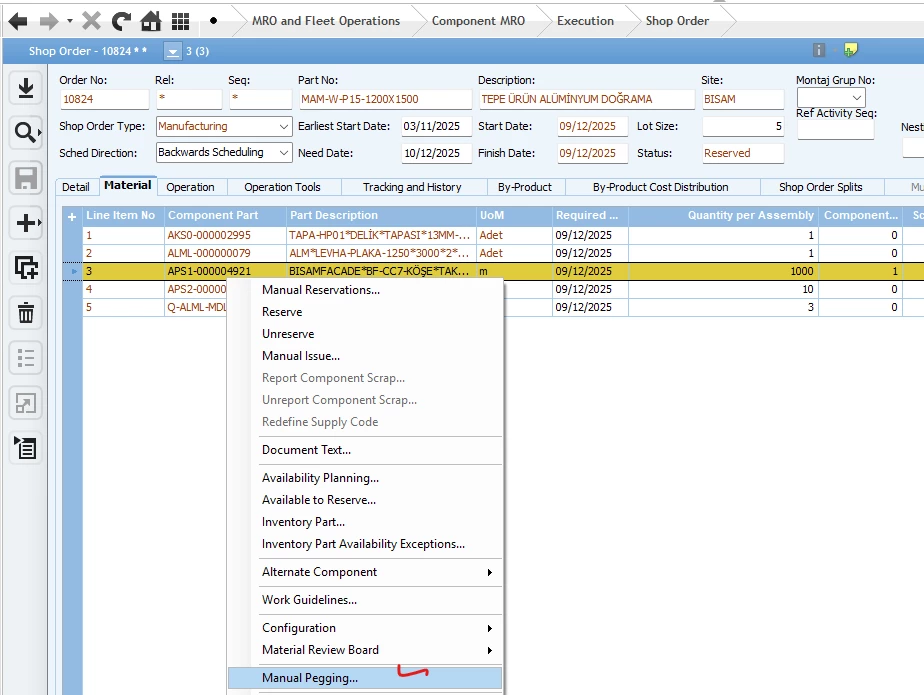
On a manually created Shop Order, right-click Manual Pegging… on the Material tab is enabled and I can peg the component to a PO line.
On a Customer Order–derived Shop Order, the same Manual Pegging… option is disabled.

Question:
Is this by design in Apps 8? If so, what is the recommended method to hard-peg a purchased component to a CO-derived Shop Order—should we use a different process on the Purchasing side, or is there a setting/workaround?
 

Thanks!

 

Best answer by matt.watters

@sahango what is the Supply Code on the material line on the shop order that is pegged to the customer order line?

Manual Pegging is available only for shop order material lines with Supply Code of Invent Order.

2 replies

matt.watters
Ultimate Hero (Partner)
Forum|alt.badge.img+26
  • Ultimate Hero (Partner)
  • Answer
  • November 3, 2025

@sahango what is the Supply Code on the material line on the shop order that is pegged to the customer order line?

Manual Pegging is available only for shop order material lines with Supply Code of Invent Order.


Forum|alt.badge.img+8
  • Author
  • Sidekick (Customer)
  • November 3, 2025

Thanks, Matt!
Switching the material line Supply Code to Inventory Order did the trick—Manual Pegging is now enabled and working. Appreciate the clear guidance!

