Solved

Data Source for Flyout panel?

  • August 21, 2026
  • 7 replies
  • 101 views

martin.surasky
Hero (Customer)
Forum|alt.badge.img+10

Hello All!


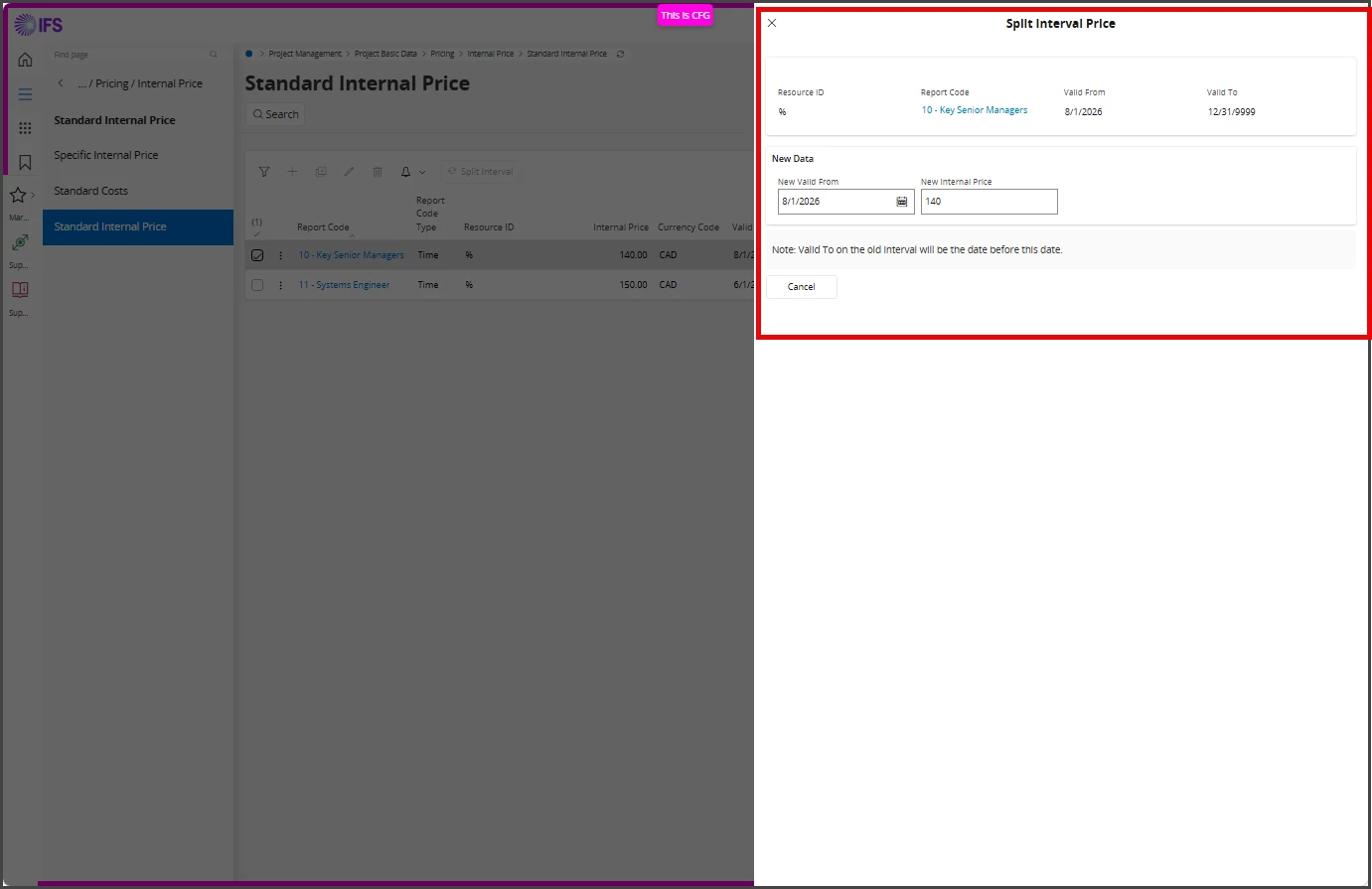
Quick question. How do I find out what Container feeds the data of a form when that form is a fly-out panel, like this?


Flyout Panel

I know that with standard forms you can inspect the metadata on Debug → Page Info. I’m also aware that there are Chrome Extensions that facilitate that information for regular forms. But I don’t know how flyout panel Container information can be obtained.


Thanks!

Best answer by Marcel.Ausan

Hi ​@martin.surasky ,


There is no simple answer without debugging.

Normally there are 2 types of Assistants (this is how we call fly-out panels in IFS 😁)

  • complex Assistant pages with more steps - having Next button → normally those Assistant pages insert data in a virtual table %VRT and as soon as the assistant is closed (press OK button), the real transaction will be executed based on data collected in the VRT table and the data from the %VRT table is deleted
  • less complex Assistants that pull data from some %LOV views

For example the Split Interval Price assistant executes 2 queries to populate data in the New Data section:

SELECT * FROM (SELECT A.* FROM (SELECT 'ResourceConnection' luname, 'COMPANY='||company||'^'||'RESOURCE_ID='||resource_id||'^' keyref, company company, resource_id resource_id, description description, resource_type_db resource_type, resource_category resource_category, resource_seq resource_seq FROM proj_per_res_per_comp_lov) A) WHERE (((company = 'xxxxx') AND (resource_id = 'xxxxx')))


SELECT * FROM (SELECT A.* FROM (SELECT 'ReportCost' luname, 'COMPANY='||company||'^'||'REPORT_COST_CODE='||report_cost_code||'^' keyref, company company, report_cost_code report_cost_code, description description, report_cost_type_db report_cost_type FROM report_cost_act_cost_lov) A) WHERE (((company = 'xxx') AND (report_cost_code = '%')))


 

7 replies

Michael Kaiser
Sidekick (Customer)
Forum|alt.badge.img+9
  • Sidekick (Customer)
  • August 26, 2026

Hi Martin,
I’m also interested in this issue.
IFS is VERY strong telling you what View, what fieldname/API and with the Debug-Console even show you the exact SQL syntax.
I love that since 1999 and analyzed hundreds of Views/tables/connections etc.
I also crossed parts in IFS (PDF outputs) which are - more or less - black boxes.
Every time IFS use a TMP table and fill it for printing I’m “kicked out”. Bähhh. :-)
So looking forward to learn more from this case.

BR
Michael


martin.surasky
Hero (Customer)
Forum|alt.badge.img+10
  • Author
  • Hero (Customer)
  • August 26, 2026

@Michael Kaiser 

The fact no one replied so far seems to indicate that the answer to my question is not as trivial as I initially thought it would be.

It’s strange how something that is so readily available in regular forms such as the supporting Container and field names, is not possible to obtain when it comes to flyout panels.


Marcel.Ausan
Ultimate Hero (Partner)
Forum|alt.badge.img+22
  • Ultimate Hero (Partner)
  • Answer
  • August 27, 2026

Hi ​@martin.surasky ,


There is no simple answer without debugging.

Normally there are 2 types of Assistants (this is how we call fly-out panels in IFS 😁)

  • complex Assistant pages with more steps - having Next button → normally those Assistant pages insert data in a virtual table %VRT and as soon as the assistant is closed (press OK button), the real transaction will be executed based on data collected in the VRT table and the data from the %VRT table is deleted
  • less complex Assistants that pull data from some %LOV views

For example the Split Interval Price assistant executes 2 queries to populate data in the New Data section:

SELECT * FROM (SELECT A.* FROM (SELECT 'ResourceConnection' luname, 'COMPANY='||company||'^'||'RESOURCE_ID='||resource_id||'^' keyref, company company, resource_id resource_id, description description, resource_type_db resource_type, resource_category resource_category, resource_seq resource_seq FROM proj_per_res_per_comp_lov) A) WHERE (((company = 'xxxxx') AND (resource_id = 'xxxxx')))


SELECT * FROM (SELECT A.* FROM (SELECT 'ReportCost' luname, 'COMPANY='||company||'^'||'REPORT_COST_CODE='||report_cost_code||'^' keyref, company company, report_cost_code report_cost_code, description description, report_cost_type_db report_cost_type FROM report_cost_act_cost_lov) A) WHERE (((company = 'xxx') AND (report_cost_code = '%')))



Forum|alt.badge.img+10
  • Hero (Partner)
  • August 27, 2026

@martin.surasky  this is an assistant working on the StandardPriceInternal entity. The queries mentioned by ​@Marcel.Ausan are to fetch the LOV values in the screen for 
ResourceConnection and ReportCost . 

So when opening the assistant it receives the selected price interval’s company, sequence, resource ID, report cost code, dates and price; when pressing  OK it calls SplitIntervalPrice(NewValidFrom, NewInternalPrice).

Anything specific you are after on that screen?


martin.surasky
Hero (Customer)
Forum|alt.badge.img+10
  • Author
  • Hero (Customer)
  • September 9, 2026

Hello ​@kvbe and ​@Marcel.Ausan and sorry for the long delay to reply (I’m super busy around here...)


Thanks both of you for your replies, it is really appreciated. I frankly placed a screenshot of Standard Price Interval only for the sake of illustrating my question. The question itself was on a broader sense: can you obtain information on Logical Units/Entity Set/Container on a fly-out panel (Assistant) without fully debugging code (like you do on regular forms)? 

Based on your answers, if I had to press for a YES/NO I guess I lean more towards a NO in this case, there is no Debug → Page Info or Information exposed via Chrome extensions that would tell you this (on fly out panel cases)


Michael Kaiser
Sidekick (Customer)
Forum|alt.badge.img+9
  • Sidekick (Customer)
  • September 9, 2026

Hi Martin,

I have another idea: 
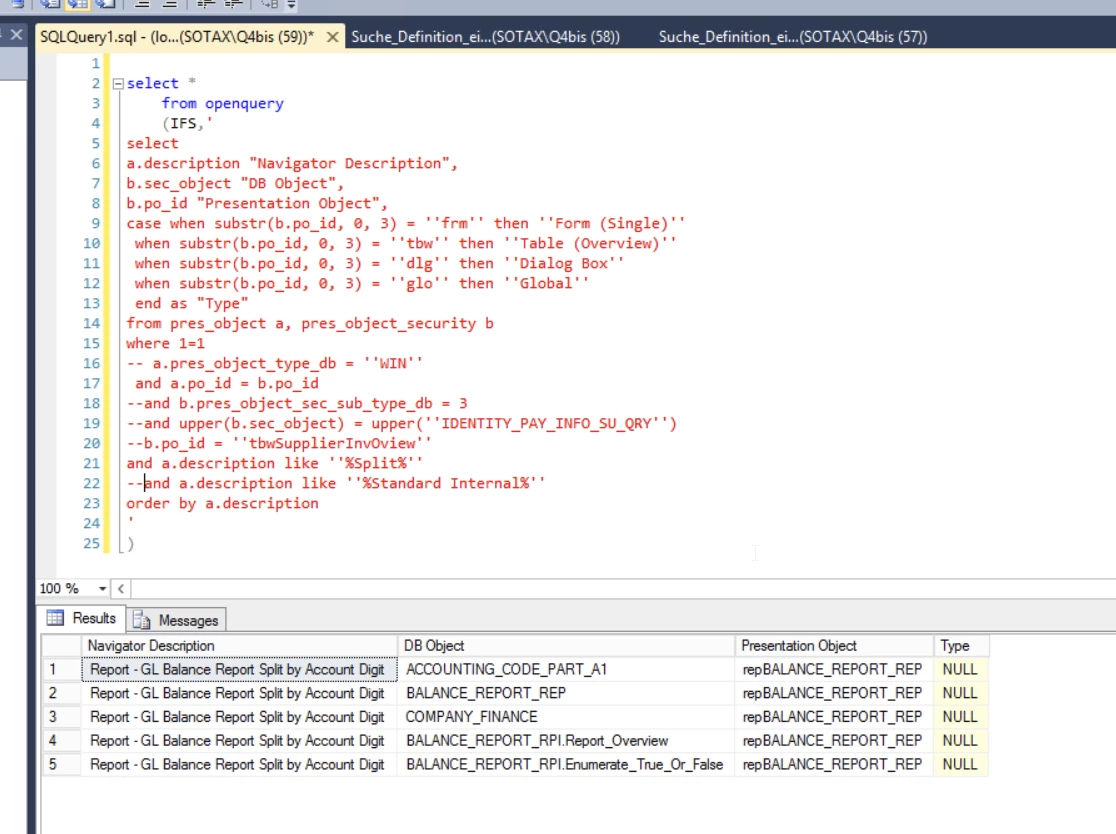
I use a script to answer the following question:
A given View is used in what parts of IFS?
I’m not full of hope if this will work for a fly-out-panel.
But why not give it a try?

-- Navigator_DB_Object_PresentationObject.sql
select
a.description "Navigator Description",
b.sec_object "DB Object",
b.po_id "Presentation Object",
case when substr(b.po_id, 0, 3) = 'frm' then 'Form (Single)'
 when substr(b.po_id, 0, 3) = 'tbw' then 'Table (Overview)'
 when substr(b.po_id, 0, 3) = 'dlg' then 'Dialog Box'
 when substr(b.po_id, 0, 3) = 'glo' then 'Global'
 end as "Type"
from pres_object a, pres_object_security b
where 
 a.pres_object_type_db = 'WIN'
and a.po_id = b.po_id
and b.pres_object_sec_sub_type_db = 3
--and upper(b.sec_object) = upper('IDENTITY_PAY_INFO_SU_QRY')

-- This you use the other way around: you know the view but not where it is used.
-- b.po_id = 'tbwSupplierInvOview'

and a.description like '%Split Internal Price%'
-- this I would give a try!! GOOD LUCK.
order by a.description

Perhaps you have to use other pres_object_type_db? 
Perhaps the fly-out is another type?

Hmmm, I will give it a try as well on a customer system where IFS cloud is used.

All the best
Michael


Michael Kaiser
Sidekick (Customer)
Forum|alt.badge.img+9
  • Sidekick (Customer)
  • September 9, 2026

Hi Martin,
I did a check on an ORACLE DB in an IFS cloud environment.
Hmmm, my guess: They do not use PM!
But the script works for e.g. “Split”
 

BR
Michael