Solved

Customer schedule release not creating customer order

  • March 16, 2026
  • 4 replies
  • 56 views

Forum|alt.badge.img+1

Hi,

While working in IFS Applications 10, I am encountering the following error when I try to release a customer order with the following configuration:

Schedule type: Call-Off
Line type: FIR (Demand type = Delivery Authorized)

Generated status: Release Exception

Error message: Error when removing order line, msg=ORA-20124: Error.NULLVALUE: The field [AUTHORIZE_CODE] is mandatory for the customer order and requires a value.

The client has the Customer Order Creation setting in Customer Schedule Agreement Parts set to “Create On Demand”; however, IFS is not creating new orders as expected.

As a test, I generated a customer order before releasing the program, but the error persists.

Thank you in advance for any help.
Best answer by Yathartha Karunananda

Hi ​@Juan.Fauda,

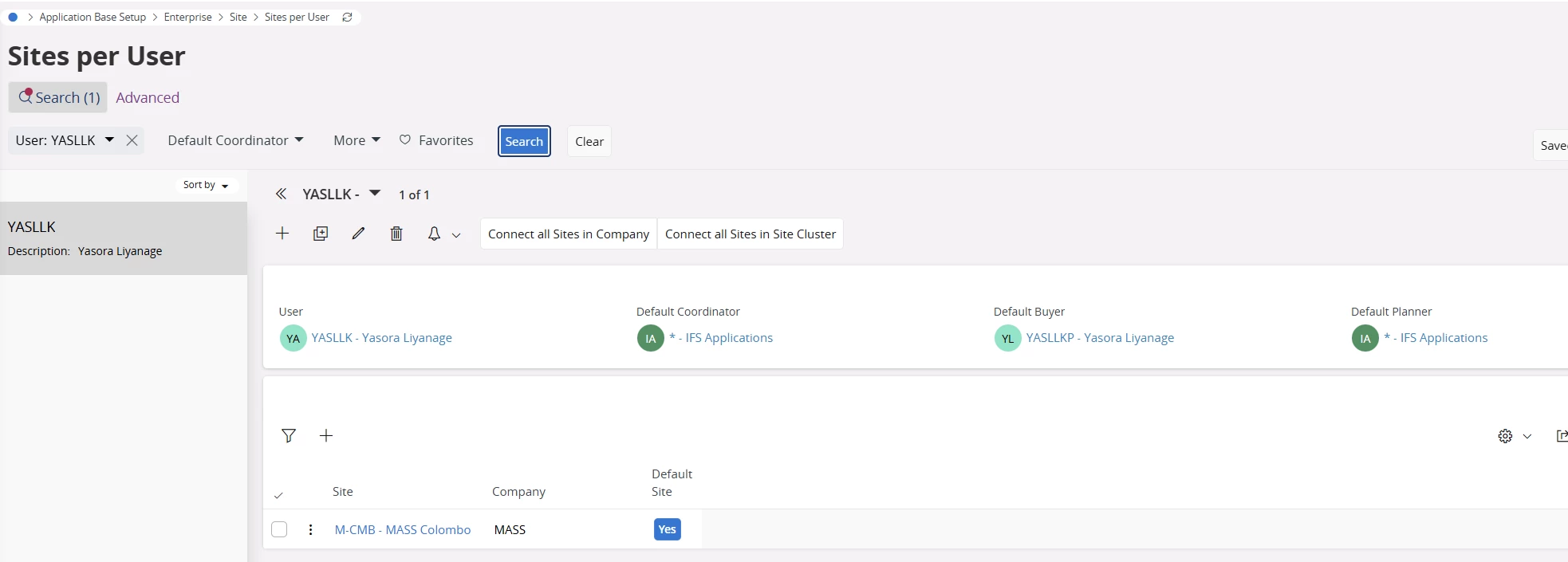
Application Base Setup > Enterprise > Site > Sites per User > filter your user


4 replies

Yathartha Karunananda
Hero (Employee)
Forum|alt.badge.img+12

Hi ​@Juan.Fauda,

Make sure you have connected a Default Coordinator in the Site per User window.

The Cooridnator is fetched from your user when creating a customer order. Most probably this data is missing in your set up which cause this error . 

Additionally : Make sure to add Default Buyer and Default Planner as well to avoid receiving similar errors in other flows 


Forum|alt.badge.img+1
  • Author
  • Do Gooder
  • March 16, 2026

Hi ​@Juan.Fauda,

Make sure you have connected a Default Coordinator in the Site per User window.

The Cooridnator is fetched from your user when creating a customer order. Most probably this data is missing in your set up which cause this error . 

Additionally : Make sure to add Default Buyer and Default Planner as well to avoid receiving similar errors in other flows 

Hi ​@Yathartha Karunananda 

Thank you for the quick answer.

Could you share the IFS path where I can check this?

I’m aware that I currently don’t have the user rights, since I couldn’t find it.


Yathartha Karunananda
Hero (Employee)
Forum|alt.badge.img+12

Hi ​@Juan.Fauda,

Application Base Setup > Enterprise > Site > Sites per User > filter your user


Yathartha Karunananda
Hero (Employee)
Forum|alt.badge.img+12

Hi ​@Juan.Fauda,

The path is: Application Base Setup > Enterprise > Site > Sites per User