Question

Custom Field Is Not Appearing on the Screen After Creation

  • November 24, 2025
  • 7 replies
  • 165 views

Forum|alt.badge.img+7

Hi,

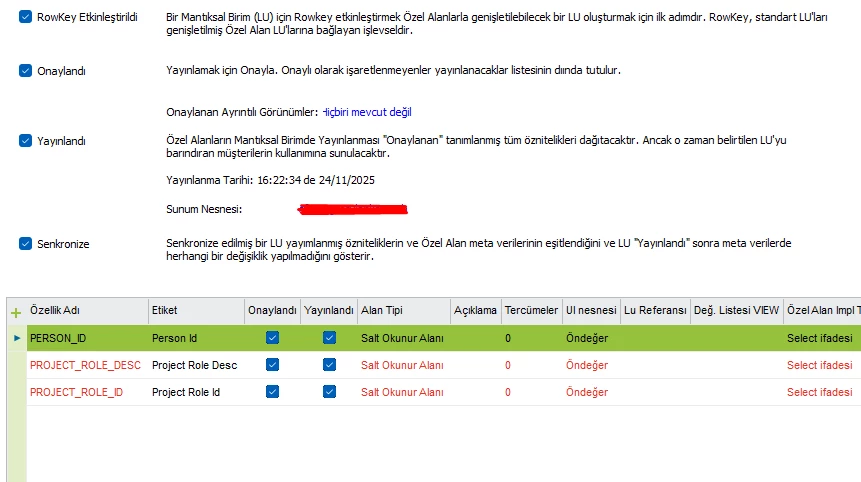
I created a new Custom Field, and the creation process completed without errors.
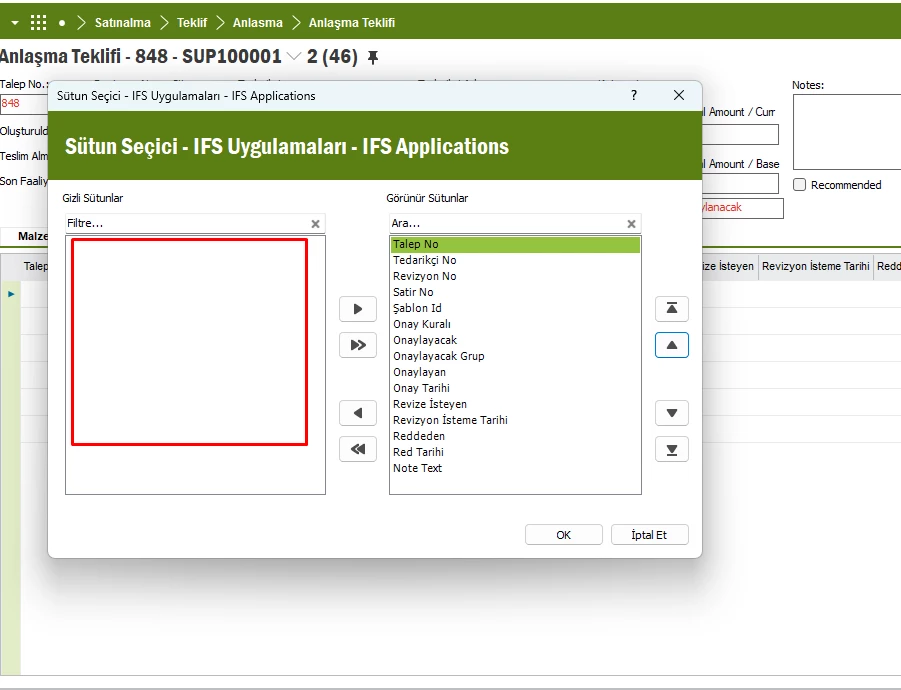
However, the field does not appear in the Page Designer / Available Fields list.
Additionally, I sometimes receive an error saying:
"The 'Custom Field Views' has already been removed by another user."
I have already cleared client cache, republished Custom Fields, and refreshed the view,
but the field still does not appear on the UI.
Has anyone experienced this issue before or knows how to resolve it?


7 replies

Forum|alt.badge.img+10
  • Hero (Customer)
  • November 24, 2025
  1.  Make sure there are no uncompiled objects
  2. Reload configuration, which is on the main page under rmb custom objects.

Forum|alt.badge.img+7
  • Author
  • Sidekick
  • November 24, 2025

Hi ​@chajash,

Thanks for the suggestions.
I checked everything you mentioned — no uncompiled objects, and I also used Reload Configuration under Custom Objects — but the issue is still the same.

The Custom Field is created successfully, but it still does not appear in the Page Designer/Available Fields list, and the error about “Custom Field Views” continues to show up occasionally.

If you have any additional suggestions, I’d appreciate it.


Forum|alt.badge.img+7
  • Author
  • Sidekick
  • November 24, 2025
  1.  Make sure there are no uncompiled objects
  2. Reload configuration, which is on the main page under rmb custom objects.

Thanks for the suggestions.
I checked everything you mentioned — no uncompiled objects, and I also used Reload Configuration under Custom Objects — but the issue is still the same.

The Custom Field is created successfully, but it still does not appear in the Page Designer/Available Fields list, and the error about “Custom Field Views” continues to show up occasionally.

If you have any additional suggestions, I’d appreciate it.


Abdul
Superhero (Partner)
Forum|alt.badge.img+20
  • Superhero (Partner)
  • November 24, 2025

Hi ​@ertan.ari,

Can you please confirm the LU name for which is configured and screen View name where you are unable to add the custom field.

By default any custom field for an LU would only be available for Base view only unless additional view are not selected.


Regards 

Abdul Rehman 


Forum|alt.badge.img+7
  • Author
  • Sidekick
  • November 24, 2025

Hi ​@Abdul ,


The field I am trying to add is intended for a customized page. I need to place the Custom Field on this customized screen, but it still does not appear in the Page Designer.

LU:QuotBlanketAuth

view:Quot_Blanket_Auth

I look forward to your support.

Regards.


Savinda.Tennakoon
Hero (Employee)
Forum|alt.badge.img+9

Why Your Custom Field Is Not Appearing in Page Designer

  • The problem usually occurs because the custom field is not enabled for the correct UI view.
  • When you create a custom field, it is linked to an entity, but Page Designer uses specific UI views (e.g., *_UIV views).
  • If the field is not added to the correct view, it will not show in the Available Fields list.

Community Best Answer:

“The issue is with your View selection. The view for the page is not the base entity view. You need to enable your custom attribute for the correct UI view (e.g., SRV_REQUEST_SCOPE_UIV) manually before publishing. Once enabled and republished, the field appears in Page Designer.”
Read Full Thread [community.ifs.com]

 Error: ‘Custom Field Views has already been removed by another user’

This error typically indicates:

  • A conflict in metadata publishing or
  • The projection metadata was not updated correctly after the custom field creation.

Fixes reported by users:

  1. Check Projection Metadata:
    • Ensure the custom field is added to the correct projection and UI view.
  2. Republish Custom Fields:
    • After enabling the correct view, republish and clear cache.
  3. Verify Entity vs. UI View:
    • If the field was added to the wrong entity, correct it and redeploy.

IFS Documentation

IFS confirms that custom fields must be properly linked to the UI view for them to appear in Page Designer.
Read Technical Guide [docs.ifs.com]

Recommended Steps

  1. Identify the UI view used by the page (e.g., *_UIV).
  2. Enable your custom field for that view in Custom Fields configuration.
  3. Republish and clear client cache.
  4. Refresh Page Designer – the field should now appear

Forum|alt.badge.img+7
  • Author
  • Sidekick
  • November 27, 2025

Hi,


The only thing I noticed is that it is named as Quot_Blanket_Auth_cfv and I can see the added fields in the database, but I cannot see them as a choose column on the screen. Why is this? Thanks.