


Question

What is your experience with Rebase Client Configurations?

  • November 27, 2024
  • 5 replies
  • 304 views

Forum|alt.badge.img+8

I have some experience with it today and wanted to know about yours.


Based on my limited experience:

On the other hand, I find the following aspects quite challenging:

  • Joining any disconnected items
  • Undoing all applied baseline changes

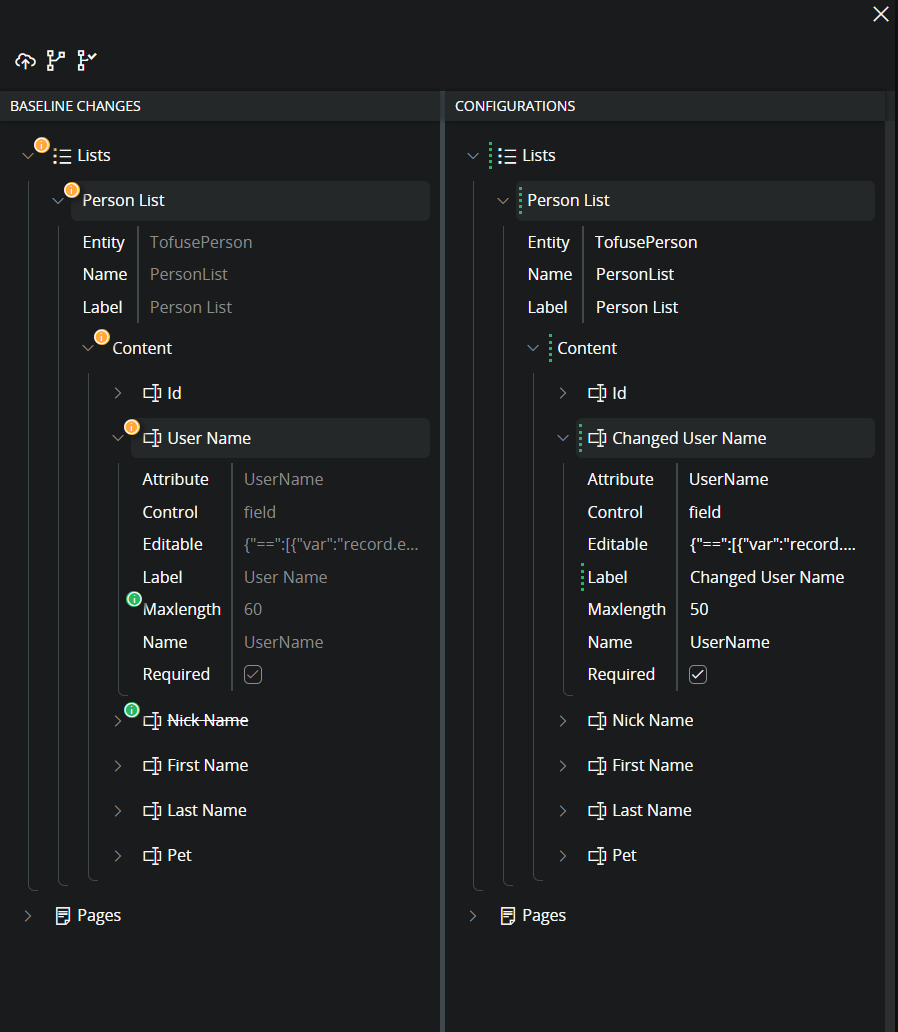
I mean points 2 and 4 in Base process


Picture from the documentation to make the post more visually appealing 😀


5 replies

Forum|alt.badge.img+8
  • Author
  • Sidekick (Former Employee)
  • November 27, 2024

After creating the post, I found existing discussions:


However, I'm still interested in hearing about your experience with it.


Forum|alt.badge.img+3
  • Do Gooder (Partner)
  • February 21, 2025

After my experience with the rebase process, I came up with an idea:


Forum|alt.badge.img+11
  • Hero (Customer)
  • August 4, 2025

We've been working with IFS since the 21R2 (early adopter), went live with 23R2. To be frank, rebasing the pages is a horrible experience. I try to rebase it on the lowest level, but sometimes I do that only to find out that I need to “apply rebase” on the highest level to get it to be up to date, causing all my work up until that point to be useless. We don't only use custom fields but also sometimes add a criteria on editing fields for instance.

These aren't always correctly shown as edited and therefor easily lost. Sometimes with updates, when opening the page designer on certain pages it completely stops working and closes the page designer again, causing the configuration to have to be deleted and rebuilt from scratch.

For a evergreen solution this is absolutely unexplainable. 


Forum|alt.badge.img+10
  • Hero (Employee)
  • April 14, 2026

Hi Tomasz, 

I think you do point to the most important aspects. Especially the ‘join disconnected items’ are reasons to a lot of frustration and confusion. 

My list of priorities:

  • Improve the element identification so that we can significantly decrease the need to ‘join disconnected items’
  • Introduce a simple vs. complex attribute schema definition in order to ‘automatically’ overwrite or preserve configurations
  • Show hidden items if they differ, to limit the need to rebase at the parent level

These are the three big things that I think would greatly enhance the rebase process.


Forum|alt.badge.img+10
  • Hero (Employee)
  • April 14, 2026

We've been working with IFS since the 21R2 (early adopter), went live with 23R2. To be frank, rebasing the pages is a horrible experience. I try to rebase it on the lowest level, but sometimes I do that only to find out that I need to “apply rebase” on the highest level to get it to be up to date, causing all my work up until that point to be useless. We don't only use custom fields but also sometimes add a criteria on editing fields for instance.

These aren't always correctly shown as edited and therefor easily lost. Sometimes with updates, when opening the page designer on certain pages it completely stops working and closes the page designer again, causing the configuration to have to be deleted and rebuilt from scratch.

For a evergreen solution this is absolutely unexplainable. 


‘I try to rebase it on the lowest level, but sometimes I do that only to find out that I need to “apply rebase” on the highest level to get it to be up to date, causing all my work up until that point to be useless.’
I would not say useless. When you rebase you have two separate things to take care of.

  • Resolve differences and merge your configuration details with core changes
  • Preserve or discard configurations

Example: If you have a configuration where you have changed the condition on ‘editable’ attribute of a field. In core they have made changes to the same field but other attributes. Then as you mention it happens to be changes in the parent structure that you don’t see. - This scenario can be approached in two different ways. 

  • Start rebasing on the top and try to figure out what changes in the mess of differences you should now undo, to preserve wanted configurations
  • Rebase from the bottom and up. Start with cherry-pick all core changes that you want. Then if you need to rebase at higher level then you can undo on a higher level, because you have already solved the differences.

I’m not suggesting that your frustration is not real and that the tool is perfect. I’m just offering a little more nuanced view. If you adapt the method where you resolve the diffs first then it is easier when you need to rebase on a higher level because that rebase introduce less differences and you can usually undo on a higher level. So no, your work is not useless it is a preparation to be able to succeed with the higher level rebase when that is needed. 


“We don't only use custom fields but also sometimes add a criteria on editing fields for instance.

These aren't always correctly shown as edited and therefor easily lost”

This is new to me. If you can showcase a situation where the designer fails to indicate that you have a change on a criteria, I would be very interested. 


“Sometimes with updates, when opening the page designer on certain pages it completely stops working and closes the page designer again, causing the configuration to have to be deleted and rebuilt from scratch.”

In almost all of these occasions it is the runtime renderer (preview) that breaks because the configuration contains something that it can not resolve. Quite often you get a good hint on what it is that fails from the error shown. 

There is a workaround that you can use in these cases. If you look at the url in the browser for the page that you want to open the designer for. (the one that throws an error). Lets say that it looks something like 

https://ifsmasterf1devlkp.rnd.ifsdevworld.com/main/ifsapplications/web/page/ConfigurationContextAdmin/ConfigurationContextMappings;path=0.1656053651.1188772997.383352743

if you change page → pagedesigner and remove all things after the client model

https://ifsmasterf1devlkp.rnd.ifsdevworld.com/main/ifsapplications/web/pagedesigner/ConfigurationContextAdmin

By doing that, you navigate to the PageDesigner for the Client Model without setting a specific form as preview. Normally, no preview no error. This could help you identify and correct the specific problem without the need to start all over with your broken configuration.





