Question

User Logging

  • Sep 24, 2020 1:20 PM UTC
  • 6 replies
  • 642 views

durette
Superhero (Customer)
Forum|alt.badge.img+19

Does IFS Enterprise Explorer have any logs that would show how long a user was logged in for a particular day?

6 replies

eqbstal
Superhero (Partner)
Forum|alt.badge.img+21
  • Superhero (Partner)
  • Sep 24, 2020 2:08 PM UTC

durette
Superhero (Customer)
Forum|alt.badge.img+19
  • Author
  • Superhero (Customer)
  • Sep 24, 2020 2:43 PM UTC

Does the answer of oguz in https://community.ifs.com/assets-enterprise-service-and-assets-management-44/how-can-i-get-user-login-history-details-4059 help?

FND_SESSION_RUNTIME is a view against the instance dynamic performance view GV$SESSION. That doesn't show history.


durette
Superhero (Customer)
Forum|alt.badge.img+19
  • Author
  • Superhero (Customer)
  • Sep 24, 2020 2:43 PM UTC

Would history logging on FND_CLIENT_LOGON_TAB be a terrible idea?


durette
Superhero (Customer)
Forum|alt.badge.img+19
  • Author
  • Superhero (Customer)
  • Sep 24, 2020 3:06 PM UTC

After enabling history logging on FND_CLIENT_LOGON_TAB, this looks like it might get me what I need. Unfortunately, since we didn’t previously have history logging, it’s only forward-looking.

I only set up this history logging in a development environment so far. Does anyone know of any potential side effects to this solution?

   SELECT logons.username,
logons.time_stamp AS logon_date,
logoffs.time_stamp AS logoff_date
FROM history_log_tab logons
LEFT JOIN history_log_tab logoffs
ON logoffs.keys = logons.keys
AND logoffs.table_name = logons.table_name
AND logoffs.lu_name = logons.lu_name
AND logoffs.history_type = '3'
WHERE logons.table_name = 'FND_CLIENT_LOGON_TAB'
AND logons.lu_name = 'FndClientLogon'
AND logons.history_type = '1'
ORDER BY logons.time_stamp DESC;


Forum|alt.badge.img+3
  • Do Gooder (Customer)
  • Oct 26, 2026 1:05 PM UTC

History Logging is not enabled for this entity (FndClientLogon)


Forum|alt.badge.img+10
  • Hero (Employee)
  • Oct 30, 2026 7:21 PM UTC

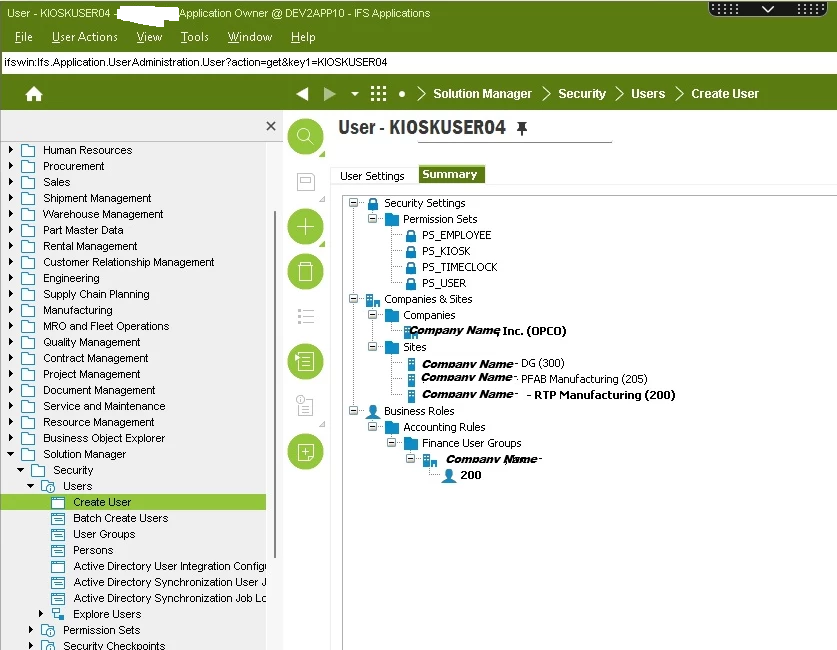
Below is an example of how another IFS customer (identifying names and labels have been removed) has created a non-specific group user in their Apps 10 environment.  Cloud configuration would be done in a similar manner:

This customer has sizeable lists of permission sets, business rules, companies and sites.  They’ve selected the permission sets, rules, company and sites to which they wish for employees, contractors or other users to have access for the specific actions they allow for this group user.  Specific user profiles can also be designated for these users.

Whether or not a separate resource group would be required for such users would be your decision based on your own company’s needs and constraints.

IFS users have substantial leeway and flexibility with the configuration of their users regardless of whether users apply to specific employees, groups of employees, contractors or temporary users.  Consider the IFS Academy’s training courses for IFS administration, contacting IFS Consulting Services or an IFS partner if you need more details in this area that what you’ve gotten from the technical documentation library regarding user configuration.