


Solved

Unable to order a Build Place Dev Environment due to error "Restricted to order dev environments since you have code changes after the last QA Approval"

  • June 2, 2025
  • 1 reply
  • 66 views

Forum|alt.badge.img+12

We currently have the Test Data Management feature enabled in our Build Place.

We have a Dev-01 Environment up and in  “Running” status.

We recently delivered a delivery into our Dev Use Place (We ordered a sanity build with a QA environment then ordered a delivery and installed it successfully).

We tried to to order a Dev-02 Environment but we received this error:
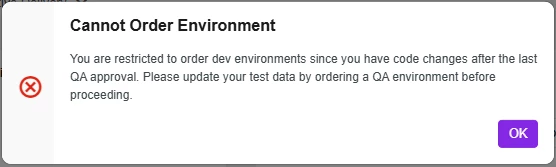
We ordered a QA environment and approved it as per the error message. Note - we kept Dev-01 running.

We tried to order Dev-02 environment again but we received the same error.

How do I resolve this error? Does this have anything to do with Dev-01 existing because it is based off of an older snapshot of our Dev Use Place?

Best answer by jamie.malangyaon

The issue was resolved by doing these steps:

  1. Clear out environments
  2. Order Sanity Build with a QA
  3. Approve the QA
  4. Order the Dev Environment
  5. If ordering the Dev Environment takes too long or gets stuck in the loading screen, wait a couple hours before trying again

The issue was caused by:

  1. A previous Sanity QA before a delivery creation was not being approved and just deleted
  2. Proper Sanity QA + approvals must be done or it will eventually cause this issue

1 reply

Forum|alt.badge.img+12
  • Author
  • Hero (Customer)
  • Answer
  • June 9, 2025

The issue was resolved by doing these steps:

  1. Clear out environments
  2. Order Sanity Build with a QA
  3. Approve the QA
  4. Order the Dev Environment
  5. If ordering the Dev Environment takes too long or gets stuck in the loading screen, wait a couple hours before trying again

The issue was caused by:

  1. A previous Sanity QA before a delivery creation was not being approved and just deleted
  2. Proper Sanity QA + approvals must be done or it will eventually cause this issue