Solved

INFORMATION SOURCES not available in the LOBBY DATA SOURCE

  • August 25, 2021
  • 2 replies
  • 414 views

Forum|alt.badge.img+2

I’m facing a permission issue in Lobby Data Source. (Apps 10 UPD 8)

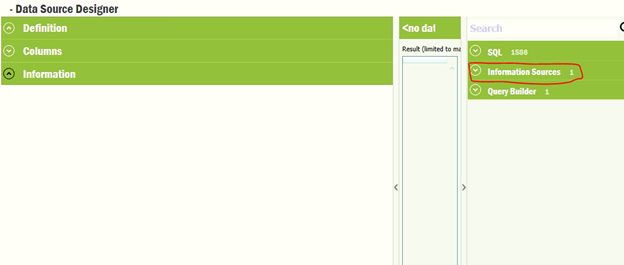
When I logged in to the application using IFSAPP, in the Lobby Data Source Designer I can see Data Sources belonging to SQL, Information Sources and Query Builder categories.
 

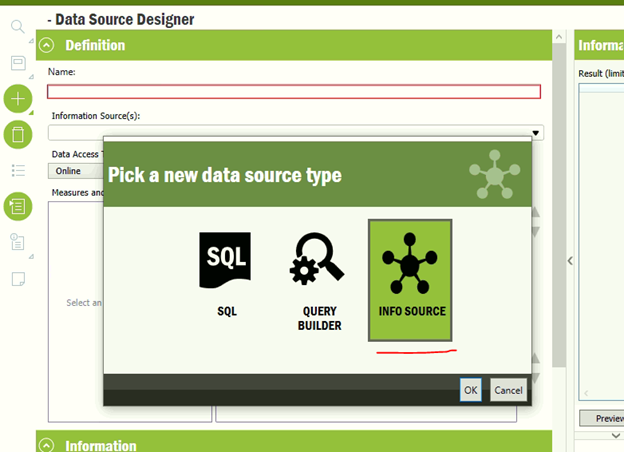
Further when I try to create a new Data Source using IFSAPP, I get the below popup which has all three options including Info Source.


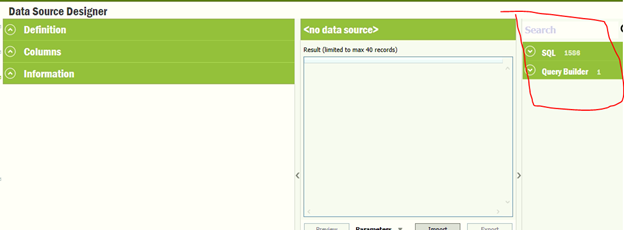
But when I logged into the application using another user (eg. user X) who has almost all the permissions as of IFSAPP (with all System Privileges), I can’t see the Data Sources under the category Information Sources.
 

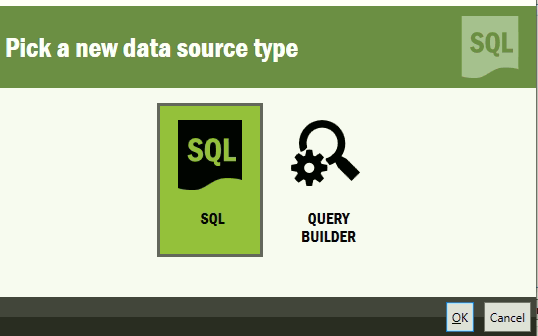
Also when I try to create a new Data Source using the user X, I can’t see the option to select Info Source.
 

Am I missing any permissions that need in order to see the Information Sources ?


Thank You !

- Binura -

Best answer by Wimali Athulathmudali

 Hi @BinuraD ,

Please check whether the user has the following activities granted.

  1. BrowseStarSchemaMetaData
  2. ExecuteStarSchema .

https://docs.ifs.com/techdocs/foundation1/040_administration/255_br_and_a/040_Services/050_Data_Sources_For_Lobby/010_Security/default.htm

Thanks & Best Regards,

Wimali

This topic has been closed for replies.

2 replies

Wimali Athulathmudali
Hero (Employee)
Forum|alt.badge.img+8

 Hi @BinuraD ,

Please check whether the user has the following activities granted.

  1. BrowseStarSchemaMetaData
  2. ExecuteStarSchema .

https://docs.ifs.com/techdocs/foundation1/040_administration/255_br_and_a/040_Services/050_Data_Sources_For_Lobby/010_Security/default.htm

Thanks & Best Regards,

Wimali


Forum|alt.badge.img+2
  • Author
  • Do Gooder (Partner)
  • August 26, 2021

Thank you very much @Wimali Athulathmudali. I was able to fix the issue by granting "BrowseStarSchemaMetaData" and "ExecuteStarSchema" activities.