Solved

How to remove Group in Aurena Page Designer

  • Sep 23, 2020 5:24 PM UTC
  • 1 reply
  • 202 views

eqbstal
Superhero (Partner)
Forum|alt.badge.img+21

Hi,

I have prepared a new group via Page Designer within IFS10 upd 9 Aurena.

Then I noticed that I didn’t want it. I want to remove it, but am not allowed to:
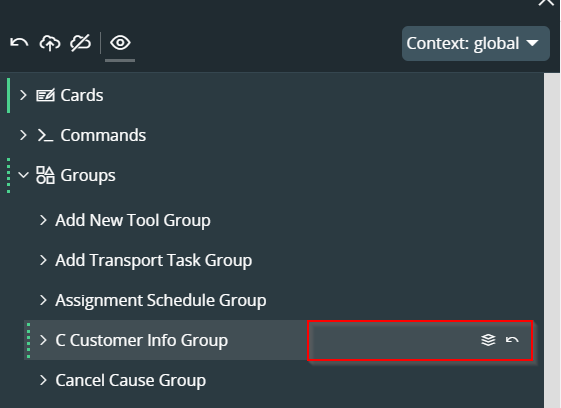
The delete icon is missing.

I can’t remember that I attached it to a page. Nor do I know how to check to which page or other element it is connected.

Question for now: how to delete this group?

Thanks in advance,

Steve
Best answer by paul harland

hi @eqbstal 

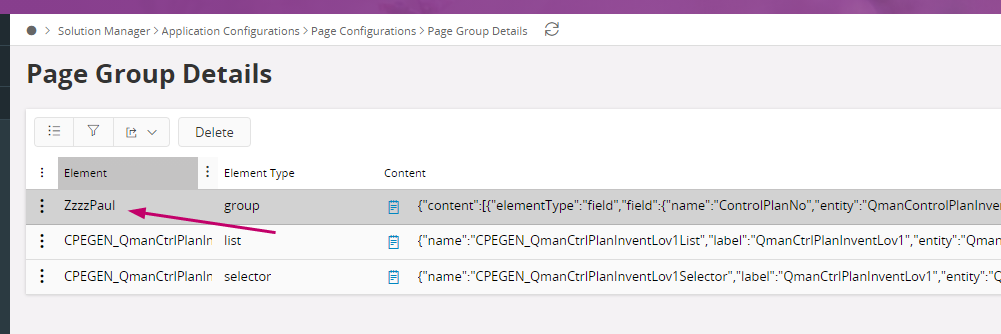
You can delete this group via the Page Configurations area, then “Page Group Details”.

But you will need to know which Page Group it was in, in order to find it.


View original

1 reply

paul harland
Superhero (Employee)
Forum|alt.badge.img+24

hi @eqbstal 

You can delete this group via the Page Configurations area, then “Page Group Details”.

But you will need to know which Page Group it was in, in order to find it.