Solved

Event + Email

  • Jul 8, 2020 11:16 PM UTC
  • 3 replies
  • 926 views

Levy
Do Gooder (Customer)
Forum|alt.badge.img+2
  • Do Gooder (Customer)


Hello, all right? Can you help me create an event?


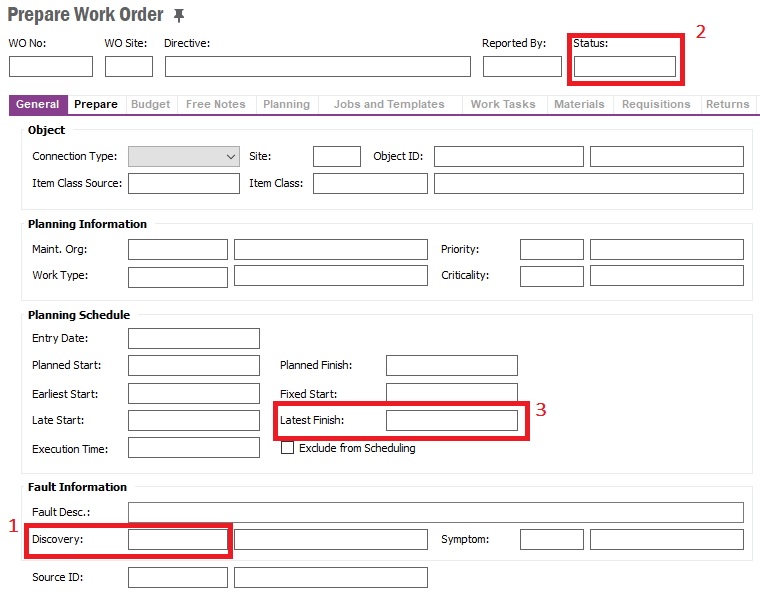
I need to automatically send an email to a collaborator x, 30 days before the latest finish (3), if the order status (2) is different from completed and the discovery is equal to 22 (1).
 

Thanks

Best answer by JULIAN

Setup schedule DB task to trigger event with a cursor picking up the relevant info and trigger the mail feature

View original

3 replies

  • Superhero (Employee)
  • Jul 10, 2020 12:58 PM UTC


Hello, all right? Can you help me create an event?


I need to automatically send an email to a collaborator x, 30 days before the latest finish (3), if the order status (2) is different from completed and the discovery is equal to 22 (1).


Thanks

To trigger an event you need something to change on the work order. I'd setup a scheduled migration job that checks all the work orders for your criteria and then set a value in a custom field or create a record in the journal. Then you can setup a simple email event that triggers based on that change. 


JULIAN
Hero
Forum|alt.badge.img+9
  • Hero
  • Answer
  • Jul 10, 2020 9:40 PM UTC

Setup schedule DB task to trigger event with a cursor picking up the relevant info and trigger the mail feature


eqbstal
Superhero (Partner)
Forum|alt.badge.img+21
  • Superhero (Partner)
  • Jul 13, 2020 3:06 PM UTC

Levy,

I think that JULIAN’s answer is a good one. I would like to mention that you could prepare a scheduled quick report.

See attachment in https://community.ifs.com/service-fsm-touch-apps-document-management-mwo-mro-pso-43/schedule-report-to-be-sent-by-email-daily-670

Answer from: KasunBalasooriya

Steve