

Solved

Disable sending mails in Apps10

  • February 2, 2022
  • 3 replies
  • 232 views

Forum|alt.badge.img+9

Hi,

Is it possible to prevent all emails being sent in Apps10? That includes from Statement of Account and from the Print Dialog screen of of Project Invoices etc.(everywhere basically)..

Best answer by Srikanth

Hi,

You can check the following screen in IFS for Email Server settings:
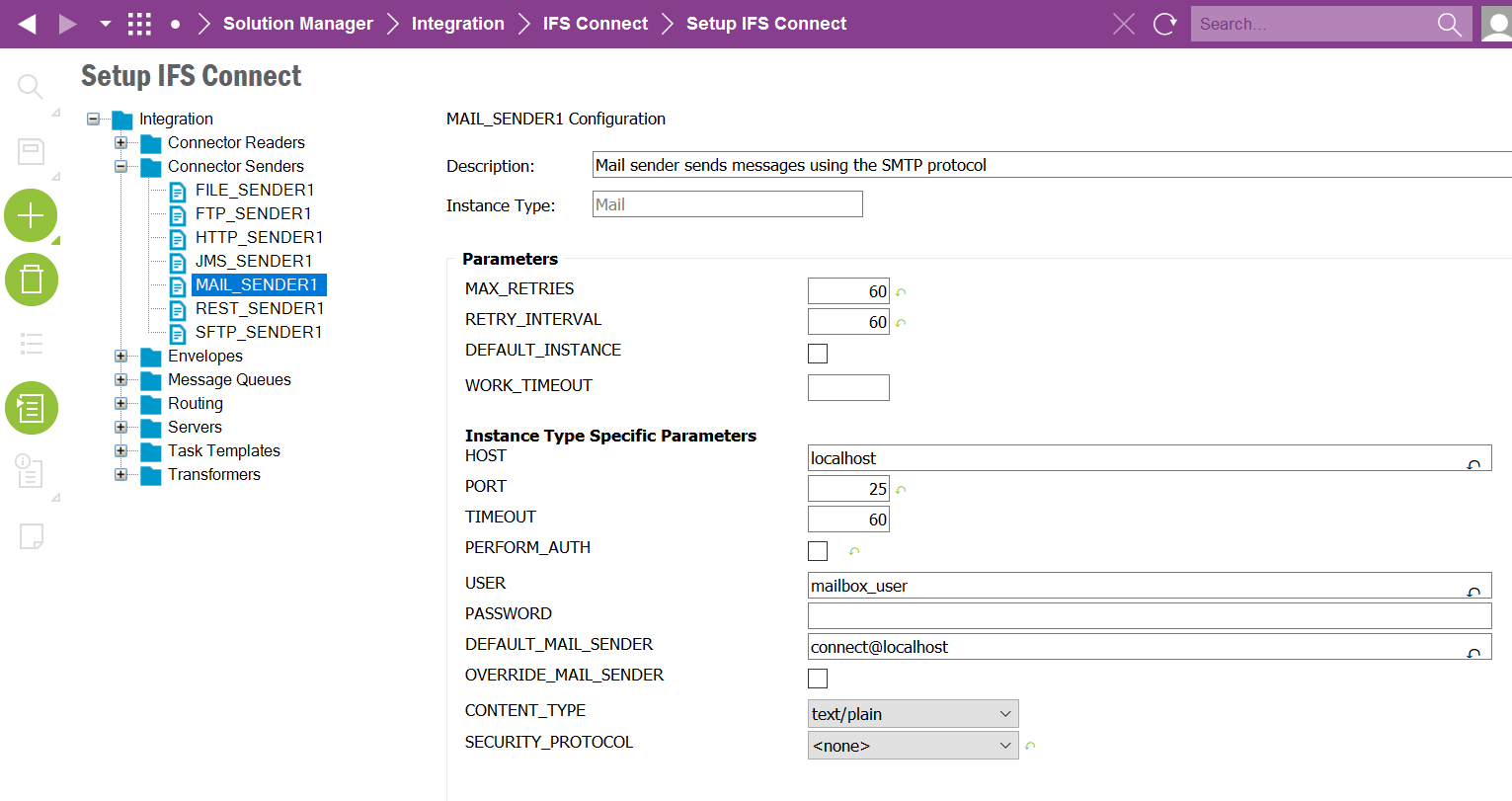
To disable emailing everywhere in IFS, you can set the host to a dummy server or localhost, which is the default value. 

Note: This will disable emailing functionality in the entire IFS instance where the changes are done. 

Hope this helps.

This topic has been closed for replies.

3 replies

Srikanth
Superhero (Partner)
Forum|alt.badge.img+18
  • Superhero (Partner)
  • Answer
  • February 2, 2022

Hi,

You can check the following screen in IFS for Email Server settings:

To disable emailing everywhere in IFS, you can set the host to a dummy server or localhost, which is the default value. 

Note: This will disable emailing functionality in the entire IFS instance where the changes are done. 

Hope this helps.


Forum|alt.badge.img+9
  • Author
  • Sidekick (Customer)
  • February 2, 2022

Thanks, I was actually going to try it that way myself but thought there might be a more elegant way. Obviously there is not.

Btw is it possible to implement “Delivered receipt” and/or “Read receipt” in IFS Connect?


Srikanth
Superhero (Partner)
Forum|alt.badge.img+18
  • Superhero (Partner)
  • February 2, 2022

Good question. I don’t think Delivered and Read Receipt funtionality is handled by IFS Connect as this should get handled by the email service provider.

IFS connect is a ready made interface to configure emailing in IFS.

