Solved

Developer Studio Installation problem

  • Apr 19, 2022 12:04 PM UTC
  • 9 replies
  • 726 views

Forum|alt.badge.img+3

When installing Developer Studio Version 22.1, it fails after installing with the following error:
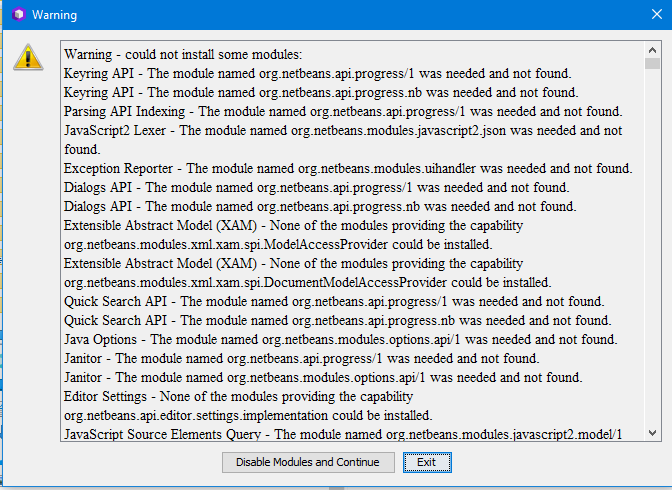
Tried reboot of computer, uninstall and install again, but no go. Also the previous version I have installed now comes with an alert that it will only work on iFS9 projects.

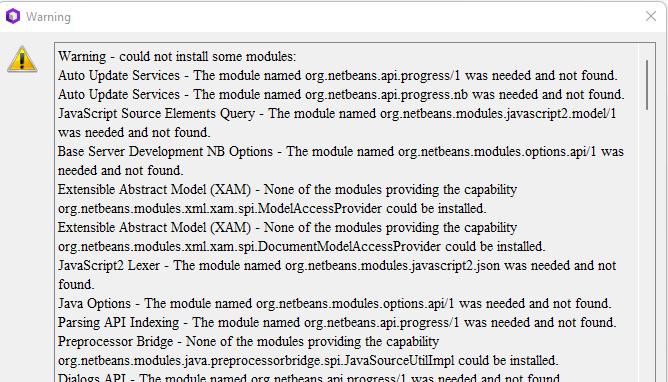
Best answer by hamalk

Hi All,  @gakous , @dedy.efendi , @GregoryB , @StartStop , @Vidar 


This issue is solved now, sorry for the inconvenience caused. Please follow the following steps:

  1. First close the tool if you have it opened. 
  2. Delete the ”User Directory” content. Locate the directory using the following path, and delete the entire content inside “22.12” folder “C:\Users\hamalk\AppData\Roaming\DeveloperStudio\22.12”
  3. Download a  fresh installer from Developer Portal, and reinstall the tool
  4. Tool should get installed without any issue now.

Thanks

Harshini

View original

9 replies

Forum|alt.badge.img+4
  • Sidekick (Partner)
  • Apr 19, 2022 6:24 PM UTC

I have the same problem as Vidar. The modules can’t be loaded when starting the application. I also had the old v10 installed when I installed the new v2.120.


Forum|alt.badge.img+11
  • Hero (Partner)
  • Apr 21, 2022 6:57 AM UTC

Hi 

Can someone from R&D check this issue ?

BR

Grégory


Forum|alt.badge.img+3
  • Author
  • Do Gooder (Partner)
  • Apr 22, 2022 6:24 AM UTC

Hi, It seems there has been a recent update, and the latest version does not work.. A colleague downloaded and installed on april 13, that was version 22.1.8546. I got a copy of that, and it works fine for me as well. The latest version 22.1.8561, does not work.

Vidar


Forum|alt.badge.img+4
  • Do Gooder (Partner)
  • Apr 25, 2022 3:23 AM UTC

i have a same the problem


Forum|alt.badge.img+1
  • Do Gooder (Employee)
  • Apr 25, 2022 6:39 PM UTC

One of my developers is experiencing this issue as well.   Has anyone found a work around?  Do we know R&D is working on this - there’s no indication here that they are.   We had to revert to V21.


hamalk
Superhero (Employee)
Forum|alt.badge.img+14
  • Superhero (Employee)
  • Answer
  • Apr 28, 2022 1:17 PM UTC

Hi All,  @gakous , @dedy.efendi , @GregoryB , @StartStop , @Vidar 


This issue is solved now, sorry for the inconvenience caused. Please follow the following steps:

  1. First close the tool if you have it opened. 
  2. Delete the ”User Directory” content. Locate the directory using the following path, and delete the entire content inside “22.12” folder “C:\Users\hamalk\AppData\Roaming\DeveloperStudio\22.12”
  3. Download a  fresh installer from Developer Portal, and reinstall the tool
  4. Tool should get installed without any issue now.

Thanks

Harshini


Forum|alt.badge.img+3
  • Author
  • Do Gooder (Partner)
  • Apr 28, 2022 1:48 PM UTC

Confirmed that it is working now.

Great, thanks @hamalk 


Forum|alt.badge.img+4
  • Sidekick (Partner)
  • Apr 29, 2022 7:52 AM UTC

It works on my PC as well. Thank you, @hamalk


Forum|alt.badge.img+4
  • Do Gooder (Partner)
  • May 11, 2022 9:07 AM UTC

thank you @hamalk