

Hi everyone,
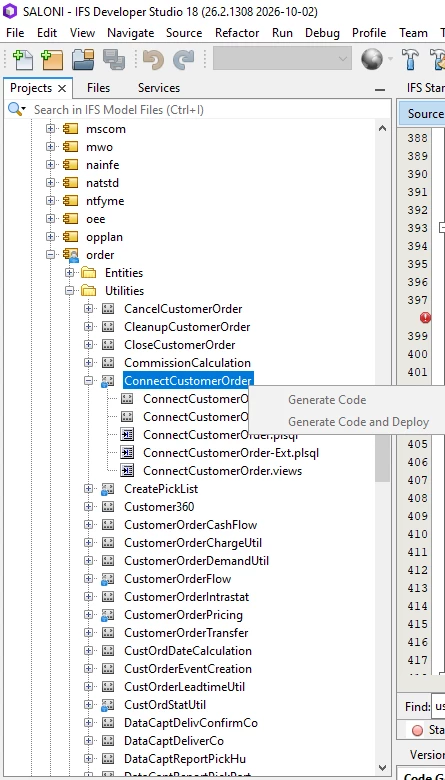
As mentioned in the title, Utility entities that have an EXT layer are marked with a blue icon in Developer Studio. However, when I right-click any of these entities, the "Customize This" option is missing from the context menu.
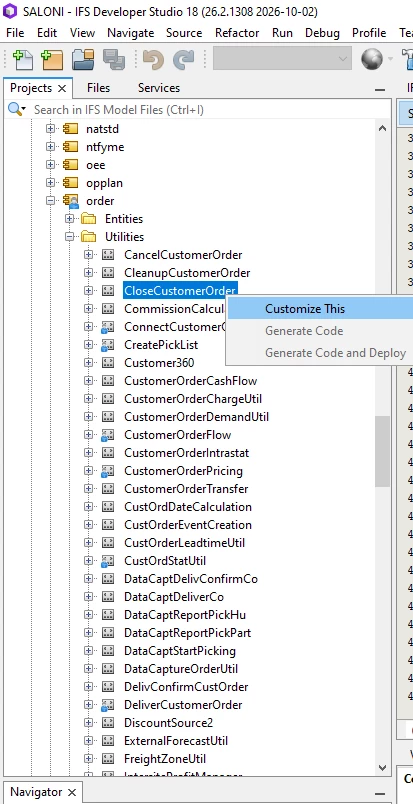
For entities without the blue icon, the option is available, and I can customize them without any issues.
This wasn't a problem before, and I was previously able to customize these entities without any issues. I suspect that a recent Developer Studio update may have introduced this behavior, but I couldn't verify it because I wasn't able to find the relevant changelogs.
What I've already tried:
-
Refresh Folders from the project root.
-
Clear and Refresh PLSQL File Cache from the project root.
-
Refresh Cache from the Build menu.
-
Clear and Refresh from the Build menu.
-
Verified that the affected Utilities have not been customized previously (no existing CUST layer).
-
Disconnected and reconnected the Build configuration.
Unfortunately, none of these steps resolved the issue.
Has anyone else experienced this? Could this be a bug introduced in a recent Developer Studio update?
Environment Details
IFS Version: 10.14
Build Version: 10.14
Developer Studio Information:
-
Product Version: IFS Developer Studio 18 (Build 26.2.1308, 2026-10-02)
-
Java: 17.0.8; OpenJDK 64-Bit Server VM 17.0.8+7-LTS
-
Runtime: OpenJDK Runtime Environment 17.0.8+7-LTS
-
System: Windows 10 version 10.0 running on amd64; UTF-8; en_US (developer_studio)
-
User directory:
C:\Users\lenovo\AppData\Roaming\DeveloperStudio\18 -
Cache directory:
C:\Users\lenovo\AppData\Roaming\DeveloperStudio\18\var\cache
Any insights or suggestions would be greatly appreciated.
Thanks in advance!