Solved

Cause of failed Application Messages

  • January 21, 2021
  • 4 replies
  • 168 views

Forum|alt.badge.img+9

Hi, 

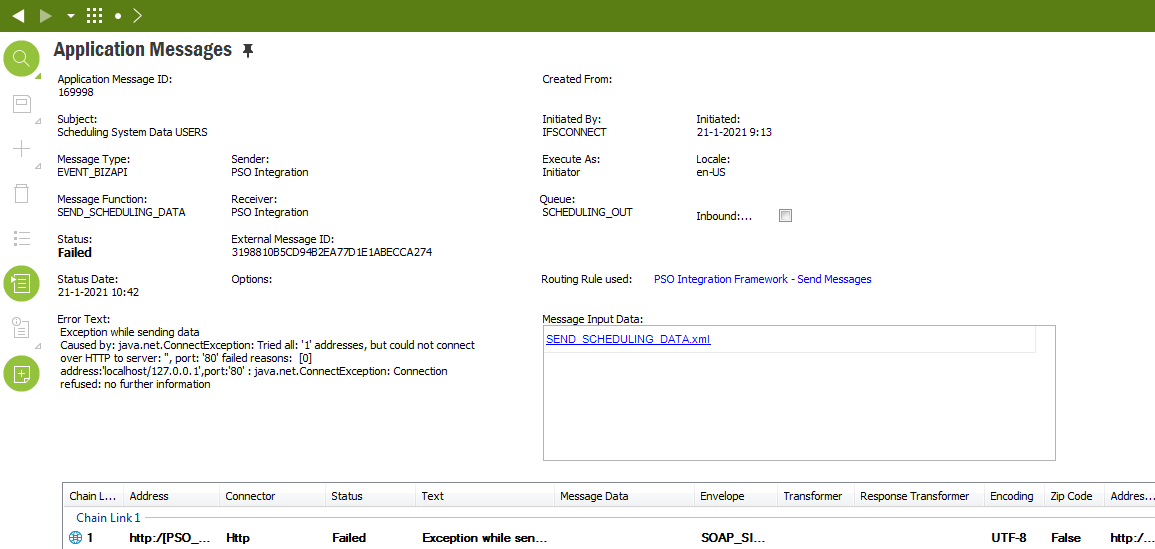
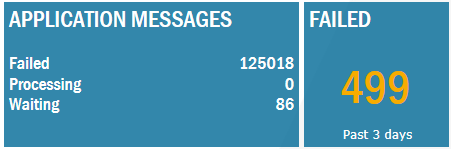
I noticed that we have a lot of failed Application Messages, but I never investigated what the cause is and what effects are. Can someone explain what the cause, effects and solution is? See the screenshots below. 

Kind regards,

Simon


Best answer by Tomas Ruderfelt

It is the PSO integration and by default when you install there are a scheduled task started for the database task “Send PSO Integration dataset updates”.

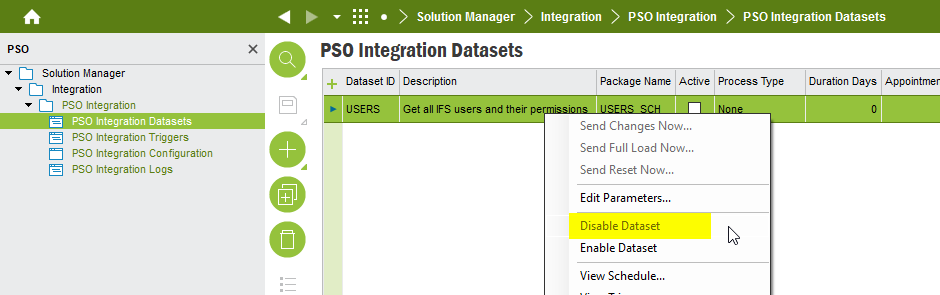
If you shall not use that integration you have to disable the PSO integration in this window:
 

This topic has been closed for replies.

4 replies

Forum|alt.badge.img+21
  • Superhero (Employee)
  • Answer
  • January 21, 2021

It is the PSO integration and by default when you install there are a scheduled task started for the database task “Send PSO Integration dataset updates”.

If you shall not use that integration you have to disable the PSO integration in this window:


Forum|alt.badge.img+9
  • Author
  • Sidekick (Customer)
  • January 21, 2021

Hi @Tomas Ruderfelt  

Thank you for your reply. Where is the PSO Integration used for? I can just turn this off without consequences? 


Forum|alt.badge.img+21
  • Superhero (Employee)
  • January 21, 2021

Yes, since it is not configured to be used it is no problem to disable it.

PSO “IFS Planning and Scheduling Optimization” is an external optimization program for a couple of things. It is mainly used for Service Management and it is not mandatory in any way. See more in the documentation link.

https://docs.ifs.com/techdocs/foundation1/010_overview/240_integration/300_pso_integration/default.htm


Forum|alt.badge.img+9
  • Author
  • Sidekick (Customer)
  • January 21, 2021

Thanks a lot @Tomas Ruderfelt 

I have disabled the integration. 

Kind regards, 

Simon