Question

23R2 dynamic navigation URL in event action

  • January 31, 2024
  • 3 replies
  • 224 views

Forum|alt.badge.img+8

We are currently working on the upgrade from IFS V8 to IFS Cloud 23R2. 

We have events actions for sending e-mail notification to users with an IFS URL.

So, we were forced to update all this navigation URL to be in accordance with Cloud version.


Example of an URL added in an event action : 

https://uat1.ifs.asf.pri/main/ifsapplications/web/page/ChangeRequest/Form;$filter=RequestNo eq $REQUEST_NO$

This kind of URL is working smoothly but only for the related environment.


The issue we are facing is that as we are on a test environnement and not on the PROD environment, the beginning of the URL is working today but it will not work tomorrow in the PROD environment as it will not be the same. 

Consequently, to avoid modifications on all events actions containing an URL, we would like if it possible to use a dynamic URL that will change depending on a variable which will be, in our case, the system URL value entered in the system parameters.
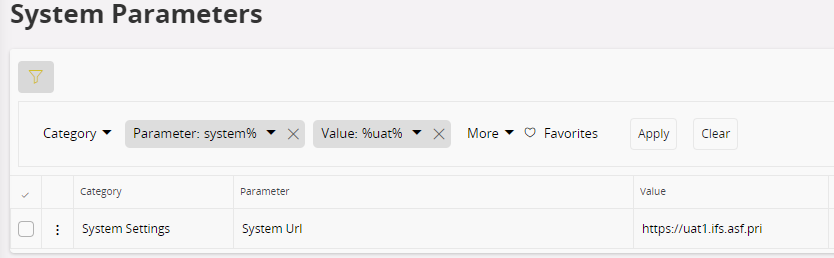


Thanks for your help

3 replies

Forum|alt.badge.img+11

Hi @Carole 

Try using this API, it works for us on cloud 23R1. 

ifsapp.fnd_setting_api.Get_Value(parameter_ => 'SYSTEM_URL')

There is probably a way to do it using the new cloud technology, but I guess it depends how your event action is written, etc. 

Hope that it helps. 

David.


Forum|alt.badge.img+8
  • Author
  • Sidekick (Customer)
  • February 1, 2024

@david.harmer 

Will try this API…

thanks 


Dagfinn Stave
Do Gooder (Partner)
Forum|alt.badge.img+2

Hi! 

This can be solved by using a CSV Varable basend on the system_url parameters Fnd_Setting_API.Get_Value('SYSTEM_URL') 


You can use a DM Job to create the new csv true the context_substiturion_var view (in the Method List)

Result:  #SYSTEM_URL#


Then replace the base url in the link  in the email event message from:

https://mycompany-cfg.ifs.cloud/main/ifsapplications/web/page/Incident/Form;$filter=IncidentReferenceNo%20eq%20%278%27

To:

#SYSTEM_URL#/main/ifsapplications/web/page/Incident/Form;$filter=IncidentReferenceNo%20eq%20%27&INCIDENT_REFERENCE_NO%27


This solution works from introduction of CSV variables in IFS Application and still in IFS Cloud. 

Som more info here about using the CSV variables:


Fun fact:

I ordered the csv variables from IFS as a Customer to make dynamic url ‘s for handling different environment when using IFS Portal back in 2002, so they have been around for a while :).  I used them in another functionality i ordered named Portlet Creator, to make information element like My Invoices, My Document, My anything….  so the user could get relevant data without do a query. A concept today known as Lobby where you still can use your csv variables. The final tool i ordered for the portal was Page Creator, A concept you will know as Page designer today.  The concept of bringing the data to the end user dynamically based logged on users is still valid today!