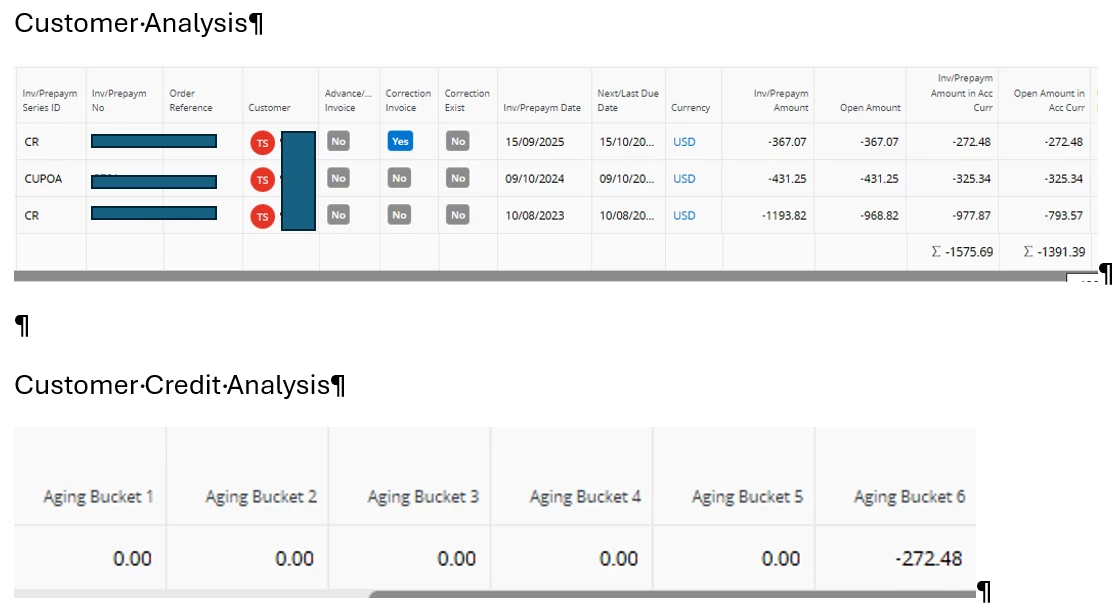
Could anyone offer any suggestions as to why the CUPOA and second CR transactions don’t appear to be included in the Customer Analysis ageing?
I’ve tried re-calculating Credit Analysis but it didn’t make any difference.
Any suggestions gratefully received!
Thanks
Linda
24.1.16
Best answer by ChrisD
Hi Linda,
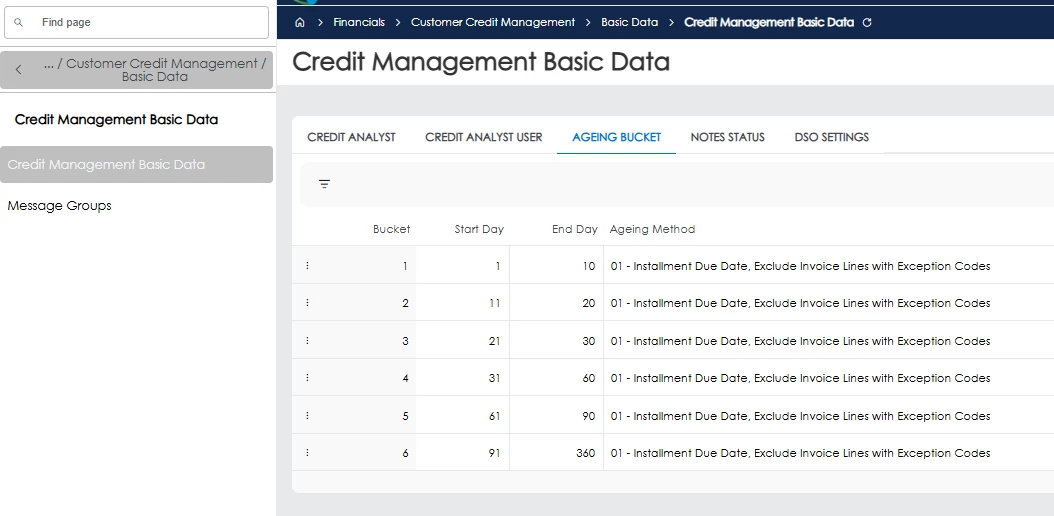
Would you be able to check the “Aging Bucket” tab of the Credit Management Basic Data screen please?
The below is how it is set in one of our environments - and I believe this is the standard out-the-box set-up:
You’ll see that the last bucket in the above is showing anything where the Due Date is exceeded by between 91 and 360 days. If yours are set up the same, then this would explain the mismatch - the two oldest rows in your Customer Analysis screenshot seem to be from 2023 and 2024, so are more than 360 days past their Due Date.
If this is the case, then increasing the “End Day” value on your Bucket 6 (and then re-doing the Calculate Credit Info) should resolve it.
Would you be able to check the “Aging Bucket” tab of the Credit Management Basic Data screen please?
The below is how it is set in one of our environments - and I believe this is the standard out-the-box set-up:
You’ll see that the last bucket in the above is showing anything where the Due Date is exceeded by between 91 and 360 days. If yours are set up the same, then this would explain the mismatch - the two oldest rows in your Customer Analysis screenshot seem to be from 2023 and 2024, so are more than 360 days past their Due Date.
If this is the case, then increasing the “End Day” value on your Bucket 6 (and then re-doing the Calculate Credit Info) should resolve it.
Would you be able to check the “Aging Bucket” tab of the Credit Management Basic Data screen please?
The below is how it is set in one of our environments - and I believe this is the standard out-the-box set-up:
You’ll see that the last bucket in the above is showing anything where the Due Date is exceeded by between 91 and 360 days. If yours are set up the same, then this would explain the mismatch - the two oldest rows in your Customer Analysis screenshot seem to be from 2023 and 2024, so are more than 360 days past their Due Date.
If this is the case, then increasing the “End Day” value on your Bucket 6 (and then re-doing the Calculate Credit Info) should resolve it.