When I tried to change the Unit Price for a PO created through project demand and then this error appears.
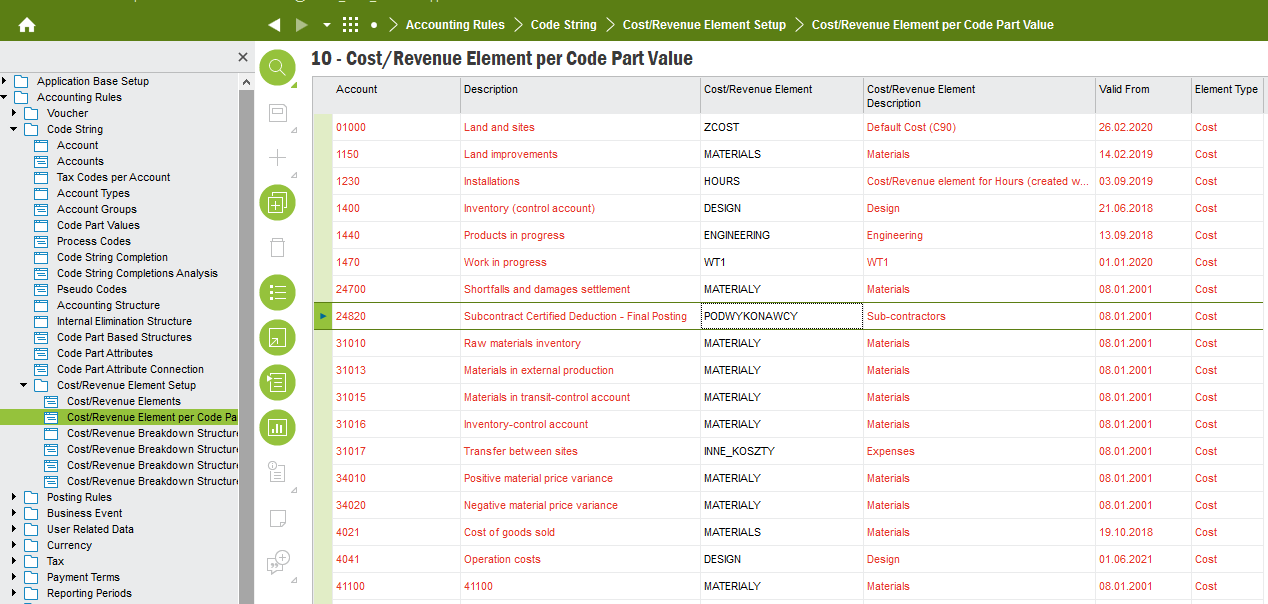
There's no project cost element connected to code part value xxxx
can you please guide me through the steps to set it up and what it means? :)



 +24
+24When I tried to change the Unit Price for a PO created through project demand and then this error appears.
There's no project cost element connected to code part value xxxx
can you please guide me through the steps to set it up and what it means? :)
Best answer by AkilaR
Hi
This error caused since Application is using Cost Elements to identify the costs under different Categories when you creating a transaction in related to Projects.
If this is a Non-Inventory Purchase part you can connect the relevant Account to EXPENSES cost element or if it is Inventory Part to MATERIAL Cost element in Projects Cost/Revenue Element per code Part value window.
Hope this will help.
Regards,
Akila
Enter your E-mail address. We'll send you an e-mail with instructions to reset your password.