Solved

Customer order release from credit block

  • February 17, 2023
  • 5 replies
  • 633 views

Forum|alt.badge.img+8

Customer order release from credit block

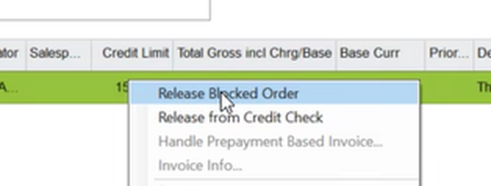
Customer orders that are blocked can be released either directly from customer order view or in “handle blocked customer orders”

Options are

  • Release blocked order
  • Release from credit check


Currently both available for finance and customer order persons. Function is different:

To proceed, the customer order must be handled in the Handle Blocked Customer Orders window where the options Release Blocked Order and Release from Credit Check exist. The difference between the two options is that when executing Release from Credit Check, the order will not be blocked again in any of the steps defined in the credit control group whereas when Release Blocked Order is being executed, there is a possibility of the order being checked and blocked again. 


Would it be possible to hide “release from credit check” for customer order? Finance should still have both options.

Best answer by Furkan Zengin

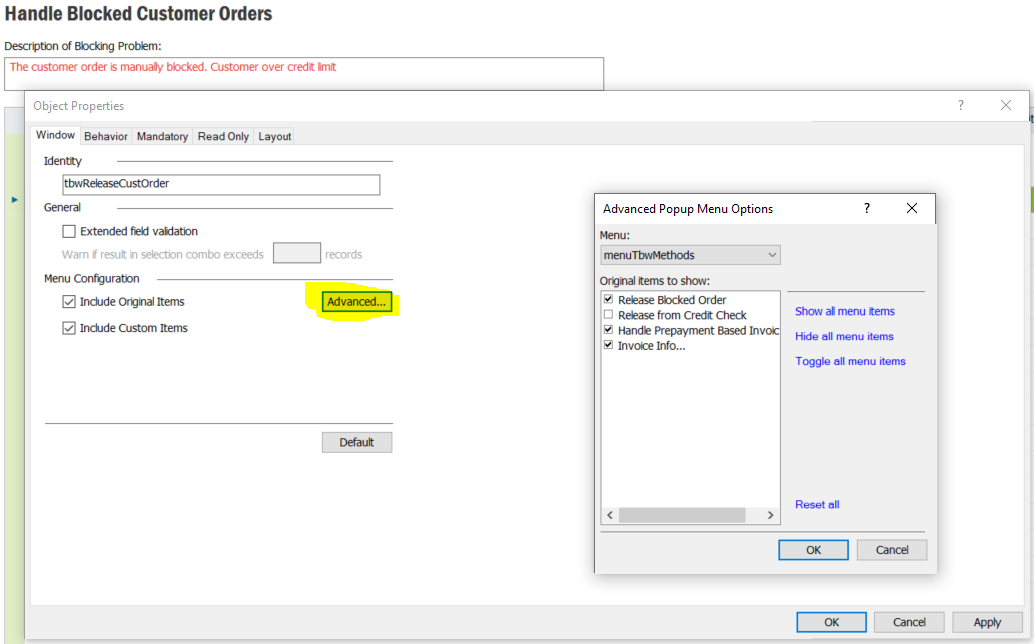
Since both release block order and release from credit check is using the same function in API, it looks not possible to solve the issue with  permission set.


I found the only way like below. RMB on the Handle Blocked Customer Orders window. Click Properties. Then click Advanced under Menu Configuration. Uncheck the item Release from Credit Check.

This will hide the function from right mouse button. 


Hope this helps

5 replies

Furkan Zengin
Ultimate Hero (Partner)
Forum|alt.badge.img+21
  • Ultimate Hero (Partner)
  • February 17, 2023

Hello @mingram 

What is the version you are using?


Forum|alt.badge.img+8
  • Author
  • Do Gooder (Customer)
  • February 17, 2023

Version 10


Furkan Zengin
Ultimate Hero (Partner)
Forum|alt.badge.img+21
  • Ultimate Hero (Partner)
  • Answer
  • February 17, 2023

Since both release block order and release from credit check is using the same function in API, it looks not possible to solve the issue with  permission set.


I found the only way like below. RMB on the Handle Blocked Customer Orders window. Click Properties. Then click Advanced under Menu Configuration. Uncheck the item Release from Credit Check.

This will hide the function from right mouse button. 


Hope this helps


Forum|alt.badge.img+8
  • Author
  • Do Gooder (Customer)
  • February 17, 2023

Thank you very much, this solved the problem.


Furkan Zengin
Ultimate Hero (Partner)
Forum|alt.badge.img+21
  • Ultimate Hero (Partner)
  • February 17, 2023

You are welcome, I am glad that your issue is resolved. You can please mark my reply as best answer.

Have a good day