

Solved

Skills Validation Business Rule for Assigning of Technician

  • Apr 19, 2023 10:41 AM UTC
  • 48 replies
  • 467 views

Forum|alt.badge.img+7

Hi Team,


This is regarding creation of a business rule. The action that I am looking for is as follows;


Person One has Skill A, B and C. Place has Skill A and B.

Person Two has Skill C.

If I assign Person One to Place One, I am not stopped.

If I assign Person Two, I will get stopped by a validation Business Rule.

I am having difficulty using validation BR as it does not seem to process that A + B. It seems to process the rule as A or B.


Am I able to use validation BR for the above? or Must I use XML BR?

If I need to use XML BR, is there any sample XML code that I can be provided with?



Best answer by Shneor Cheshin

Hey @StejonatL 

For better UX consider assigning the script to the value change event on the person_id field. So the user will get a message immediately on value entering.

Yes, you need a separate script for the mobile client. Assuming you are using the WebClient. The event should be the same, value changed. 

Not sure what is ‘team task’ you mentioned, but again, assuming it is a standard screen.

Cheers!

View original

48 replies

Shneor Cheshin
Superhero (Employee)
Forum|alt.badge.img+28
  • Superhero (Employee)
  • Apr 19, 2023 11:06 PM UTC

Hey @StejonatL 

Can you please provide more details?

When do you wish to trigger the BR?

What is the required outcome?

When you create a comma separated list, it is the ‘OR’ condition between the values.

If you wish to have an ‘AND’ condition, you will need to separate to a few different rules, and each rule check a different value.

Cheers!


Forum|alt.badge.img+7
  • Author
  • Do Gooder (Customer)
  • Apr 20, 2023 1:30 AM UTC

Hi Cheshin,


We want to limit the assignment of technicians by use of the skills function.


We will populate task_skills by using the place of the request. So we will indicate skill lines in place and when a request is created for that place. The task will inherit the corresponding skills.


So when a technician is being assigned to the task, any technician without the corresponding skills will be stopped from being assigned. I am using a validation BR to do this.


So for an example.


Currently Place ID 100, will have Skill A, Skill B, Skill C and Skill D in place_skill table.

When a request is created for Place ID 100. the task_skill table will inherit these 4 skills.


For assigning of technician. In my validation BR, I need it to check if the technician has the required skills in his/her Person_skill table. If it meets the condition, the technician will be able to be assigned. If it does not meeting the conditions. It will be stopped via the validation BR.

The conditions could be eg. If task_skill has Skill A and B, and if technician has Skill A and B, he will be allowed to be assigned. Otherwise, he will be stopped.

Place_skill:


Person_skill:
Person A:

Person B:


​​​​So in the above example, Person B will be stopped by the Business Rule and Person A will be allowed to be assigned to the task.


Forum|alt.badge.img+7
  • Author
  • Do Gooder (Customer)
  • Apr 20, 2023 1:45 AM UTC

And also, is it possible to indicate for 1 line of an input parameter to include a “contain” operator


Shneor Cheshin
Superhero (Employee)
Forum|alt.badge.img+28
  • Superhero (Employee)
  • Apr 20, 2023 2:00 AM UTC

Hi @StejonatL 

I understand the scenario and conditions, but missing the workflow.

How do you assign the technician to the task? Automatic? Manually? Which client? etc.

Cheers!


Forum|alt.badge.img+7
  • Author
  • Do Gooder (Customer)
  • Apr 20, 2023 2:01 AM UTC

Hi Cheshin,


Manually via Request task tab in technician field


Shneor Cheshin
Superhero (Employee)
Forum|alt.badge.img+28
  • Superhero (Employee)
  • Apr 20, 2023 2:05 AM UTC

Hey @StejonatL 

Thanks for the info.

Personally, I would create a client script to check the validity of the assignment.

It will be easier to implement and the UX should be a bit better.

Cheers!


Forum|alt.badge.img+7
  • Author
  • Do Gooder (Customer)
  • Apr 20, 2023 2:08 AM UTC

I see, for that case, is the client script attached to the save button of the request screen?

If we want to also implement this logic and validation to mobile app, so when technician try to assign themselves via team task, do we need to add an additional script to mobile screen?


Shneor Cheshin
Superhero (Employee)
Forum|alt.badge.img+28
  • Superhero (Employee)
  • Answer
  • Apr 20, 2023 2:26 AM UTC

Hey @StejonatL 

For better UX consider assigning the script to the value change event on the person_id field. So the user will get a message immediately on value entering.

Yes, you need a separate script for the mobile client. Assuming you are using the WebClient. The event should be the same, value changed. 

Not sure what is ‘team task’ you mentioned, but again, assuming it is a standard screen.

Cheers!


Forum|alt.badge.img+7
  • Author
  • Do Gooder (Customer)
  • Apr 20, 2023 2:29 AM UTC

Thank you Cheshin


Forum|alt.badge.img+7
  • Author
  • Do Gooder (Customer)
  • Apr 20, 2023 8:16 AM UTC

Hi @Shneor Cheshin 


Able to see what is wrong with my client script?

Currently line 3 is giving issue.


This is the client script code:


var taskId = getControlValue("request", "task_id");
var personId = getControlValue("task", "person_id");
var personSkill = getDBValues(stringFormat("SELECT skill FROM person_skill where person_skill.person_id = {0}",personId));
var taskSkill = getDBValues(stringFormat("SELECT skill FROM task_skill where task_skill.task_id = {0}",taskId));


if (personSkill != taskSkill)
    {    
        alert(getMessage("C_SKILL_NOT_PRESENT", "ERROR"));
            return false;
    }  
    
return true;


Shneor Cheshin
Superhero (Employee)
Forum|alt.badge.img+28
  • Superhero (Employee)
  • Apr 20, 2023 10:24 AM UTC

Hey @StejonatL 

As far as I know getDBValues requires a client script sql to be executed.

So first create a SQL client script and then use it in the client script.


From docmentation

getDBValues

Used to select one or more database result values executing a SQL statement defined in the Client Script Sql screen (under Studio). Specify the Client Script SQL ID when calling getDBValues.

Syntax

getDBValues(clientScriptSqlId)

Return Value

String

Example

This example assumes a Client Script Sql ID named SELECT_ADDRESS_232 has been created containing this SQL statement:
select name, address, second_address, third_address, city, state_prov, country, zippost from address where address_id = '232'

var myResult = getDBValues('SELECT_ADDRESS_232');alert(myResult[0].name);alert(myResult[0].address);alert(myResult[0].city);alert(myResult[0].state_prov);alert(myResult[0].country);alert(myResult[0].zippost);

Forum|alt.badge.img+7
  • Author
  • Do Gooder (Customer)
  • Apr 24, 2023 1:51 AM UTC

Hi @Shneor Cheshin 


Is there any example or baseline BR that compares multiple values within 2 tables? Similar to the requirements of the above work flow.


Shneor Cheshin
Superhero (Employee)
Forum|alt.badge.img+28
  • Superhero (Employee)
  • Apr 24, 2023 2:57 AM UTC

Hey @StejonatL 

It will be challenging to use a BR like this.

  1. You need to compare a list of values, and not just 1.
  2. You would like to use a validation rule which is simple/naive BR.

For that I recommend to create a view and compare values.

How exactly to build that view? Not sure. Need to be creative and try a few approaches.

First thing that comes to mind is a join between the task skills and the person skills table. Find where there is a mismatch and search for it in your BR.

Cheers!


Forum|alt.badge.img+7
  • Author
  • Do Gooder (Customer)
  • Apr 24, 2023 10:27 AM UTC

Hi @Shneor Cheshin 

What is wrong with my XML Code?


<hierarchy_select>
  <primary_table>person_skill</primary_table>
  <from>
    <table>person_skill</table>
    <table>task_skill</table>
    <table>task</table>
  </from>
  <attrs>
    <attr>person_skill.skill</attr>
    <attr>task_skill.skill</attr>
    <attr>task.person_id</attr>
    <attr>person_skill.person_id</attr>
  </attrs>
  <where>
    <data_constraint>
      <constraint>
        <left_operand>person_skill.skill</left_operand>
        <operator>eq</operator>
        <right_operand>task_skill.skill</right_operand>
      </constraint>
    </data_constraint>
  </where>
  <where>
    <data_constraint>
      <constraint>
        <left_operand>task.task_id</left_operand>
        <operator>eq</operator>
        <right_operand>1853</right_operand>
      </constraint>
    </data_constraint>
  </where>
  <where>
    <data_constraint>
      <constraint>
        <left_operand>person_skill.person_id</left_operand>
        <operator>eq</operator>
        <right_operand>task.person_id</right_operand>
      </constraint>
    </data_constraint>
  </where>
  <where>
    <join_constraint>
      <constraint>
        <left_operand>person_skill.person_id</left_operand>
        <operator>eq</operator>
        <right_operand>task.person_id</right_operand>
      </constraint>
    </join_constraint>
  </where>
</hierarchy_select>

I am getting the below result:

<person_skill_hierarchy_select_result result_name="" />


Shneor Cheshin
Superhero (Employee)
Forum|alt.badge.img+28
  • Superhero (Employee)
  • Apr 26, 2023 2:44 AM UTC

Hey @StejonatL 

You have a few issues

  1. Only 1 <where> caluse in XML. Not sure if this is the main issue.
  2. You check the person/task skill. That is a list but you check one value only. So only 1 value is compared.
  3. Join constraint should be equi, not eq
  4. According to point 2 above, might be that the urle returns 0 records. Which is OK.

Where should be something like

 <where>

<data_constraint>
<constraint>
<left_operand>person_skill.skill</left_operand>
<operator>eq</operator>
<right_operand>task_skill.skill</right_operand>
</constraint>

<constraint>
<left_operand>task.task_id</left_operand>
<operator>eq</operator>
<right_operand>1853</right_operand>
</constraint>

<constraint>
<left_operand>person_skill.person_id</left_operand>
<operator>eq</operator>
<right_operand>task.person_id</right_operand>
</constraint>
</data_constraint>

<join_constraint>
<constraint>
<left_operand>person_skill.person_id</left_operand>
<operator>equi</operator>
<right_operand>task.person_id</right_operand>
</constraint>
</join_constraint>

</where>


Why are you not using a client script?


Cheers!


Forum|alt.badge.img+7
  • Author
  • Do Gooder (Customer)
  • Apr 28, 2023 11:01 AM UTC

Hi @Shneor Cheshin 


Ok thank you. I have now used your suggestion and used a client script. This client script is binded to a Screen Event → Table Event → BeforeRowSave

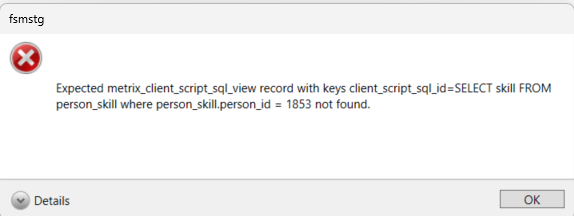
When I save my request i get an error


This is my client script and client script sql


var personId = getControlValue("task", "person_id");
var taskId = getControlValue("task", "task_id");
var projectSkill = getDBValue("C_SKILL_PRESENT_SQL",personId,taskId);
var personSkill = getDBValue("C_PER_SKILL_PRESENT_SQL",personId,taskId);


if (personSkill == "0")
    {
    alert(getMessage("C_SEC_PER_FAIL", "ERROR"));
    return false;
    }
    
if (personSkill == "1")
        {
        if (projectSkill == "0")
            {
            alert(getMessage("C_SEC_PROJ_FAIL", "ERROR"));
            return false;
            }
            
        else if (projectSkill == "1")
                {
                return true;
                }
        }


What could be the issue?


Shneor Cheshin
Superhero (Employee)
Forum|alt.badge.img+28
  • Superhero (Employee)
  • May 1, 2023 10:46 PM UTC

Hey @StejonatL 

getDBValue is for mobile client.

getDBValues is for the webclient.

I would recommend using the documentations as reference.

Cheers!


Forum|alt.badge.img+7
  • Author
  • Do Gooder (Customer)
  • May 3, 2023 2:08 AM UTC

Hi @Shneor Cheshin 

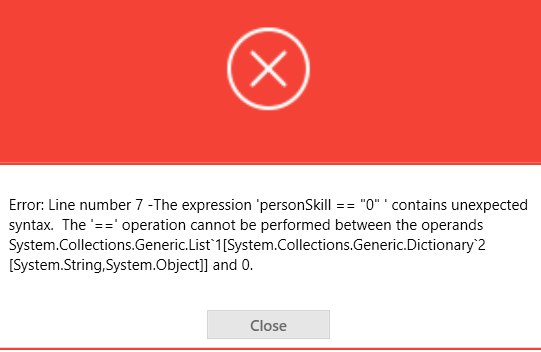
After using getDBValues as is required for web client scripts. I am getting this error:


Below are the SQL scripts:
C_SKILL_PRESENT_SQL


select count (*) from person_skill where person_id = '{0}' and Skill like 'PROJECTSC%' and expiration_dt > SYSDATETIME() 
and skill in 
(
  select skill from TASK_SKILL where task_id  = '{1}' and Skill like 'PROJECTSC%'
)

C_PER_SKILL_PRESENT_SQL


select count (*) as count from person_skill where person_id = '{0}' 
 and Skill = 'PERSONALSC' 
 and expiration_dt > SYSDATETIME()
 and CAST(skill_level as INT) <= 
 
  (select CAST (skill_level as INT) from TASK_SKILL where
   task_id  = '{1}' and 
    Skill = 'PERSONALSC' 
  )


I suspect that the values being returned are string and somehow it throws me this error. Greatly appreciate your help.


Shneor Cheshin
Superhero (Employee)
Forum|alt.badge.img+28
  • Superhero (Employee)
  • May 3, 2023 2:18 AM UTC

Hey @StejonatL 

getDBValues returns an array of objects.

To access the data, you will need something like this (just an example)

var personSkill = getDBValues("C_PER_SKILL_PRESENT_SQL",[personId,taskId]);

var count = personSkill[0].count;

if(count == 0)

{

   Do Something

}


Cheers!


Forum|alt.badge.img+7
  • Author
  • Do Gooder (Customer)
  • May 3, 2023 7:01 AM UTC

Hi @Shneor Cheshin 


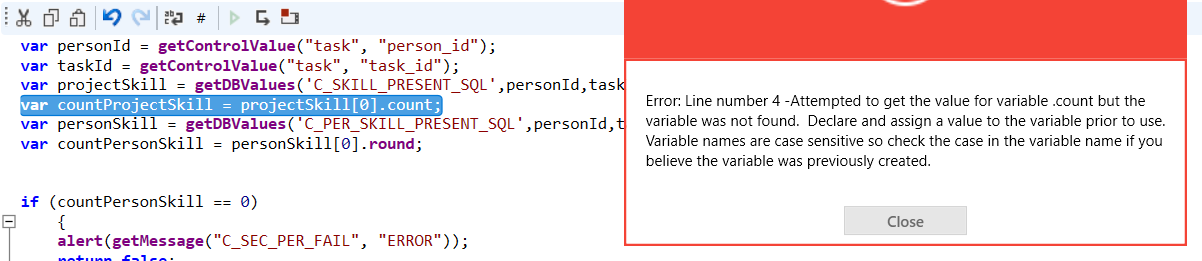
I get this error when trying to use count

Could these issues be caused by the return output being a string?


getDBValue without the ‘s’ works. The script works and i can get the correct result. Just that I cannot use it for web client I guess.


I am only having this issue with getDBValues.


Also, the result of the 2 sql scripts are one value as well, not an array or multiple values.


Any way around this?


Shneor Cheshin
Superhero (Employee)
Forum|alt.badge.img+28
  • Superhero (Employee)
  • May 3, 2023 7:06 AM UTC

Hey @StejonatL 

Try adding squere brackets to the function parameters. I think your query is not working correctly with your syntax.

var personSkill = getDBValues("C_PER_SKILL_PRESENT_SQL",[personId,taskId]);

Cheers!


Shneor Cheshin
Superhero (Employee)
Forum|alt.badge.img+28
  • Superhero (Employee)
  • May 3, 2023 7:08 AM UTC

@StejonatL 

Also try a simple query to start with. Just for testing.

For example

select count (*) as count from person_skill where person_id = '{0}' 


Cheers!


Forum|alt.badge.img+7
  • Author
  • Do Gooder (Customer)
  • May 3, 2023 7:10 AM UTC

@Shneor Cheshin 
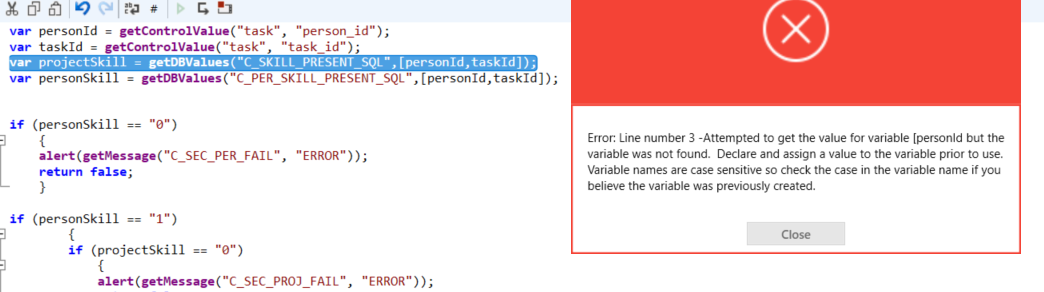
I tired, but does not seem to recognize square bracket, does the get control value line need square bracket as well?


Forum|alt.badge.img+7
  • Author
  • Do Gooder (Customer)
  • May 3, 2023 7:12 AM UTC


Forum|alt.badge.img+7
  • Author
  • Do Gooder (Customer)
  • May 3, 2023 7:12 AM UTC