Solved

PSO - Showing the reason for Absence

  • Mar 24, 2023 10:44 AM UTC
  • 7 replies
  • 170 views

Forum|alt.badge.img+3

Hi All,


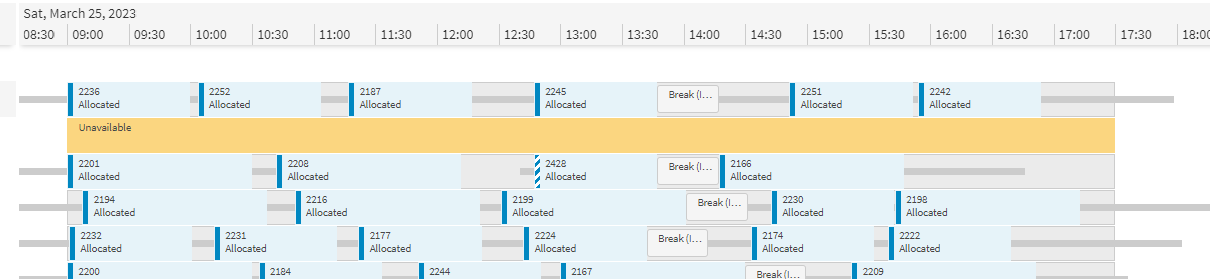
In PSO when an absence is booked in IFS Cloud it feeds through to PSO as Unavailable. Is there a way of expanding this to show the reason for the absence or is the only option we have is Unavailable?


Thanks 


Best answer by Alexander Heinze

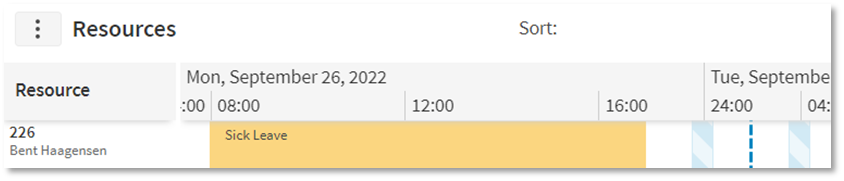
Hi @ZEPWAYNEH , have a look at the document that I posted here: IFS Cloud - Scheduling demystified (22R2) | IFS Community The chapter “Resource unavailability/absence” explains the necessary configuration steps and brings you to this visualization:
 

View original

7 replies

Forum|alt.badge.img+9
  • Hero (Employee)
  • Mar 24, 2023 11:08 AM UTC

Hi @ZEPWAYNEH 


The only option at the moment is to have the description as Unavailable in the Workbench for unavailabilities created as a Misc. Resource Allocation.


We are aware of this request to view more detailed information and are planning to allow for this in coming releases.


Alexander Heinze
Ultimate Hero (Employee)
Forum|alt.badge.img+25
  • Ultimate Hero (Employee)
  • Answer
  • Mar 24, 2023 3:22 PM UTC

Hi @ZEPWAYNEH , have a look at the document that I posted here: IFS Cloud - Scheduling demystified (22R2) | IFS Community The chapter “Resource unavailability/absence” explains the necessary configuration steps and brings you to this visualization:


Forum|alt.badge.img+3
  • Author
  • Do Gooder (Customer)
  • Mar 27, 2023 9:08 AM UTC

Hi @ZEPWAYNEH , have a look at the document that I posted here: IFS Cloud - Scheduling demystified (22R2) | IFS Community The chapter “Resource unavailability/absence” explains the necessary configuration steps and brings you to this visualization:


Hi Alexander,


This is great document thanks for sharing!


Forum|alt.badge.img+3
  • Author
  • Do Gooder (Customer)
  • Apr 20, 2023 9:04 AM UTC

Hi @Alexander Heinze 


I have tried the solution you proposed (great document by the way so thanks for that) but in PSO still shows that the absence and unavailable.

We are using IFS cloud 22r2. is this a later development or could I missing a step 


any help is appreciated 


  • Superhero (Employee)
  • Apr 20, 2023 9:33 AM UTC

Hi @Alexander Heinze 


I have tried the solution you proposed (great document by the way so thanks for that) but in PSO still shows that the absence and unavailable.

We are using IFS cloud 22r2. is this a later development or could I missing a step 


any help is appreciated 

Are you using HR absence or Miscellaneous Resource Allocations? For the latter, the description will not show up, but we will fix that in 23R1.


Forum|alt.badge.img+3
  • Author
  • Do Gooder (Customer)
  • Apr 20, 2023 6:46 PM UTC

Hi


we are using HR absence.

every time we enter an absence of any reason it comes though as unavailable.


Do you know if we need to change anything in the PSO side?


I will have a look at the data files tomorrow to see what IFS is passing to PSO  


Forum|alt.badge.img+3
  • Author
  • Do Gooder (Customer)
  • Apr 20, 2023 7:01 PM UTC

Think i got this working now.


So we need to make a 1 to 1 relationship between wage codes and absence types to get this pulling through to PSO with the correct data.


I plan to test more tomorrow and will feedback 


Thanks for your help