Question

PSO Invalid Fixed Time and Planned activity in Jeopardy

  • February 23, 2026
  • 4 replies
  • 18 views

Forum|alt.badge.img+1

I have just created two requests in IFS-Cloud, the first one via API, the second one via screen.

Both requests are identencial (besides of the starting time).

Both requests are scheduled in future (07.03.2026). 

Both requests in the future raise the same execptions (they are marked as green)

  • Why is the exception type raised: “Planned activity in Jeopardy” with more then 17.000 minutes?
  • What das the exception type “Externally violated constraints” mean?
  • How can I fix them?
  • What do I have to insert where to get rid of these exceptions?

Please give me some hints.
4 replies

Bhanuka Abeygoonawardana
Hero (Employee)
Forum|alt.badge.img+9

​​​Hi ​@Michael_B,

The behavior you are observing is expected in IFS Cloud and is not related to whether the requests were created via API or via the user interface. Both creation methods use the same scheduling and exception logic.

1. “Planned Activity in Jeopardy” 

  • The reason could be that the exception “Planned Activity in Jeopardy” is raised when a planned (already scheduled) activity is expected to miss its Primary SLA.
  • In your case, although the activities are scheduled in the future (07.03.2026), the SLA expiry date may occur earlier than the planned execution time. When this happens, calculates the difference between the SLA expiry and the planned start/finish time. Because the activity is far in the future, this results in a large value (for example, more than 17,000 minutes).
  • It simply means that, according to the current SLA definition, the activity is already outside its SLA at the time it is planned.

How to resolve this:

  • Review and adjust the SLA definition so that the SLA expiry is after the planned execution window.
  • Ensure that the SLA duration is sufficient for future dated activities.

2. “Externally Violated Constraints”

  • The exception “Externally violated constraints” indicates that the activity violates one or more fixed constraints that originate outside the scheduling optimizer (PSO). These constraints are considered mandatory and cannot be changed automatically by the system.

Common examples include:

  • Fixed planned start or finish dates
  • Fixed appointment windows
  • Fixed or preassigned resources who don’t have the required skills.
  • Dates or restrictions enforced by an external system or integration

When such constraints conflict with SLA rules or scheduling logic, PSO must accept the violation and raise this exception.

How to resolve this:

  • Remove or relax fixed dates, fixed resources, or appointment windows where possible.
  • Allow PSO to calculate dates and resource assignments automatically instead of enforcing them externally.
  • If these constraints are required from a business perspective, the exception cannot be removed and can only be accepted or ignored, as the system is behaving correctly.

Alexander Heinze
Ultimate Hero (Employee)
Forum|alt.badge.img+23
  • Ultimate Hero (Employee)
  • February 23, 2026

Planned Activities In Jeopardy: Raised when planned activities (allocated to a resource) are
expected to exceed their SLA deadline.


If the activity is scheduled too late relative to its required SLA window, PSO flags it. Your allocation is 2 weeks from today, so that’s likely the case. What’s your SLA window?


Externally Violated Constraints: Identifies constraint violations caused by committed or fixed
activities, for example that an activity is committed to a resource who lacks the required skills. This
may be due to manual interventions to the schedule.


Do you not see additional details for this exception?


Forum|alt.badge.img+1
  • Author
  • Do Gooder (Customer)
  • February 23, 2026

Thank you for your answers.

Currently we have no real SLA defined. We have fixed resources und fixed times.

My solution is to set the tasks dates, especially Planned start und Planned finish.

Then both exception disappear in PSO.

Unfortunately I can not set the times via api.

Every time I get the same error, when Patching the necessary times:

----- RESPONSE 412
{
  "status": 412,
  "Message": "Precondition Failed",
  "error": "{\r\n  \"error\": {\r\n    \"code\": \"DB_OBJECT_MODIFIED\",\r\n    \"message\": \"Resource already modified.\",\r\n    \"details\": [\r\n      {\r\n        \"code\": 20114,\r\n        \"message\": \"ORA-20114: JtTask.FND_MODIFIED: The Work Task record has already been changed. Please refresh the record and reenter your changes.\"\r\n      }\r\n    ]\r\n  }\r\n}",
  "Timestamp": "2026-02-23T11:41:01.203"
}
Endpoint:
main/ifsapplications/projection/v1/WorkTaskServiceHandling.svc/JtTaskSet(TaskSeq=30840)
Request:
{
 "PlannedStart" : "2026-03-07T08:00Z" ,  "PlannedFinish" : "2026-03-07T12:00Z" ,  "EarliestStart" : "2026-03-07T08:00Z" ,  "LatestStart" : "2026-03-07T08:00Z" ,  "LatestFinish" : "2026-03-07T12:00Z" ,  "Duration" : 4 ,  "Objsite" : "xxx"
}
Do you have any idea with wich API-call I can refresh the record before I set the task dates?


Alexander Heinze
Ultimate Hero (Employee)
Forum|alt.badge.img+23
  • Ultimate Hero (Employee)
  • February 23, 2026

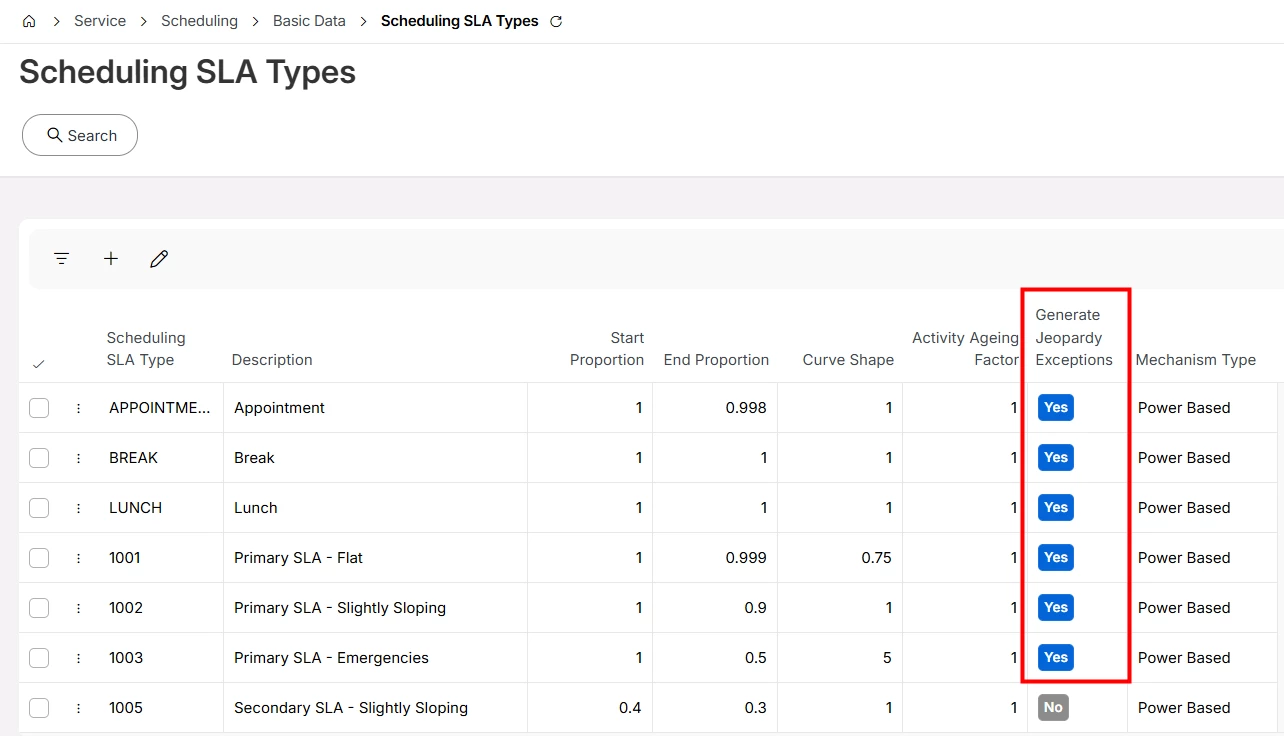
“no real SLA defined” means that PSO will get dummy SLAs or no SLAs at all? Either way, that’s probably the reason for the exceptions you mentioned. If you send SLAs and don’t need exceptions, try setting “Generate Jeopardy Exceptions” to No.


If you need to fix the start of an allocation, try setting the “Fixed Start” attribute, this is considered by PSO and will automatically populate Planned Start and Planned Finish.