
Solved

How is the Appointment Window durations is PSO

  • May 12, 2026
  • 3 replies
  • 17 views

Forum|alt.badge.img+4

24R2, In PSO/Audit/Load/Input Reference Appointment window Durations is showing as 54 Days. how is this calculating.

In Scheduling Dataset, Scheduling working days is ‘4’ and Appointment Working Days is ‘38’

Best answer by Alexander Heinze

Thanks for your Input

Suppose if i change the calander which is currently as ‘5’ working days to ‘7’ working days … will the Appointment window Durations in PSO be as ‘42’ ?

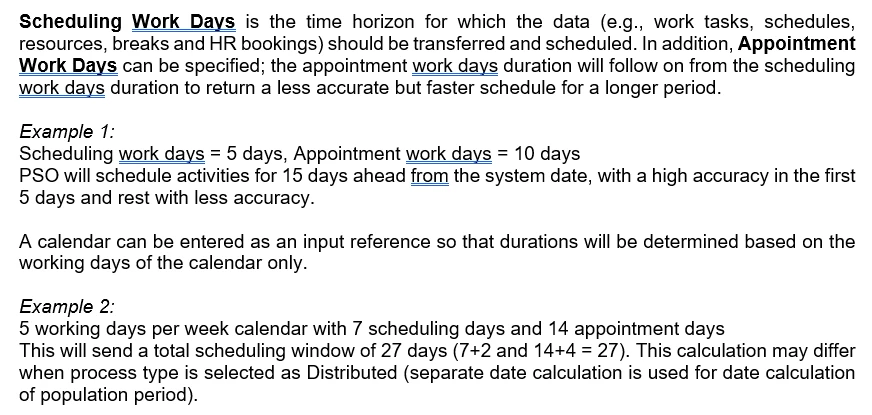
Yes, you should get a total horizon of 42 days. Here’s the respective section from Scheduling Demystified (IFS Cloud - Scheduling demystified (25R2) | IFS Community):
 

3 replies

Forum|alt.badge.img+8
  • Hero (Employee)
  • May 12, 2026

Hi,

You probably have a calendar stated on your Scheduling Dataset?

The Appointment window is caluclated as 4+38 = 42 Working Days

But taking the calendar you have stated into consideration the total window with non-working days included is likely to be why you are having  a 54 day window.


Forum|alt.badge.img+4
  • Author
  • Do Gooder (Partner)
  • May 12, 2026

Thanks for your Input

Suppose if i change the calander which is currently as ‘5’ working days to ‘7’ working days … will the Appointment window Durations in PSO be as ‘42’ ?


Alexander Heinze
Ultimate Hero (Employee)
Forum|alt.badge.img+25
  • Ultimate Hero (Employee)
  • Answer
  • May 12, 2026

Thanks for your Input

Suppose if i change the calander which is currently as ‘5’ working days to ‘7’ working days … will the Appointment window Durations in PSO be as ‘42’ ?

Yes, you should get a total horizon of 42 days. Here’s the respective section from Scheduling Demystified (IFS Cloud - Scheduling demystified (25R2) | IFS Community):





