Solved

Error while creating Work order in FSM

  • Mar 15, 2021 11:29 AM UTC
  • 5 replies
  • 165 views

Forum|alt.badge.img+2

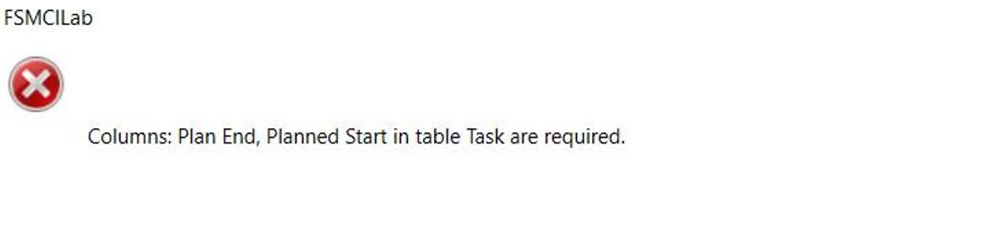
We are getting below error while creating work order in FSM 6 version.

 

Best answer by ruben.maas

Hi @ERCESEGSIL ,


OK in that case the CustomAssemblies are not initialized. 

Basically this could have 2 reasons:

  1. Ericsson.BusinessServer.dll is NOT located in [APP_ROOT]\CustomAssemblies
  2. Application Extension in web.config [APP_ROOT]\web.config is incorect. 

make sure following config exists in web.config:

    <CustomEntitiesAssembly>Ericsson.BusinessEntities.dll</CustomEntitiesAssembly>
    <!-- Name of the custom Policy assembly -->
    <CustomPoliciesAssembly>Ericsson.BusinessServer.dll</CustomPoliciesAssembly>
    <!-- Namespace of the custom manangers -->
    <CustomManagerNamespace>Ericsson.BusinessServer.BusinessPolicies</CustomManagerNamespace>


Let me know if you need any further assistance. 


-Ruben

View original
This topic has been closed for replies.

5 replies

Forum|alt.badge.img+13
  • Hero (Employee)
  • Mar 15, 2021 11:46 AM UTC

Hi @ERCESEGSIL ,


This exception is raised while trying to create a task for the Request \ workorder. 

Baseline policy will ensure a plan start and end date is set in case it is not supplied. 

So from that standpoint the error does not make much sense as baseline should always set a default value. . 


The only reason i can think of why such an error would occur is in case there’s a custom policy class defined for table TASK which does not exists or is not deployed. 

In that case FSM will fall back to a generic policy class and therefore the baseline TASK policy will be bypassed. (and therefore also setting the default values for plan start and end.)

Can you verify the Custom Meta Data for table TASK and check if Policy Name or Policy namespace settings are set?

If there’s custom TASK Policy implemented check if the CustomAssemblies has been deployed correctly. 

If there has not been any custom policy implemented for TASK make sure that the fields Policy Name and Policy Namespace are empty in custom meta data. 


-Ruben


Forum|alt.badge.img+2
  • Author
  • Do Gooder (Customer)
  • Mar 15, 2021 1:23 PM UTC

Thanks Ruben..We have refreshed our instance recently so I have to check if all CustomAssemblies are properly updated or not..but in TASK I can see Policy name and namesspace:-


Forum|alt.badge.img+13
  • Hero (Employee)
  • Answer
  • Mar 15, 2021 2:14 PM UTC

Hi @ERCESEGSIL ,


OK in that case the CustomAssemblies are not initialized. 

Basically this could have 2 reasons:

  1. Ericsson.BusinessServer.dll is NOT located in [APP_ROOT]\CustomAssemblies
  2. Application Extension in web.config [APP_ROOT]\web.config is incorect. 

make sure following config exists in web.config:

    <CustomEntitiesAssembly>Ericsson.BusinessEntities.dll</CustomEntitiesAssembly>
    <!-- Name of the custom Policy assembly -->
    <CustomPoliciesAssembly>Ericsson.BusinessServer.dll</CustomPoliciesAssembly>
    <!-- Namespace of the custom manangers -->
    <CustomManagerNamespace>Ericsson.BusinessServer.BusinessPolicies</CustomManagerNamespace>


Let me know if you need any further assistance. 


-Ruben


Forum|alt.badge.img+2
  • Author
  • Do Gooder (Customer)
  • Mar 18, 2021 9:18 AM UTC

Thanks it was noted that was missing and were asked to restore with latest dump again


Forum|alt.badge.img+2
  • Author
  • Do Gooder (Customer)
  • Mar 18, 2021 12:47 PM UTC

You are really an expert it workedfor me and now Im able to createworkorder