


Solved

Drop Down Populating Text Field

  • Feb 7, 2025 5:07 PM UTC
  • 3 replies
  • 82 views

Forum|alt.badge.img+8

I have a Global Code that has the code value and description. I want to be able to display both the code value and description. I understand I can have 2 initiative ID fields, 1 display the code value while the other displays the description, but how would the initiative description be written to the database?
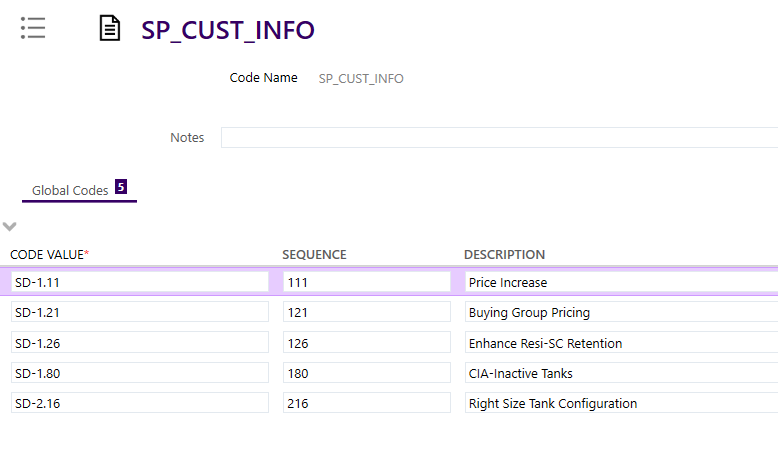
Is there a way to have a field populated based on a drop down in UI Designer?

 

Best answer by qquac

I figured it out. I had to update the custom metadata relationship def

View original

3 replies

Forum|alt.badge.img+4
  • Do Gooder (Customer)
  • Feb 10, 2025 8:46 AM UTC

Hi ​@qquac,

Are you trying to populate the drop-down with both code value and description? or do you want the write values into global codes with code value and description combined?
I am not clear on this.


Forum|alt.badge.img+8
  • Author
  • Sidekick (Customer)
  • Feb 10, 2025 4:42 PM UTC

Hi ​@qquac,

Are you trying to populate the drop-down with both code value and description? or do you want the write values into global codes with code value and description combined?
I am not clear on this.

Hello ​@eluxpiumal,

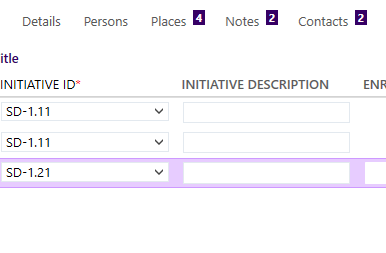
When the drop down is selected, I would like the corresponding description populated in the text field, INITIATIVE DESCRIPTION, right beside it. For example, if “SD-1.11” is selected from the drop down, I would like “Price Increase” to be populated in the INITIATIVE DESCRIPTION text field.


Forum|alt.badge.img+8
  • Author
  • Sidekick (Customer)
  • Answer
  • Feb 11, 2025 1:48 PM UTC

I figured it out. I had to update the custom metadata relationship def
