Solved

Using Office Add-In with Document management -workshop questions (generated via scope tool)

  • Feb 21, 2022 5:21 AM UTC
  • 11 replies
  • 285 views

Forum|alt.badge.img+8

Hi,

Following workshop questions are generated via scope tool.  I'm referring to application IFS Cloud 21R1/22R1

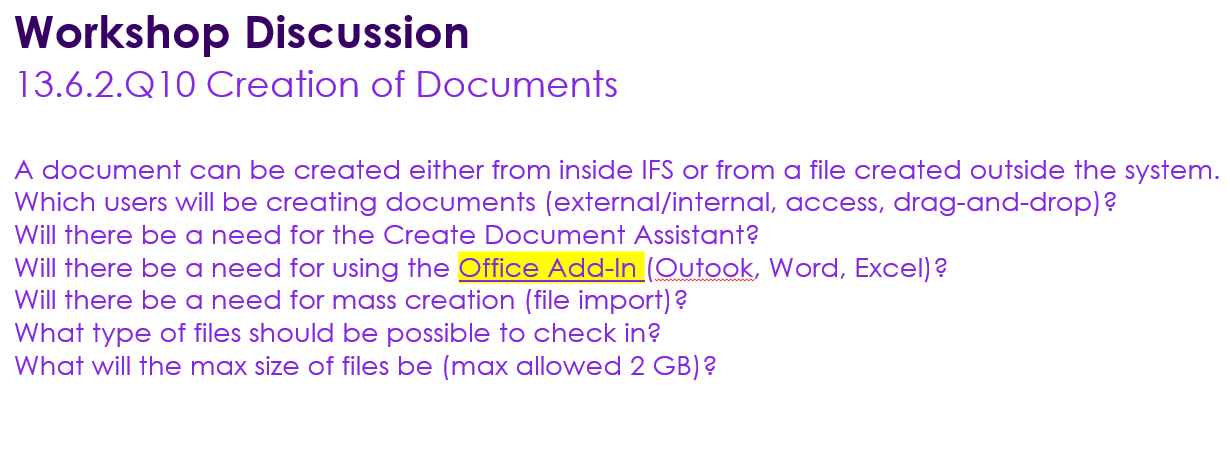
The highlighted question asks about using office  add-in. Could  you please provide more information about these  Office Add-In s that can be  used with IFS  document management ?
# How to install Add-In

#How to connect it with IFS Doc Management

#Usage 
 

Thank you.

Kind regards,

Yashodha. 


Best answer by Mathias Dahl

It's available in the public documentation site for IFS Cloud. Just search for Office Add-In there and you will find it.

Let me know if it doesn't work out for you.


View original
This topic has been closed for replies.

11 replies

Mathias Dahl
Superhero (Employee)
Forum|alt.badge.img+33
  • Superhero (Employee)
  • Feb 21, 2022 5:58 AM UTC

Hi Yashoda,

The overall capabilities and how to install our Office Add-In should be described in our documentation. Was there something in there that's not clear?


Forum|alt.badge.img+8
  • Author
  • Sidekick (Partner)
  • Feb 22, 2022 4:05 AM UTC

Hi  @Mathias Dahl ,
Could you please  send me the link for mentioned documentation where it describes about Office Add-In related to DocMan. 

Thank you. 
Kind regards,

Yashodha. 

Mathias Dahl
Superhero (Employee)
Forum|alt.badge.img+33
  • Superhero (Employee)
  • Answer
  • Feb 22, 2022 5:14 AM UTC

It's available in the public documentation site for IFS Cloud. Just search for Office Add-In there and you will find it.

Let me know if it doesn't work out for you.


Forum|alt.badge.img+8
  • Author
  • Sidekick (Partner)
  • Feb 22, 2022 6:46 PM UTC

Hi @Mathias Dahl ,
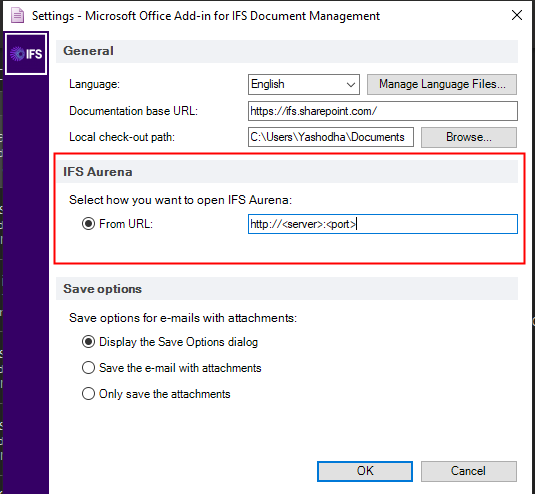
Can you explain what should be entered below when I'm using IFS cloud 22R1 

Thank you.

Kind regards,

Yashodha.


Forum|alt.badge.img+8
  • Author
  • Sidekick (Partner)
  • Feb 22, 2022 7:06 PM UTC

Hi @Mathias Dahl ,

I could solve above issue. Thank you. 


Kind regards,

Yashodha.


Mathias Dahl
Superhero (Employee)
Forum|alt.badge.img+33
  • Superhero (Employee)
  • Feb 22, 2022 7:20 PM UTC

That's great! 💪🏻🙃

What did you enter to solve it?


Forum|alt.badge.img+8
  • Author
  • Sidekick (Partner)
  • Feb 23, 2022 4:05 AM UTC

Hi,

URL for the IFS Cloud 21R1 (customers cloud environment) :)

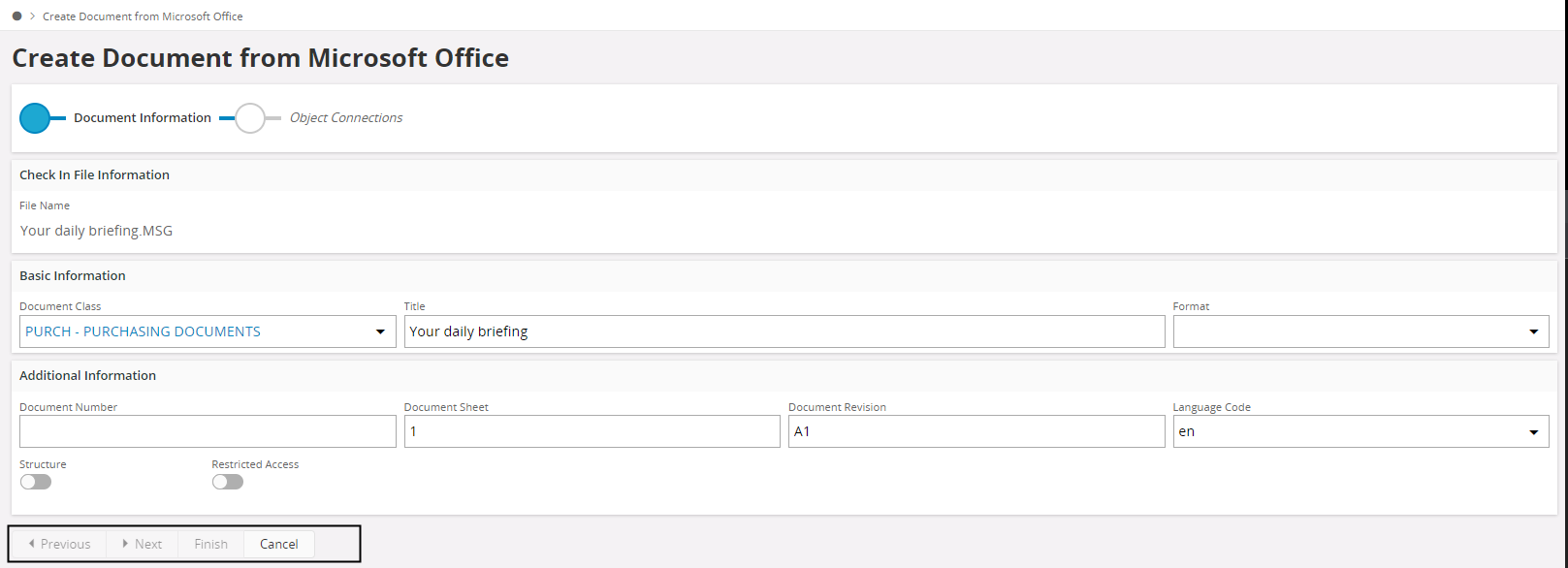
I have  another issue at  the moment:grimacing: . When I press 'Save as new document’ in Add-In, it opens the correct cloud environment and the file is attached as shown below. Issue is, I cant continue as the buttons are not enabled. Can you guess any reason? 


kind regards,

Yashodha


Mathias Dahl
Superhero (Employee)
Forum|alt.badge.img+33
  • Superhero (Employee)
  • Feb 23, 2022 5:45 AM UTC

Thanks!

Yes, that's a known bug that I think is fixed.

I also think there's a workaround, but I don't remember what it is. @Mayura Wasantha do you remember?


Mayura Wasantha
Superhero (Employee)
Forum|alt.badge.img+19

I agree Mathias. Bug is being fixed now in21R2. We have to refer @Gayani H  to know the the workaround. :grinning:


Forum|alt.badge.img
  • Do Gooder (Employee)
  • Feb 24, 2022 6:46 AM UTC

Hi Yashodha,

As mentioned in your comment are you trying with an environment URL of 21R1 as the “From URL” in the Settings? Office Add-in functionality is available in IFS Cloud from 21R2 onwards. It’s not available in 21R1. 

If you are working with 21R2 or 22R1, there was an issue of Next and Finish buttons not getting enabled in the assistant if a value is not defined for DOC_CLASS in Document Management>Basic Data>Document Default Values. We have recently fixed it in 21R2 SU4 and 22R1 EA. So that issue should not be there now. The workaround for that is to have default value defined for DOC_CLASS in Document Management>Basic Data>Document Default Values.

Regards,

Gayani.


Forum|alt.badge.img+8
  • Author
  • Sidekick (Partner)
  • Mar 7, 2022 8:11 AM UTC

Hi @Gayani H , Thank you for the information.
Yes I'm  using 22R1. I'll define a default value and  try again.

kind regards,

Yashodha.