Answer

Manual Bill of Lading

  • February 15, 2022
  • 4 replies
  • 209 views

Forum|alt.badge.img+4

Has anyone found a way to create a manual bill of lading if the “Ship To” is not a current customer in Apps10

Best answer by MartyK23

I think this is going to work. Thank you!

This topic has been closed for replies.

4 replies

Forum|alt.badge.img+11

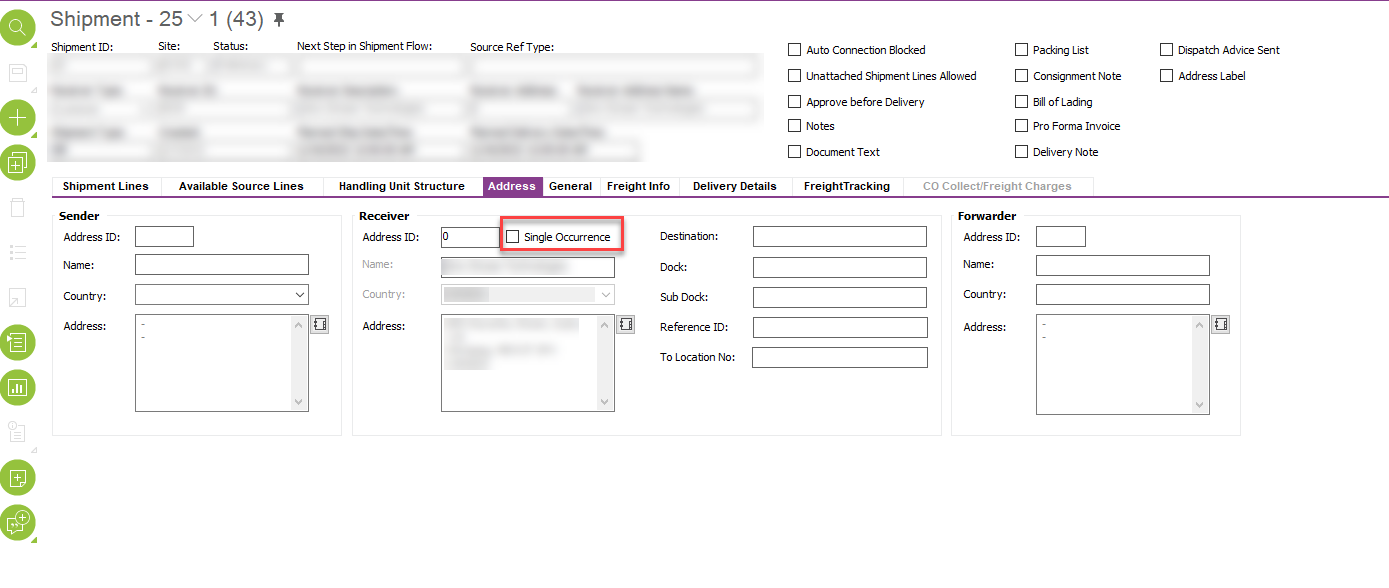
Hi @MartyK23, can you try to use a Single Occurrence address as the Receiver’s Address in the Shipment for this purpose? Thanks.


Forum|alt.badge.img+4
  • Author
  • Do Gooder (Customer)
  • February 16, 2022

Thanks for the reply - I’m not sure I understand what you mean by a Single Occurrence address. Our Shipment window prompts for a receiver ID. The Receiver type defaults to Customer and I cannot change it


RajanKhatri7
Sidekick (Customer)
Forum|alt.badge.img+8
  • Sidekick (Customer)
  • February 16, 2022

Thanks for the reply - I’m not sure I understand what you mean by a Single Occurrence address. Our Shipment window prompts for a receiver ID. The Receiver type defaults to Customer and I cannot change it


Hi Marty,

Please follow the steps below:

  1. Go to shipment/Address tab
  2. Enable the single occurrence as shown in screen shot
     Type the address for which you need the manual BOL and save the record
  3.  Print BOL 
  4. Disable the single occurrence if you want shipment to display the original ship to address from customer order

Let me know if this works.


Forum|alt.badge.img+4
  • Author
  • Do Gooder (Customer)
  • Answer
  • February 16, 2022

I think this is going to work. Thank you!